breannel43545306
Participant
January 3, 2018
Answered

Merging Data for Numbered Labels in a Table

  • January 3, 2018
  • 3 replies
  • 2003 views

I am using an Online Labels template and I need about 10,000 labels numbered sequentially - there are 160 on a sheet. Is a data merge from an excel doc with the numbers all in one column the way to do this? Struggling to figure it out...

This topic has been closed for replies.
Correct answer Jeffrey_Smith

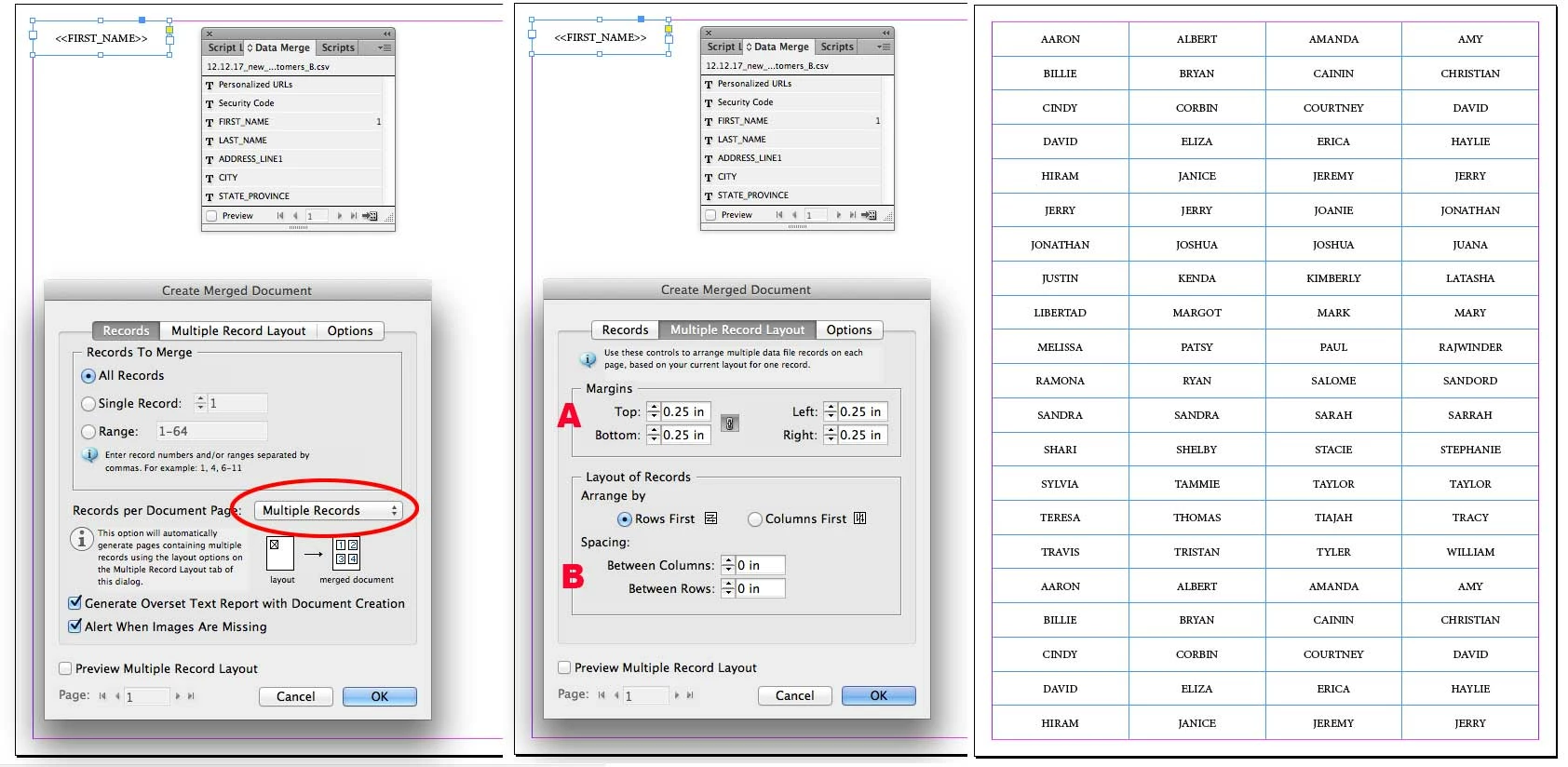
You will need to use Excel to generate a sequential list by autofilling a column and export to .csv. Then use a Multiple Record data merge in Indesign to complete this task. The merge document size will be 160 labels (I'm assuming 8.5 x 11), not one individual label. However, you do want to create a frame the size of one label that will contain the variable placeholder(s). A. from screen shot will be the offset for outer margins. B. will determine the horizontal and vertical spacing between each label. My example shows a 2 x .5 label, stepped 84 times, on a 8.5 x 11 sheet, with a .25 margin.

3 replies

Jeffrey_SmithCommunity ExpertCorrect answer
Community Expert
January 3, 2018

You will need to use Excel to generate a sequential list by autofilling a column and export to .csv. Then use a Multiple Record data merge in Indesign to complete this task. The merge document size will be 160 labels (I'm assuming 8.5 x 11), not one individual label. However, you do want to create a frame the size of one label that will contain the variable placeholder(s). A. from screen shot will be the offset for outer margins. B. will determine the horizontal and vertical spacing between each label. My example shows a 2 x .5 label, stepped 84 times, on a 8.5 x 11 sheet, with a .25 margin.

Dave Creamer of IDEAS
Community Expert
Community Expert
January 3, 2018

Depending on the actual layout is set up, you could also use a paragraph number style. The cell would need some content for the number to appear, but a space will work.

David Creamer: Community Expert (ACI and ACE 1995-2023)
MW Design
Inspiring
January 3, 2018

Sure. Maybe. I dunno.

I have no idea what an "Online Labels template" is nor what its relationship to ID is for certain. Are these labels you'll print yourself? If yes, then one could create all the numbers in an Excel sheet and do a data merge. It may be a bit fiddly to enter the position/offset for the multiple data merge though.

I think it would be easier to copy and paste that numbered Excel spread sheet and save as a plain text file. Then create and place threaded text boxes in the proper position on a master page, then on a regular page import that text.

The paragraph style for the numbers simply needs set up to position the numbers where you want them and at what text size, then add to the style that there is a frame break associated with it. Then each number should be positioned in each text box and flow until it is all placed.