
devlind49794593
Participant
July 18, 2017
Answered

Minion Pro font has vanished from inDesign?

  • July 18, 2017
  • 1 reply
  • 4880 views

Hi, I work mostly in minion pro because its the default, at least until ready to typeset everything, but a few days ago my Minion Pro has utterly vanished, meaning the majority of my WIP documents are now blank. I realize that I can go and change fonts on them manually, but I'd really rather just NOT be missing the default font. I've tried restarting and relogging in creative cloud to see if that did anything and as far as I can tell, it hasn't helped. I have no idea why the font just disappeared, and I haven't noticed any other font I regularly use go missing either.

any tips?
This topic has been closed for replies.
Correct answer amaarora

Hi,

Do you see the font "minion pro" present at this path... [path to Adobe InDesign application] \Resources\Required\Fonts?

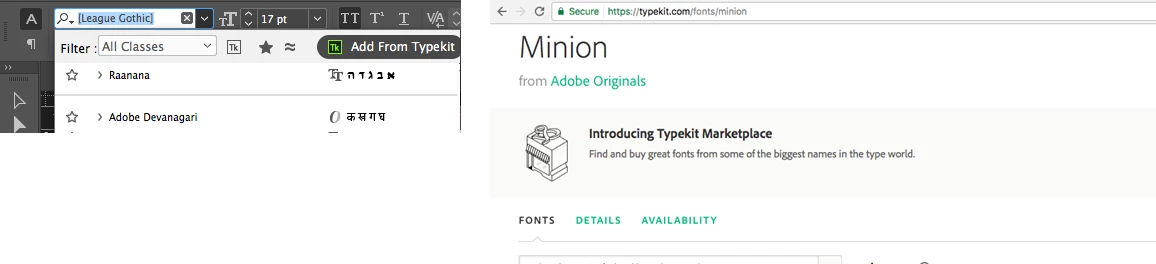
You can still sync the font "minion pro" from Typekit, which will solve your problem hopefully.

-Aman

1 reply

amaarora
amaaroraCorrect answer
Inspiring
July 18, 2017

Hi,

Do you see the font "minion pro" present at this path... [path to Adobe InDesign application] \Resources\Required\Fonts?

You can still sync the font "minion pro" from Typekit, which will solve your problem hopefully.

-Aman

devlind49794593
Participant
July 18, 2017

I was able to solve it!

I was unable to reinstall the minion fonts from typekit because it said they were already installed, and they werent where I thought they'd be at all, but searching C drive I was able to find them. I just deleted them there and was able to reinstall them via typekit.

Thanks for the assistance.