Participant
March 5, 2023
Answered

Minion Pro Font Issue

  • March 5, 2023
  • 1 reply
  • 3434 views

Hello

I have Indesign 17.4.1

My problem is with Minion Pro Fonts


I have a file that includes the font and I words looks likes squares 
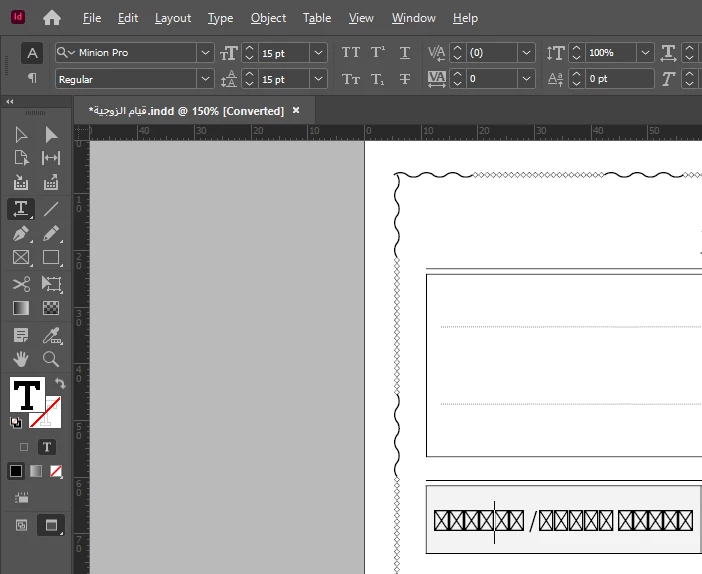


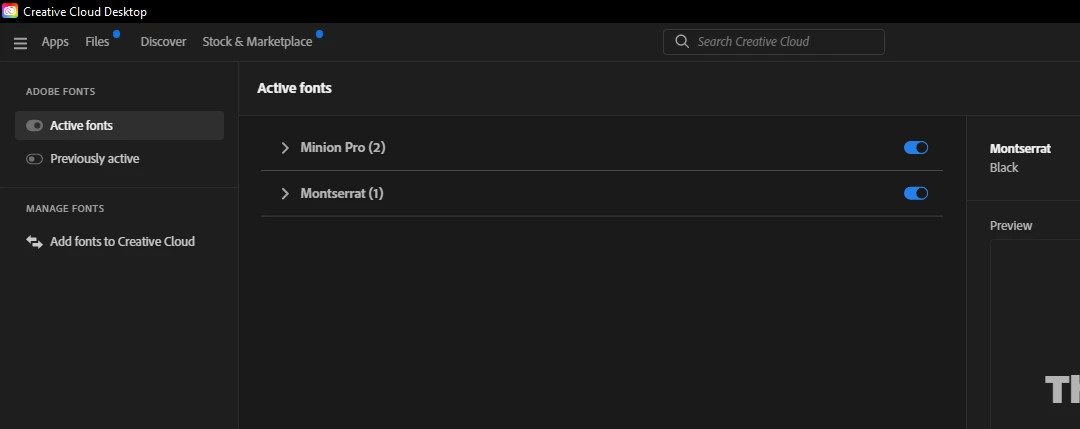
Fonts Active in creative cloud


This topic has been closed for replies.
Correct answer James Gifford—NitroPress

The usual reason for a substitution character is that the font does not have the specific glyph for it. It's commonly seen when accented or non-Roman characters are used in a font with a limited character set. But all 'Pro' sets have extended character sets, so unless that text is in Uighur it should display.


Try these three fixes:


1) Does this occur only in this file, or all files using Minion Pro?


2) Change to another font to see if the affected text displays the correct letters. If other fonts work, then it's a fault with Minion Pro, which is a bigger problem since it's ID's base font.


3) Try repairing your document: save or export it to IDML, then open that IDML file and resave to regular INDD under a different name. That purges old data from document files, and often fixes all kinds of little structural problems.


Let us know what works, here, or not...


1 reply

James Gifford—NitroPress
Legend
March 5, 2023

The usual reason for a substitution character is that the font does not have the specific glyph for it. It's commonly seen when accented or non-Roman characters are used in a font with a limited character set. But all 'Pro' sets have extended character sets, so unless that text is in Uighur it should display.


Try these three fixes:


1) Does this occur only in this file, or all files using Minion Pro?


2) Change to another font to see if the affected text displays the correct letters. If other fonts work, then it's a fault with Minion Pro, which is a bigger problem since it's ID's base font.


3) Try repairing your document: save or export it to IDML, then open that IDML file and resave to regular INDD under a different name. That purges old data from document files, and often fixes all kinds of little structural problems.


Let us know what works, here, or not...


Participant
March 5, 2023

Thanks for your reply!


Same font used in multiple files and all same problem


I changed font style and it's wokring fine

I exported it to IDML and saved it again with INDD and same problem

But it looks like the original font is this file in not Minion Pro that comes with InDesign 


James Gifford—NitroPress
Legend
March 5, 2023

A full, valid set of Minion Pro files should be installed with ID or CC. I would search out and purge any installed "Minion" fonts that are not the correct Adobe files; don't just depend on the font list saying it's installed and activated. Then make sure your styles are mapped to the Adobe Minion Pro set.


Your second screen shots shows you're working in a non-Roman language — Arabic or Farsi, I can't tell from the example. Is the text in Minion meant to be in Roman letters, or are you depending on the Arabic character set within that font?


There are a number of pitfalls in combining RTL languages and non-Roman alphabets with Roman/LTR ones. But having a complete, correct font set is the starting point.
