
Exit
  • Global community
    • Language:
      • Deutsch
      • English
      • Español
      • Français
      • Português
  • 日本語コミュニティ
  • 한국 커뮤니티
0

Missing General Preferences...

New Here ,
Oct 03, 2022 Oct 03, 2022

We have a user whose General Preferences window is missing the top two options, so there is no checkbox for:
- Show Home Screen When No Documents Are Open
- Use Legacy "New Document" Dialog
Here's an image of that user's General Preferences screen:
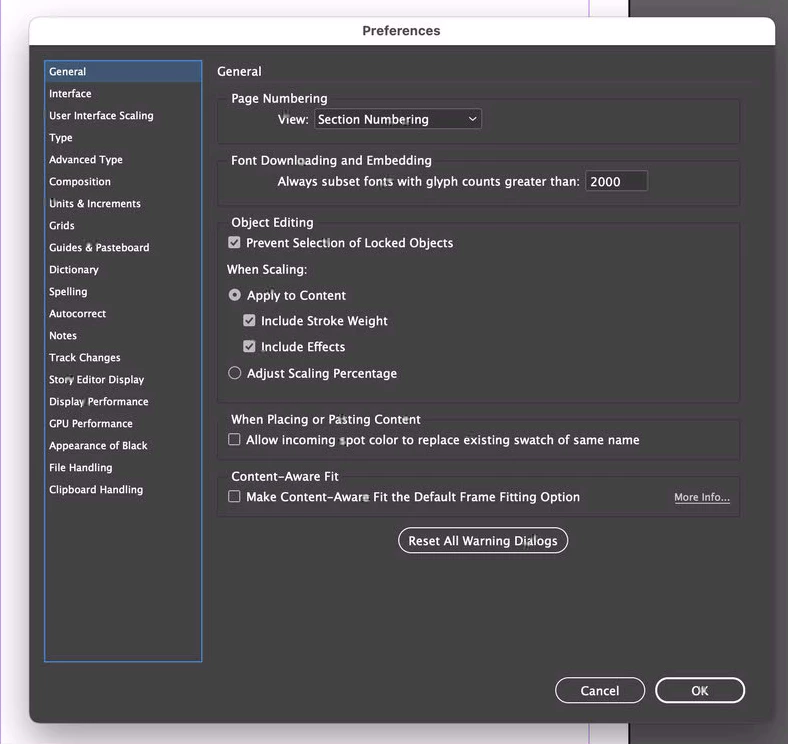
General Preferences - User.png

We've tried uninstalling InDesign, then re-installing, but this remains the same.
Not sure if the same issue causing this, but the user also reports that even when they directly open an InDesign document by double-clicking it to open the file and launch InDesign, that the welcome screen appears every time (on other Macs, this bypasses the welcome screen).

TOPICS
Bug , How to
464
Translate
Report
Community guidelines
Be kind and respectful, give credit to the original source of content, and search for duplicates before posting. Learn more
community guidelines
Community Expert ,
Oct 03, 2022 Oct 03, 2022
Translate
Report
Community guidelines
Be kind and respectful, give credit to the original source of content, and search for duplicates before posting. Learn more
community guidelines
New Here ,
Oct 04, 2022 Oct 04, 2022

We've tried every single option on that page for Reseting InDesign Preferences and Other Troubleshooting, and the issue remains -- the user's general preferences are still missing those first two options.

Translate
Report
Community guidelines
Be kind and respectful, give credit to the original source of content, and search for duplicates before posting. Learn more
community guidelines
Community Expert ,
Oct 04, 2022 Oct 04, 2022

Hi @jspringer008 ,

can you show a screenshot of the general preferences where the items are missing?

Plus an open document window with the Control panel enabled and the whole document layout window showing.


Thanks,
Uwe Laubender
( Adobe Community Expert )

Translate
Report
Community guidelines
Be kind and respectful, give credit to the original source of content, and search for duplicates before posting. Learn more
community guidelines
New Here ,
Oct 04, 2022 Oct 04, 2022

That screenshot you're asking for is is my original post (at the top).

But to repeat it, here is the "problem" computer's General section from InDesign > Preferences:
One.png


And here is the same screen on another computer without this issue:
Two.png
The options in the red box are missing on the computer with the issue.

I'm not sure why you're requesting the open document -- the issue exists on the problem computer whenever InDesign > Preferences > General is opened, irregardless of whether or not a document is open; or if the menu is selected from the welcome screen.

Translate
Report
Community guidelines
Be kind and respectful, give credit to the original source of content, and search for duplicates before posting. Learn more
community guidelines
Community Expert ,
Oct 04, 2022 Oct 04, 2022

Hm. I was suspecting something like a touch device GUI with InDesign and issues with that.

So I'd wipe InDesign from the machine and do a new clean installation.


What is the operating system version of that device?

Did you try to install a new user and launch InDesign from that?


Regards,
Uwe Laubender
( Adobe Community Expert )

Translate
Report
Community guidelines
Be kind and respectful, give credit to the original source of content, and search for duplicates before posting. Learn more
community guidelines
New Here ,
Oct 04, 2022 Oct 04, 2022

We've tried uninstalling and reinstalling InDesign with no luck. Yes, we've also tried uninstalling, running the Adobe Cleaner Tool, and re-installing.

One of my questions would be if there's a guide somewhere to performing a complete manual uninstall of all things related to InDesign (basically, I'd like to uninstall, confirm and verify in some way that anything related to InDesign is uninstalled, then try to reinstall again -- but I'm unaware of any documentation of how-to do this).

The computer is a Mac, running MacOS 12.6 (the current version of MacOS).

Translate
Report
Community guidelines
Be kind and respectful, give credit to the original source of content, and search for duplicates before posting. Learn more
community guidelines
Community Expert ,
Oct 04, 2022 Oct 04, 2022

Can you verify which exact version of InDesign you are running?

Translate
Report
Community guidelines
Be kind and respectful, give credit to the original source of content, and search for duplicates before posting. Learn more
community guidelines
Community Expert ,
Jan 09, 2026 Jan 09, 2026

This is also happening to my win11 install as of January 2026. No fix yet that I see.

Mike Witherell
Translate
Report
Community guidelines
Be kind and respectful, give credit to the original source of content, and search for duplicates before posting. Learn more
community guidelines
Adobe Employee ,
Jan 09, 2026 Jan 09, 2026
LATEST

Hi everyone,


Thanks for sharing the updates and for all the detailed testing you've already done. I'm checking this internally with the product team to understand why these General Preferences options might be missing for some users on Windows and macOS.

Once I have more clarity from the team, I'll update this thread right away.


Thanks for your patience while we look into this.

Abhishek 


Translate
Report
Community guidelines
Be kind and respectful, give credit to the original source of content, and search for duplicates before posting. Learn more
community guidelines