
Participant
March 16, 2017
Answered

Missing Pages in Pages panel

  • March 16, 2017
  • 6 replies
  • 14697 views

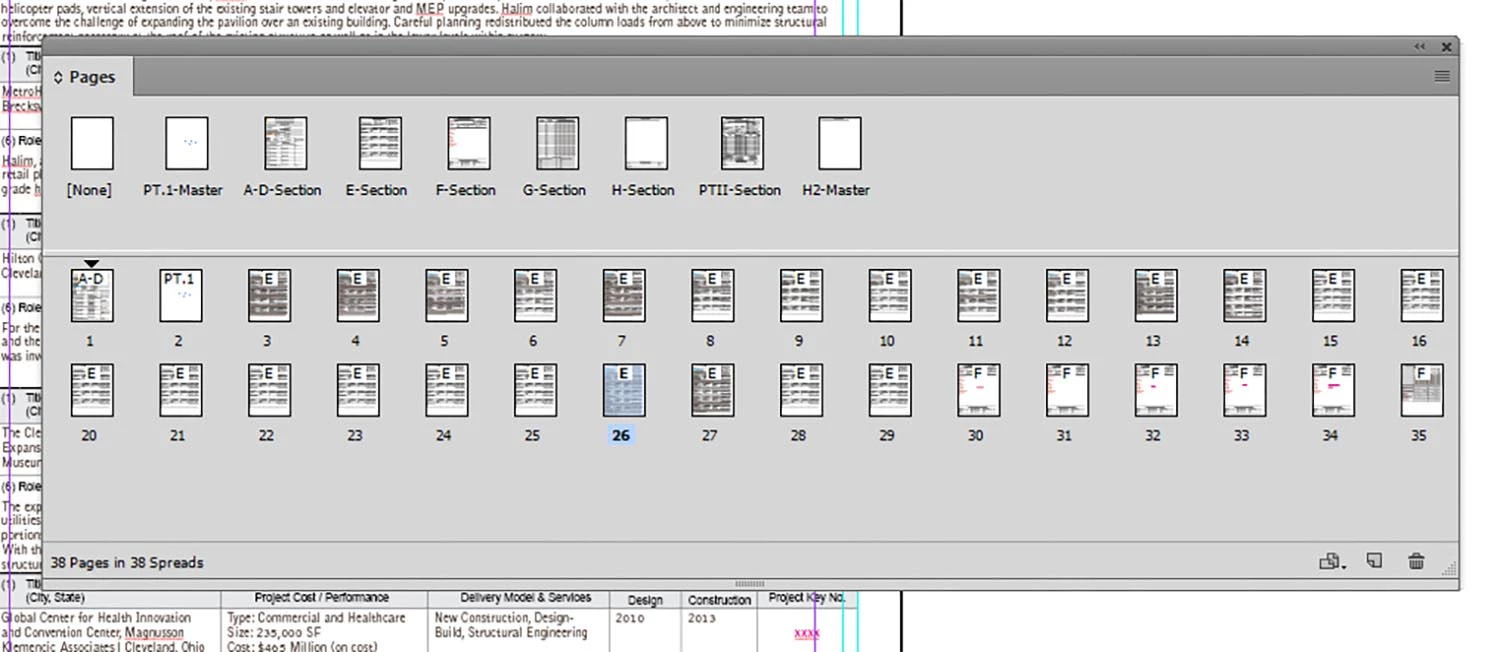
Working in InDesign CC and recently upgraded to Windows 10. Blerg. Suddenly my Pages panel no longer allows me to scroll through pages. I can't see all of the page icons either. No matter how I resize the palette, I can't see all of the pages. Tried resetting preferences, undocking, changing view/options, etc., and finally uninstalling and reinstalling the software thinking the preferences might be corrupt. Same problem. My workaround is to extend the page palette across the page. Not good. Our IT guys at work are totally stumped. Help?
[Moved from non-technical Lounge Forum to specific Program forum... Mod]

[Here is the list of all Adobe forums... https://forums.adobe.com/welcome]
    This topic has been closed for replies.
    Correct answer Barb Binder

    Hi Jennifer:

    This comes up occasionally on the forums. Check out this thread:

    Page Panel Spread Icons Not Visible

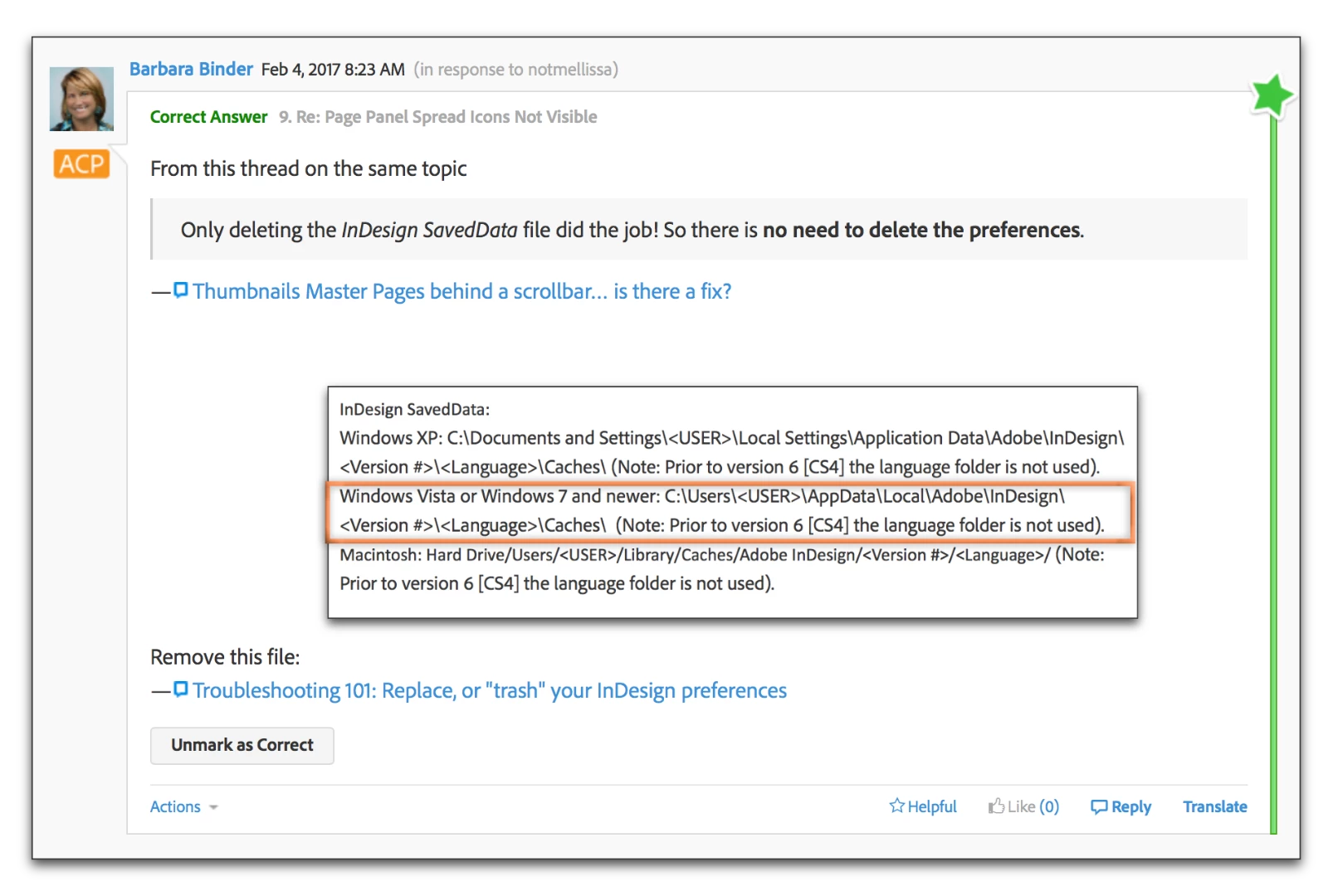
    Specifically the instructions on only deleting the InDesign SavedData file and not resetting all the preferences:

    6 replies

    Participating Frequently
    March 17, 2017

    I have the same thing going on in InDesign 2017.  Started happening after the latest CC update. However, all attempts to remedy this have failed.  I uninstalled and re-installed the programs 3 times.  Did the Ctrl Alt Del method, deleted the User\Adobe files\...., and all other known proposed remedies offered across the web.  No luck.  Only the Page palette is affected.  Most bizarre.  Most annoying.

    None of the other Apps in the Suite have any issues.

    Running Win 10 64, latest updates.

    Bob

    Barb Binder
    Community Expert
    Community Expert
    March 17, 2017

    Did you locate and delete the InDesign SavedData file specifically, Bob?

    ~Barb at Rocky Mountain Training
    Legend
    March 17, 2017

    Must admit I regularly delete Caches and entire Prefs folders even on my own system I see some very weird things happen (recurring) in InDesign… I have dialog boxes that stop working regularly… my culprit is that I work on mixed high res/standard VGA/HDMI screens seems to confuse InDesign… but that’s a topic for another discussion

    Participant
    March 16, 2017

    By deleting "Saved Data" we were able to restore the page palette! What a huge relief. Thank you to everyone for helping.

    Barb Binder
    Community Expert
    Community Expert
    March 16, 2017

    Awesome! I glad to hear that deleting the InDesign SavedData file was the answer you needed.

    ~Barb at Rocky Mountain Training
    Barb Binder
    Community Expert
    Barb BinderCommunity ExpertCorrect answer
    Community Expert
    March 16, 2017

    Hi Jennifer:

    This comes up occasionally on the forums. Check out this thread:

    Page Panel Spread Icons Not Visible

    Specifically the instructions on only deleting the InDesign SavedData file and not resetting all the preferences:

    ~Barb at Rocky Mountain Training
    Erica Gamet
    Inspiring
    March 16, 2017

    Hi Barb!

    What exactly goes away when that file is trashed? I've never had to resort to it, and it scares me. Is it just what's maintaining any current .idlk files?

    Barb Binder
    Community Expert
    Community Expert
    March 16, 2017

    hmmm. I know it's some of the preferences, but not clear exactly what.

    I can confirm that these missing pages come up about once a month, and that's been the answer each time.

    ~Barb at Rocky Mountain Training
    Legend
    March 16, 2017

    Also one more thing you can try (sorry to send three msgs in succession):

    Save the InDesign file as IDML, then open IDML file (this recompiles the InDesign file... just in case here is some weird corruption inside the document causing the issue).

    Participant
    March 16, 2017

    Thanks Cari. Unfortunately this didn't work.

    Legend
    March 16, 2017

    I should have read your msg better, you'd already done the preferences reset. Do you have any third party software installed (such as plug-ins/extensions) in InDesign? Are you able to uninstall those and try again?

    Also ask IT to clear the cache on your system and temp files that are generated.

    Finally if they can't resolve it, ask them to set-up a NEW user account on your computer and try opening the file in that account... If the issue is resolved, there is a file or setting on your system that is causing the problem...

    Keep us posted on results pls.

    Legend
    March 16, 2017

    It looks like your InDesign preferences might have corrupted themselves? Are you on the latest version of InDesign CC (e.g. 2017), with all Updates installed?

    I'd start by restoring your InDesign preferences to see if that returns the Pages panel to normal (you'll have to set the View Pages option back to displaying pages horizontally as per your screenshot after restoring the preferences, hopefully the scroll bar will appear again so you can see all pages).

    To restore preferences see: Set preferences in Adobe InDesign

    Participant
    March 16, 2017

    Thanks Cari. This didn't work.