Participant
April 30, 2021
Respondido

Missing pantone color Indesign CC 2021

  • April 30, 2021
  • 2 respostas
  • 19211 Visualizações

I have selected a color through my "Formula Guide Solid Coated" printed swatch. The color is the Pantone 2310 C and somehow I can't find it in the Indesign "solid coated" digital swatch. Any clue why and where to find it?

Melhor resposta por rob day

The Pantone .acb swatch libraries that get installed with InDesign haven’t been updated since CS6. To get the most recent Pantone books you can install the free Pantone Connect Extension (Window>Find Extensions on Exchange...):
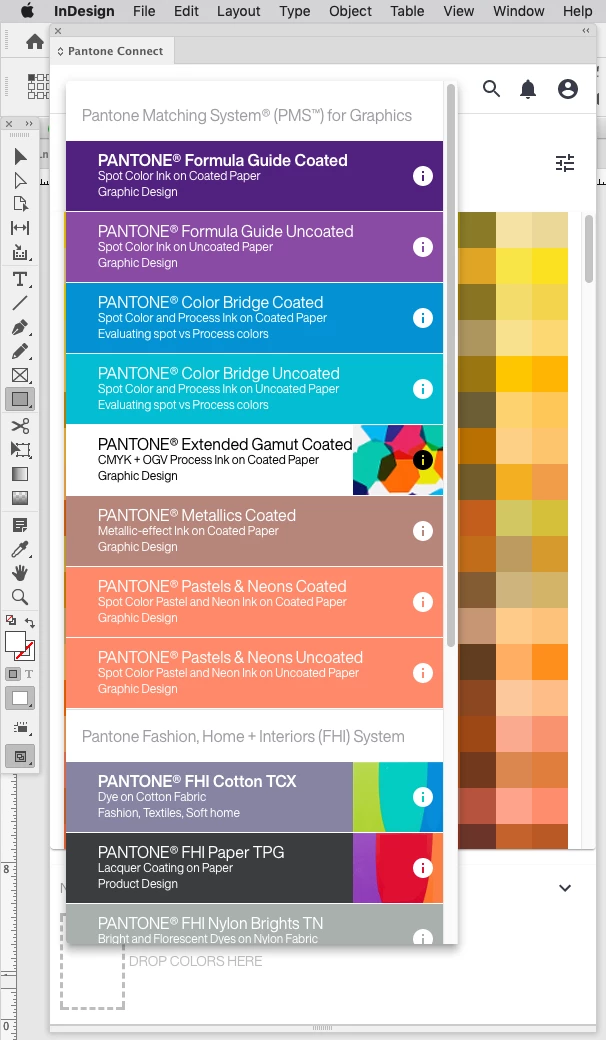
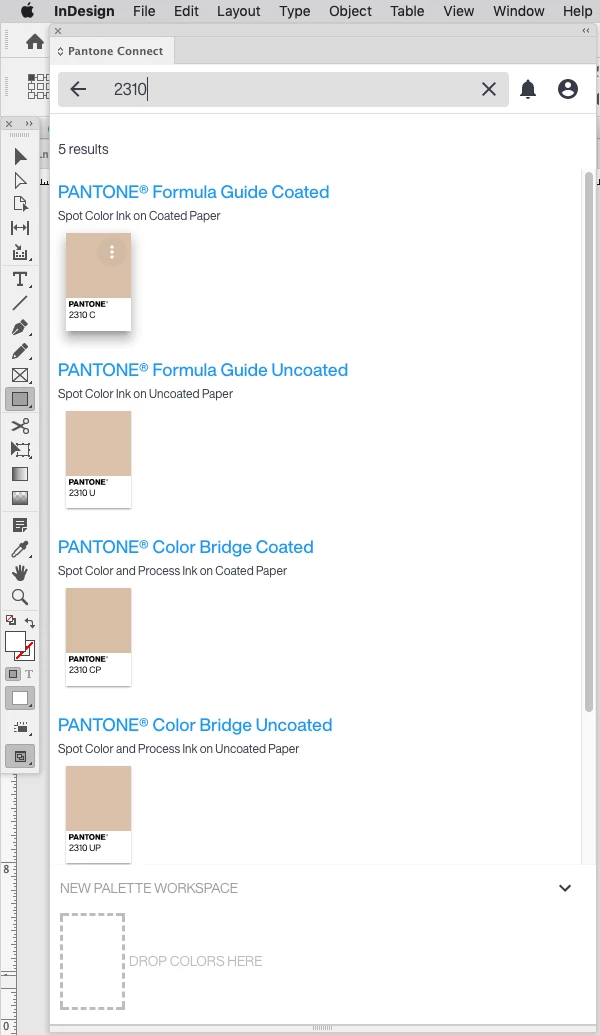


One thing to watchout for with the current version is the PANTONE Bridge Libraries are supposed to be Pantone’s recommended CMYK simulations for the solid ink spots colors. When you click a Bridge swatch more icon there is an option to add the Bridge color to your swatches, but the color gets added as process Lab and not the listed CMYK value.

2 Respostas

rob day
Community Expert
rob dayCommunity ExpertResposta
Community Expert
April 30, 2021

The Pantone .acb swatch libraries that get installed with InDesign haven’t been updated since CS6. To get the most recent Pantone books you can install the free Pantone Connect Extension (Window>Find Extensions on Exchange...):
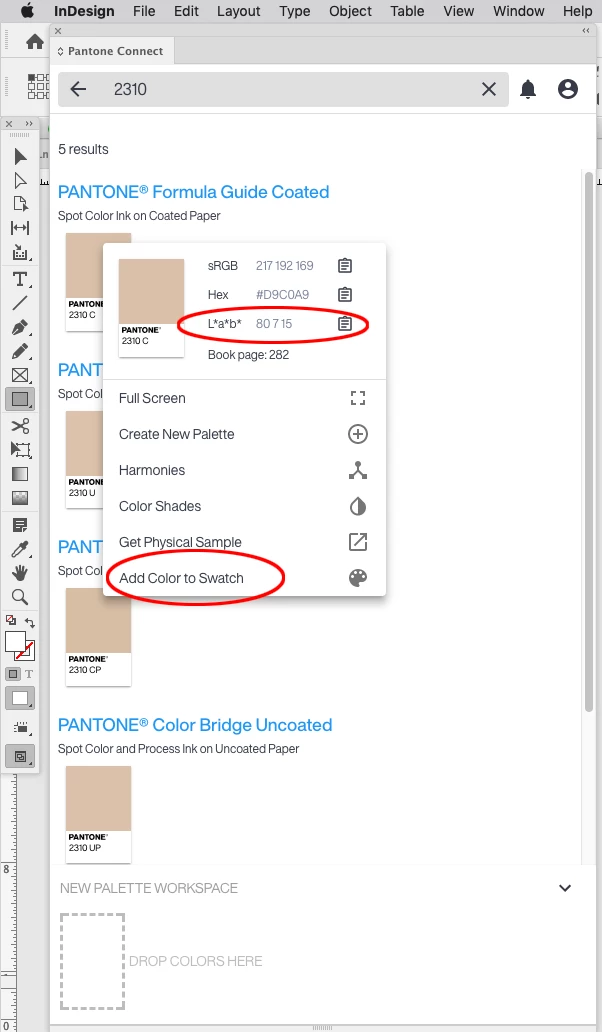


One thing to watchout for with the current version is the PANTONE Bridge Libraries are supposed to be Pantone’s recommended CMYK simulations for the solid ink spots colors. When you click a Bridge swatch more icon there is an option to add the Bridge color to your swatches, but the color gets added as process Lab and not the listed CMYK value.

Dave Creamer of IDEAS
Community Expert
Community Expert
October 21, 2021

Also note that prior to 2010, the Pantone lists in Adobe software were simply called "Pantone".  After that (CS6 and up), they are called "Pantone+" [Plus]. The Pantone+ colors stayed that way until about 2019 (although new colors were periodically added from 2010-2019 to the Plus libraries). Sometime in 2019, they dropped the + [Plus] moniker and emphasized the "Formula Guide" name. However, Adobe software is still installing the Plus libraries. Now, with their extension, it looks like Pantone is trying to get into the subscription business too, although they do have a free version of their account.


My opinions for using Pantone color guides...

Solid Colors: Use the Formula Guide IF you are actually printing spot/solid colors. If printing as a true spot color, you can make your own spot color in Adobe software, naming by the PMS #, and make the color look as visually close as possible to the color. This will print out on a separate separation and the printer will print with the PMS # ink mix. (Tell them what version of the guide you are using.) For example, fluorscent and metalic inks can't be reproduced on screen, so if doing a 5/C job, I don't really need to use the libraries to create the color. 

Color Bridge (previously Solid to Process guide): I use this ONLY when a client gives me a solid color # and I'm printing in process (CMYK). I do NOT use it to pick colors for a CMYK-only job. I call it my "CYA guide"--I can look up how close the color will print in CMYK and warn the client in advance, rather than the client getting mad after the job is printed. (I refer to it as "being disappointed up front rather than after-the-fact". 

Process Guides: I used these when I am picking the colors for a process-only job. Also, if a client does not have a predetermined color in mind (that is, a Pantone spot color), I show them this guide. I still have to warn them about differences in paper and press quality, but generally, the guides are pretty close the the final job. The nice thing about the CMYK guides is that they don't go out of style like the spot colors do. If you take good care of the guide, it can last a LONG time. I still use the old Pantone guides. (BTW, I have the old pre-Plus Pantone libraries if anyone needs them.)

Laser Print Exception: If the final output is a laster printer, I'll test the true spot color against the Color Bridge conversion. Since lasers use toner and "bake" the toner to the top of the paper, they can sometimes do a better job printing the actual spot color. But you need to test it first. 

David Creamer: Community Expert (ACI and ACE 1995-2023)
Participant
April 21, 2023

Now it seems that I need the subscription to use add to swatch? Or am I wrong? Does not work for me unfortunately...


Yes, it looks like the Basic mode will not allow you to add a swatch or get the values.


If you don’t need all of the Pantone Connect features try downloading the InDesign Pantone charts from the link below. The charts are searchable and you can drag and drop a swatch into another ID doc. These are not .acb libraries, all of the swatches are contained in the chart documents:


https://shared-assets.adobe.com/link/cdac4aa5-ebad-42d1-5a89-9cc0e015f2fa


There are an extra 637 metallic swatches included in the coated chart.


Amazing. Thanks so much for this.


Mike Witherell
Community Expert
Community Expert
April 30, 2021

Is it possible that the Pantone Formula Guide Solid Coated book published in 2021 is newer than the InDesign version released in late 2020?

Mike Witherell