
tombeckham
Participating Frequently
February 5, 2023
Question

Mixed Baselines and mixed sizes and inset text in Indesign

  • February 5, 2023
  • 5 replies
  • 766 views

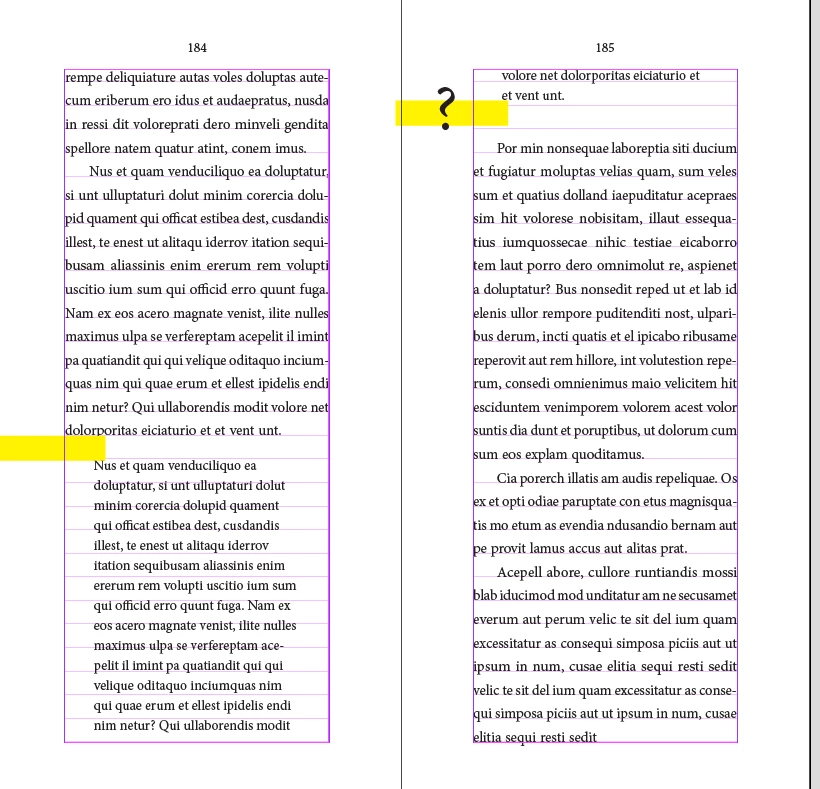
What is the best practice when setting inset text or excerpts where the baseline of teh inset text is not a 1/2 or 1/1 multiple of the predominant baseline grid? In my screenshot, I have some Minion Pro locked in at 11pt/17.6pt and then some inset text not locked at 10.5pt/15pt. I want to have an equal amount of space preceding and following each excerpt eg. the spaces before and after the inset text account for the overall space that the excerpt takes up (pie in the sky?).

Is the best practice to set up the inset text as a separate object, or try to control it's appearance with custom instances of space before/after in each occurance? 

Thanks for your ideas.


This topic has been closed for replies.

5 replies

tombeckham
Participating Frequently
February 6, 2023

Here, I took into account some of James' suggestions regarding the 1/2 basleine setup. I've got some Minion body text at 12/17.3pt on-grid (gives a 8.65pt grid). Then I have some insets  8.5/10.2pt off-grid however I used before and after spacing and set the inset paragraph style to align the first-line-only. This approach seems pretty decent at the moment.

James Gifford—NitroPress
Legend
February 6, 2023

Why are you using such odd fractions for leading? It's usual practice to stay with whole points and adjust the baseline and/or vertical margins to be a precise multiple.


It doesn't matter, as such, but it seems like the adjustment values can get pretty hairy with two decimal place calculations.


Peter Spier
Community Expert
Community Expert
February 6, 2023

I'm probably in that group James referred to that objects to splitting the grid, and in my opinion Rene's screen shot is a disaster.

I have no problem with text insets not following the grid and just realign the body text after. If you want even spacing above and below your text inset you can use space before and/or after to adjust the spacing of the block between gridlines.

James Gifford—NitroPress
Legend
February 6, 2023

Yes, you've brought your torches and pitchforks to prior discussions of this. 🙂


I don't necessarily disagree, but this kind of meticulous text alignment either has to be done according to a few strict rules, and damn the odd spacing here and there as the cost, or some set of workarounds needs to be used.


Keeping the baseline grid at body leading leads to one set of solutions and is perhaps closer to a 'pure' solution, yes. But the fractional baseline method, IMHO and IME, allows a simpler set of workarounds (fewer alternate styles, more 'native' conformance to the grid on most pages, etc.) although it does perhaps have some deeper pitfalls as well.


It's all much like the very lengthy topics a recent newcomer generated, who wanted absolutely everything always aligned perfectly, by default... despite the seasoned types around here showing over and over that wasn't possible.


Maybe each method has its range of application. I've found the half-step baseline to fit most of my demands the best, but I fully concede it may not be the best for every user or every project. (For things like lengthy reports or journals, where typographic perfection isn't really needed and there's no time to muck with each page, I'd argue for the rigid baseline method, with spacing a secondary concern.)


Peter Spier
Community Expert
Community Expert
February 6, 2023

I'd much rather see a slightly larger space after a block quote or other inset than body text that doesnt align across columns or pages (and I have no problem fudging the bottom margins by a line from time-to-time to get better flow, as well).

tombeckham
Participating Frequently
February 6, 2023

Hi,

I want to thank you for taking time to consider my question and offer your replies. I have to agree with all that's been suggested. I think selecting each excerpt and baseline-shifting it to become centered seems like a quick and viable practice at this point, although the future editing/corrections issues have been duly noted. Perhaps the best & most foolproof answer is the first: structure the entire document/case area/margins/etc to account for the variants in the first place above all else. Many thanks.

James Gifford—NitroPress
Legend
February 6, 2023

Note that any such tweaks, preferably applied through a style ('INSET -3pt,' etc.) will be disturbed by any content reflow. It's best to stay with base styles until the very last step, then linearly tweak each page for ideal spacing. An edit might even call for a reset to all base styles, and then re-tweaking page by page again.


Rene Andritsch
Community Expert
Community Expert
February 5, 2023

I think you face several challenges here. First of all you have one sort of text being locked to the baseline grid. That means that you can only predictably control the space before the indented paragraph starts. At the end of that paragraph it would just have to fall into the right multiple/fraction of the leading.

So you have to use some fractional amount regarding the leading for the indented text so it can fall in line with the baseline grid at a certain amount of lines of indented text. If it doesn’t, you have to edit accordingly (maybe with a right indent).


Using separate text boxes as anchored objects is not feasable in my opinion as it makes editing a more cumbersome. Your example makes it obvious as you would need already two text boxes if the text flows to the next page.


Depending on the paper quality (if it gets printed) you could opt for the whole text not being on the baseline grid (if it does not shine through a lot) which would make it much easier obvioulsy.


If you have to use a baseline grid for the main text, I would divide your main baseline grid by the fractional value that can be shared by the indented text. So the main text can fall onto new lines in smaller increments which will make it possible that the indented text can keep a constant space before and after no matter how many lines of text you have for the indent. Like in the example below. Though this will still mess up the “overall main baseline grid”. I hope this makes sense.


James Gifford—NitroPress
Legend
February 5, 2023

If you have to use a baseline grid for the main text, I would divide your main baseline grid by the fractional value that can be shared by the indented text.


Yeah, I didn't go there because when I note it, the more conservative faction here howls and moans about it. 🙂 But my working method for baseline grids, which I use in every book, is to set them to half the base leading (7pt for 14pt body leading, etc.) This does lead to some downstream problems and some need for alternate styles, but I've found it to work very well and allow for more variant styles (insets, pulls, quotes, bullets, etc.) than a 1-up grid.


Another trick when you have one or more headings in the text is to apply some baseline shift to them, so that by the grid, there's a full line below them, but visually, they can be shifted down from the preceding text and closer to the following text. Call it a hack, but I have found it to work very well when the absolutely rigid spacing looks awful.


Rene Andritsch
Community Expert
Community Expert
February 6, 2023

I would consider myself also belonging to the more conservative group regarding typography, but using this approach it might even be easier to get everything to line up again with great editing of the indented text and occasional main copy editing.

James Gifford—NitroPress
Legend
February 5, 2023

When using a baseline grid, whether it's InDesign's feature or a virtual one, everthing has to be a multiple of your base leading. Period.


Any time you want to have a variation, such as the reduced leading on your inset text, it's going to lead to either (1) a lot of fussy workaround to balance things or (2) variation from the precise spacing.


There isn't really a (3), there.


But in this case, you could create multiple spacing styles for inset text that adjust it top and bottom to produce something close to visually equal spacing. It gets fussier if you are going to have multiple paragraphs in inset text, for which you'll need "first," "middle" and "end" spacing paragraphs, and probably a matrix of them. There would be few rules by which thes can be applied other than your eye and applying the right ones for each instance.


You can also put insets in text boxes, which can have a different baseline grid, and then use various tricks to get the text box to align its spacing... but not if it breaks over columns. But you'd have the various text box settings, like that custom baseline, and vertical justification, to help with all the tweaks.


Many of the same problems apply to things like bullet and number lists. And the only real solution is to devise a layout in which every element conforms to the baseline grid.


It's an example of where typography and layout become art, not tech.