
shaoorj20824909
Participating Frequently
July 7, 2019
Question

MULTIPLE HYPERLINKS ON TOP OF A BUTTON IN AN INTERACTIVE PDF

  • July 7, 2019
  • 7 replies
  • 2862 views

Hello! I am facing a problem for quite some time and has wasted a lot of my time, I would really appreciate some quick help. The problem is:

I am creating an interactive PDF in Indesign. I am writing a paragraph on top of a rectangle(that I have converted into a button). I have multiple hyperlinks in that paragraph. When I export it to pdf(interactive), I am unable to click on the hyperlinks, because they are on a button, I can click the button but not individual hyperlinks.

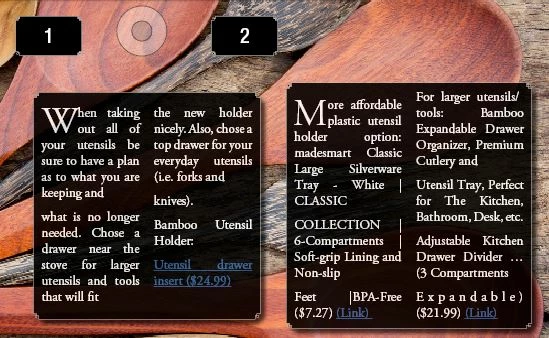
In the screenshot: 1 and 2 are buttons that when clicked pop up the two text rectangles. The two rectangles with text has some hyperlinks.. These hyperlink can not be pressed once the file is exported to interactive pdf.

I would really appreciate some quick help.

Thanks
7 replies

Luke Jennings
Inspiring
July 8, 2019

There is a work-around that might help. Instead of clicking a button to open another button, have the button show a layer, on the layer you can add a separate invisible button on top of the hyperlinks that opens a web page. You can create the layers in InDesign and use Acrobat to set the button properties.

Here is a DropBox link to a PDF that shows how it works:

Dropbox - Layers.pdf - Simplify your life

The PDF would need to be viewed with Acrobat or Reader.

shaoorj20824909
Participating Frequently
July 7, 2019

Thanks a lot. This was all really useful information. I will do adjustments accordingly 

Derek Cross
Community Expert
Community Expert
July 7, 2019

To be clear about Interactive PDFs

What doesn’t work in a PDF

Here’s a list of things that you can create with InDesign that don’t work in a PDF:

– Animation

– Video*

– Animated GIFs

– Multi-State Objects

– Embedded HTML content (like YouTube videos)

– Button actions related to several of the above items

– Scrollable Frames

– Custom page transitions (like flipbook pages)

– Flash Player SWF icon broken down the middle*Video was supported previously in Acrobat and Adobe Reader, but it was dependent on the Flash Player (which no longer comes bundled with the Adobe apps).

The introduction of smartphones and tablets—almost none of which now support Flash—and a slew of new PDF readers, essentially guarantee that interactive PDF features will not work when your clients view your PDFs.

Written by Justin at Ajar Productions

Frans v.d. Geest
Community Expert
Community Expert
July 7, 2019

The problem in most cases is an invisible object on top. Say that the first button is over the second, even when the first is hidden it still is there although not visible. That makes the scond so te speak the bottom object that is covered by the first now invisible one! That can make clicking on button and links is not doing anything. I came across that problem myself with complicated layouts in FXL ePubs.

Not saying that in this is so in your case, but maybe worthwhile considering..

Derek Cross
Community Expert
Community Expert
July 7, 2019

Let me try again – you can't successfully use buttons nowadays in Interactive PDFs, you have to use hyperlinks for links.

If you want to have buttons and other interactivity in your document, use InDesign's Publish Online,  FXL ePub or in5 Digital Magazines, Mobile Apps, Web Banner, Microsites, & more from InDesign with in5 - Home

Derek Cross
Community Expert
Community Expert
July 7, 2019

Just stick to simple hyperlinks in your Interactive PDF or consider InDesign's Publish Online or FXL ePub instead, if you want buttons.

And, as has been mentioned, why have you got two narrow justified columns!

shaoorj20824909
Participating Frequently
July 7, 2019

Its dummy text, so the problems with the typography.

Simple hyperlinks wont open if they are placed on top of a button. I have tried it. Is there a way around to get them to work in interactive pdf?

Thanks

Derek Cross
Community Expert
Community Expert
July 7, 2019

Don't use buttons, use hyperlinks.

Frans v.d. Geest
Community Expert
Community Expert
July 7, 2019

I should worry first more about your typography...