

July 21, 2020
Answered

Multiple table of contents in single doc.

  • July 21, 2020
  • 4 replies
  • 8299 views

Does ID support this?

This topic has been closed for replies.
Correct answer vladan saveljic

Of course.

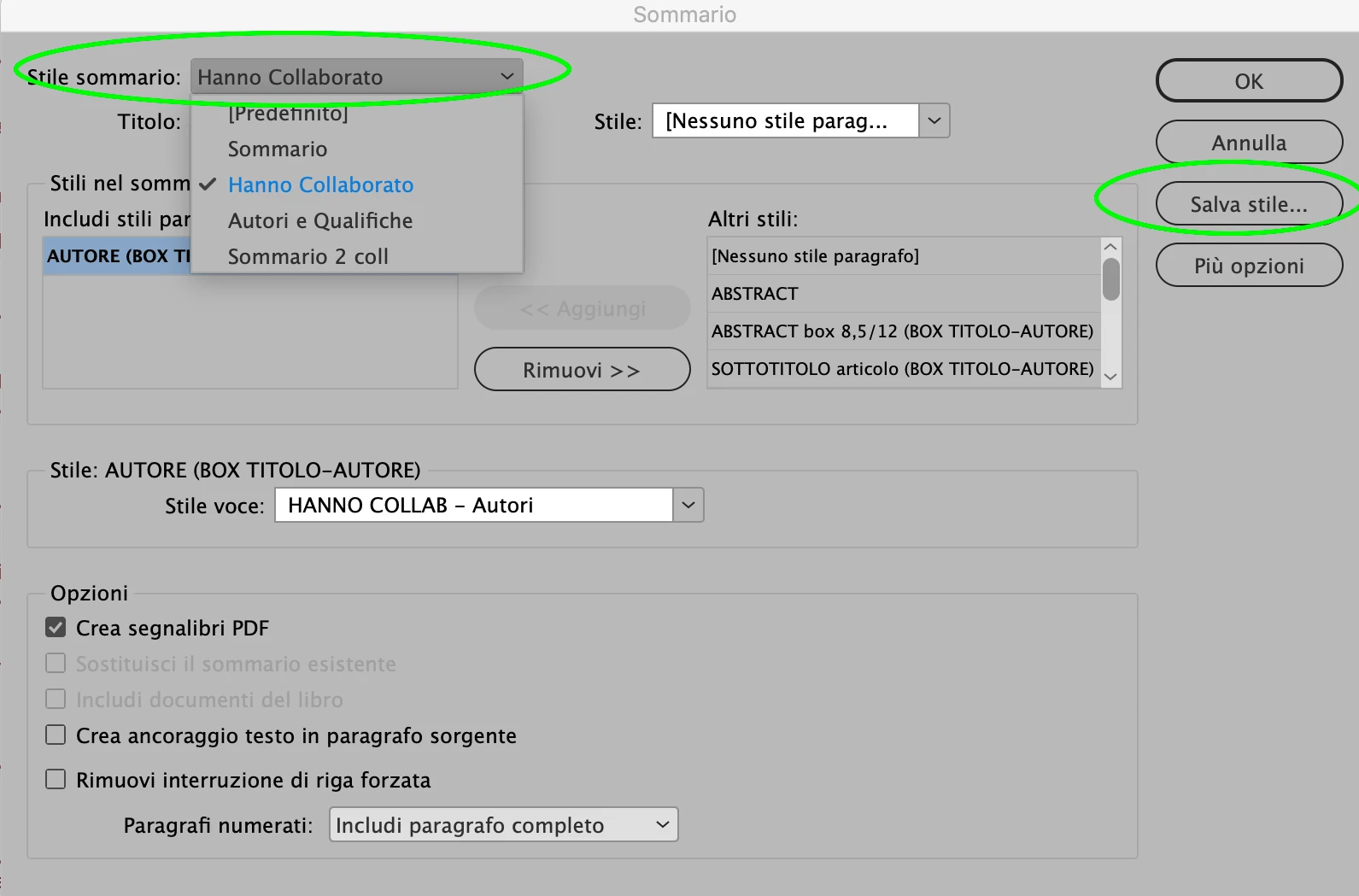
In the TOC window (Layout > Table of Contents) add paragraph style/styles you want and then save your TOC with name.

If you want one other TOC add other paragraph styles and then save your TOC with a different name.

In the screenshot bellow I have 4 different TOC in one single doc
4 replies

keithconover
Inspiring
August 28, 2023

I have a related question. I am writing a textbook, and in order to have seamless crosslinks between related chapter PDFs, I have grouped those chapters into a single volume and used it to create a single PDF. It has a single Table of Contents at the beginning of the volume, one spread is shown below:

This is all well and good. But the volume is pretty big, so I might want to offer the chapters separately, by extracting pages from the resulting PDF. Without have differently named paragraph-style headings (like "H2-Chapter-1" "H2-Chapter-2" and "H2-Chapter-3"), is there any way to also have a TOC just for a single chapter show up at the beginning of each chapter in the single-volume file? Probably not but thought I would ask.

James Gifford—NitroPress
Legend
August 28, 2023

Yes, but it won't be easy. The simplest solution would be to break the chapters into individual INDD files and then group the book as a whole using the Book feature. You'd use a Book TOC for the comprehensive TOC, and a file TOC for each chapter.


There will be some issues with styles and TOC assignments to work out, but yes, this can be done. Each TOC "style," even in different chapter files, should have a unique name just to make sure there are no namespace collisions in the assembled Book, especially if you are going to export to EPUB or PDF.

Participant
April 1, 2024

Gosh I would think there would be a simpler way. Is the fastest way to use go-to-page links in the hyperlinks panel? Won't auto update if pages get moved or added. Why would ID give you the ability to do multiple TOC styles?

Barb Binder
Community Expert
Community Expert
July 25, 2020

A TOC is just a list of paragraphs. I also have multiple TOCs in a single file.  


~Barb

~Barb at Rocky Mountain Training
August 2, 2020

Question: how was this "unrelated"?

vladan saveljic
Inspiring
July 22, 2020

The TOCs can be on the same page or different pages but they have to be in different stories (separated text frames and not threated one with other)

For example I have

- the main TOC;

- in one another text box is the TOC colled "Authors and qualifications";

- in one another pages is the TOC called "collaborators" etc.

- the secondary TOC in two columns


vladan saveljic
vladan saveljicCorrect answer
Inspiring
July 21, 2020

Of course.

In the TOC window (Layout > Table of Contents) add paragraph style/styles you want and then save your TOC with name.

If you want one other TOC add other paragraph styles and then save your TOC with a different name.

In the screenshot bellow I have 4 different TOC in one single doc

July 21, 2020

Have you actually placed four separate TOCs in the document in different locations (on different pages), or just created/saved four different types/templates? (since your screenshot does not show 4 separate tables placed)
