Copy link to clipboard
Copied
Hello, I'm trying to understand how XML import works and I encountered my first problem that I can't solve by myself.
I have several Textboxes and in some Textboxes I want to place 2 or more Tags,
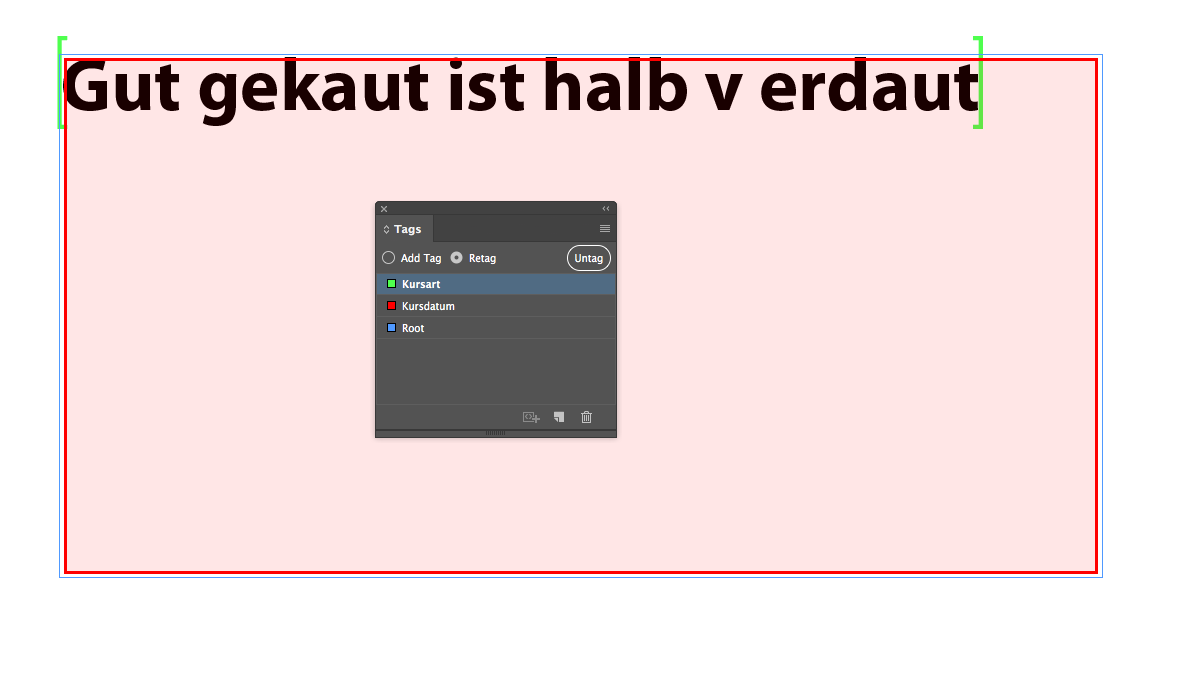
here in this Screenshot you can see that Im trying to place the TAG "Kursart" inside the Tagged Box "Kursdatum",
But indesign does not return the value "Kursart"
Can someone tell me step by step how to do it correctly, or is something like that impossible?

Thank you very much for your help.

It's definitely possible, you just have to understand how InDesign deals with this. When tagging content in InDesign, you can tag the frame as well as the text inside the frame. You tag the frame by selecting the frame with the Selection tool and applying a tag. Now if you select text inside the frame, you can tag that with a different tag. If memory serves me correctly, sometimes if you select all of the text in the frame it will also tag the frame so you may need to "trick" InDesign by selecti
...Copy link to clipboard
Copied
It's definitely possible, you just have to understand how InDesign deals with this. When tagging content in InDesign, you can tag the frame as well as the text inside the frame. You tag the frame by selecting the frame with the Selection tool and applying a tag. Now if you select text inside the frame, you can tag that with a different tag. If memory serves me correctly, sometimes if you select all of the text in the frame it will also tag the frame so you may need to "trick" InDesign by selecting some of the text first to tag the frame and text independently, then you can copy paste the text into the tag for the text. Hopefully that makes sense. Make sure you choose View > Structure > Show Tag Markers to be able to see this.

Get ready! An upgraded Adobe Community experience is coming in January.
Learn more