
Known Participant
November 28, 2017
Question

My InDesign CC window will not minimise into the dock?

  • November 28, 2017
  • 5 replies
  • 4111 views

Hi,

Not sure where to go with this one but I have just upgraded to Adobe CC and noticed that I'm unable to 'Minimise' the window in InDesign and also noticed that it won't do it in Illustrator but Photoshop does minimise (ODD!)

All it will do is when you double click it fills to fit screen and then the opposite.

Has anybody experienced this and if so please could you help me out!?

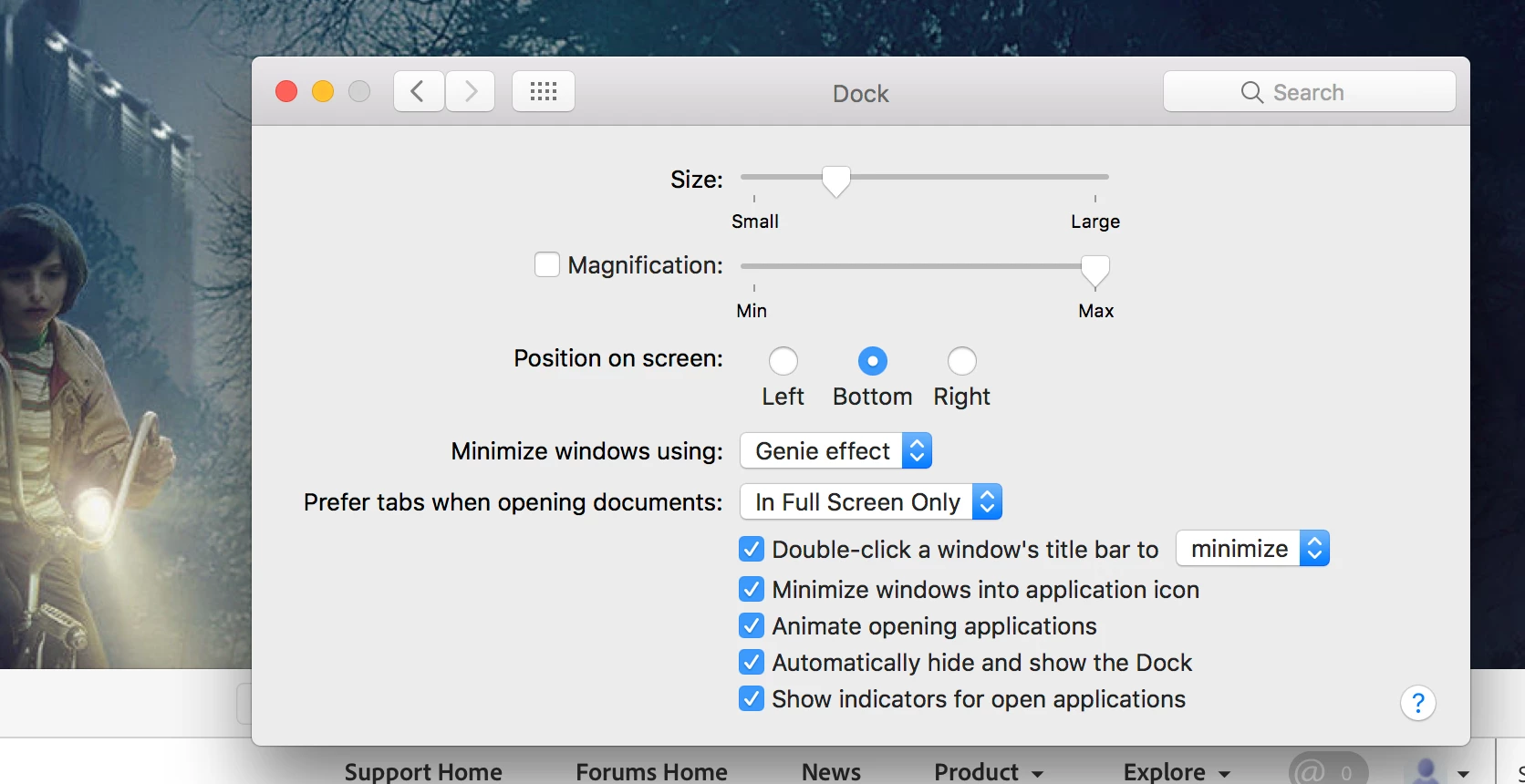
(I have turned on the 'Double -click a windows title bar to minimize' in the System Preferences)

see images

Cheers
    This topic has been closed for replies.

    5 replies

    drasikAuthor
    Known Participant
    January 19, 2018

    Hi ,

    No still the same issue with InDesign and Illustrator but Photoshop works fine and collapses when you double click on the bar.

    At the moment I have to click and move the whole window to one side or use the yellow circle to collapse the window, really annoying when you've got used to a certain way of working.

    Not sure if Adobe will do anything but I sent my message to them.

    Cheers.

    drasikAuthor
    Known Participant
    November 29, 2017

    Hi Guys,

    Thanks for looking into this issue!

    I'll take it up with Adobe and use those links.

    Thanks again.

    Barb Binder
    Community Expert
    Community Expert
    November 29, 2017

    Safe to say we all learned from the experience!

    ~Barb at Rocky Mountain Training
    Barb Binder
    Community Expert
    Community Expert
    November 28, 2017

    So drasik, there is nothing further Steve or I can do for you here. I still think the next step is to report this behavior to Adobe, and reference this thread because it clarifies the inconsistencies between the applications and the supported operating systems.

    Adobe InDesign Feedback and Adobe Illustrator Feedback

    ~Barb

    ~Barb at Rocky Mountain Training
    Barb Binder
    Community Expert
    Community Expert
    November 28, 2017

    I can confirm that. It isn't working for me on Sierra either in InDesign or Illustrator. It does work in Photoshop and most of my other Mac applications. Instead, it is toggling between maximize and restore, to use Windows parlance.

    I think your best bet here is to:

    1. Use the orange button to minimize those two apps for now; and
    2. Draw this to Adobe's attention with the links below (this is a user-to-use forum)
      Adobe InDesign Feedback and Adobe Illustrator Feedback

    I see other threads blaming the Mac OS, but since most apps work and these two don't, I'd start with Adobe.

    ~Barb

    ~Barb at Rocky Mountain Training
    Steve Werner
    Community Expert
    Community Expert
    November 28, 2017

    On a Mac, in InDesign, if you have chosen Window > Application Frame (on), then you can't minimize by double-clicking.

    If your turn Application Frame OFF, then it works.

    The Application frame attempts to keep each window within the overall application frame. It hides the background, and makes it easier to have windows reopen in a consistent position.

    Barb Binder
    Community Expert
    Community Expert
    November 28, 2017

    Hey Steve, what I see after reading your response is that I can double click on the Application title bar in Photoshop with the Application Frame on and it works as my other Mac apps do. The entire application—along with the open document windows—minimizes to the dock.

    That does not work in InDesign or Illustrator, but turning the Application frame off in those two apps does allow me to double click on the Document title bars to minimize the documents, but it leaves all the panels visible and In/Ai still active until I click the desktop.

    It's definitely inconsistent between the three apps.

    ~Barb

    ~Barb at Rocky Mountain Training
    Steve Werner
    Community Expert
    Community Expert
    November 28, 2017

    I tested 2017.1 too, but it still didn't work for me. This workstation is Sierra—what are you using?

    ~Barb


    High Sierra. mac OS 10.13.1