
Participant
November 17, 2023
Question

Myanmar font issue

  • November 17, 2023
  • 2 replies
  • 3866 views

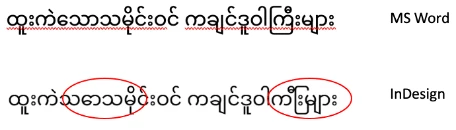
We are preparing a book in Myanmar (Burmese) using InDesign. We have an issue with Myanmar font after we placed the text from our MS Word document. We use Noto Sans Myanmar font. It is OK on Word, but it does not appear correctly for some strokes on InDesign (please see below).

Thank you, Chit
 

This topic has been closed for replies.

2 replies

James Gifford—NitroPress
Legend
November 17, 2023

There are always a number of issues when working with extended-alphabet languages, but first... is the file from MS Word or from an alternate app such as Pages or Google Docs, and exported or saved to Word format? InDesign is very fussy and does not always import Word-clone files correctly. (The simple solution is to open and re-save such files from a copy of Word itself.)

Participant
November 17, 2023

The imported file is an original MS word file. We opened/resaved it on MS word again and tried to place it into InDesign. InDesign rendered it the same way as before. We are stuck and don’t know how to proceed. We use the Apple Mac system. Thank you very much for your reply.

Joel Cherney
Community Expert
Community Expert
November 25, 2023

Your fix is the correct way, more or less - it doesn't matter how you apply the World-Ready Composer to your text, and it doesn't matter that much whether you choose the single-line or paragraph composer. (Try them both on a paragraph to see the difference; it's sometimes important in Burmese to use the multi-line as InDesign isn't very good at Burmese line-breaks, and typically the paragraph composer is a little bit better.)


The fix for Burmese page numbers is a bit more complex. InDesign's text layout engine has support for Burmese digits, but there's no real support in the interface. If you know how to install and run a script, this one will create a paragraph style that has Burmese digits turned on.


/*
	Add Paragraph style with Burmese numbering by Joel Cherney
	Based on "Khmer Page Numbering.jsx"	version: 1.1 by Thomas Silkjær
	
*/

var my_document = app.documents.item(0).paragraphStyles.add({
	name:"BurmeseDigitsSupport",
	characterDirection:CharacterDirectionOptions.LEFT_TO_RIGHT_DIRECTION,
	composer:"Adobe World-Ready Paragraph Composer",
	digitsType:DigitsTypeOptions.BURMESE_DIGITS,
	paragraphDirection:ParagraphDirectionOptions.LEFT_TO_RIGHT_DIRECTION,
});

This will create a paragraph style that will number in Burmese digits. You'd need to edit the resulting "BurmeseDigitsSupport" paragraph style to add a font that supports Burmese. 


Here's a screenshot of the paragraph style definition; note that InDesign can't tell us what digits are being used, as the UI and localized menu names don't have a string for Burmese digits.


Whoops! And, if you don't know how to install a script, here are some instructions. And, at the bottom of those instructions, there's a handy link to an explanation regarding what to do if you don't know how to turn some random internet person's posting of a JS snippet into an installable script

Robert at ID-Tasker
Legend
November 17, 2023

Next time, could you please use forum's Search, before posting your question - it should save you a lot of time:


https://community.adobe.com/t5/forums/searchpage/tab/message?advanced=false&allow_punctuation=false&filter=location&location=category:ct-indesign&q=Myanmar


Or Google...