
Known Participant
August 17, 2022
Answered

Mysterious wrapping

  • August 17, 2022
  • 1 reply
  • 1046 views

I cannot figure out why the text shown here is wrapping the way you see (sorry, I blurred the text because it is unapproved so far). You would assume that it is the photo on the right which does have text wrapping for the bounding box turned on. Likewise with the red and black graphics above. But I deleted these elements, along with literally every other thing on the page, one at a time to determine which it was, but doing so does not change that wrapping. Turning on "ignore text wrap" for the text does make the wrapping disappear.


Given this, I cannot figure out what is causing it, so of course, how to fix it. Other ideas of what to check?
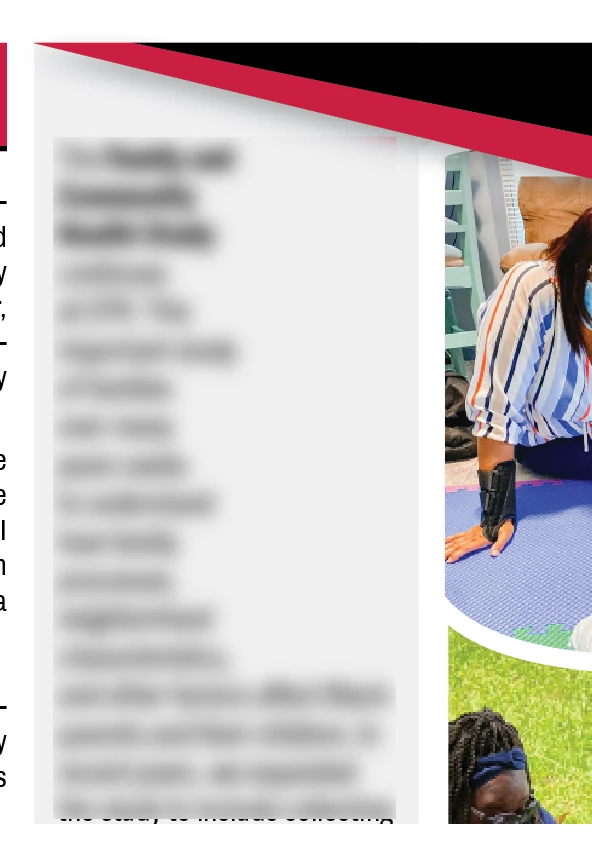


This topic has been closed for replies.
Correct answer James Gifford—NitroPress

Thanks James. No, adjusting the width or hyphenation does not change wrapping. It is wrapping around some phantom element. Again, I deleted everything on the page but this text frame, and the wrapping remains. I also just deleted the text frame and recreated it in case there was something odd about it, but the wrapping didn't change. 


I can edit the shape of the text frame but not get exactly what I need because the text frame is also filled with that grey, and so I need it to the top of the margin. Is there some setting I am missing to turn off the uniform inset spacing?


The ideal solution would be to (1) find out what's causing that bizarre wrapping, and then (2) set wrapping with the angled object. But you knew that. 🙂


Does the wrapping in the text box change if you move it around? Have you done a "select all" on the page to see if there's a phantom object, maybe on a hidden layer, that's causing the effect?


And are you sure there's no soft returns in the text forcing those breaks?


1 reply

Known Participant
August 17, 2022

I did not explain that I want to move this text up a little and have the wrapping respond to the angled graphic above it. So turning on "ignore text wrapping" is not the solution for this.

James Gifford—NitroPress
Legend
August 17, 2022

It looks as if it may be wrapping to the elements in the photo next to it. Your best option may be to turn all wrap off and change the text box shape to follow the angle above.


Known Participant
August 17, 2022

The ideal solution would be to (1) find out what's causing that bizarre wrapping, and then (2) set wrapping with the angled object. But you knew that. 🙂


Does the wrapping in the text box change if you move it around? Have you done a "select all" on the page to see if there's a phantom object, maybe on a hidden layer, that's causing the effect?


And are you sure there's no soft returns in the text forcing those breaks?


Thanks again. Yes, if I just drag the text box around, it wraps around that phantom object. I did a select all as you suggest, but the only thing I see there is that photo on the right. I did another select all after deleting the photo to be sure there was not something like an empty text frame but don't see anything.  It is indeed a phantom.


I realized that I can get what I need by making the text frame transparent and adjusting it as needed and then just adding a gray rectangle behind it. So I will do that and move on, but I would sure love to know what is causing the wrapping.