
Mystery lines underneath text after placing Word Doc. into InDesign
Hi Adobe Community!
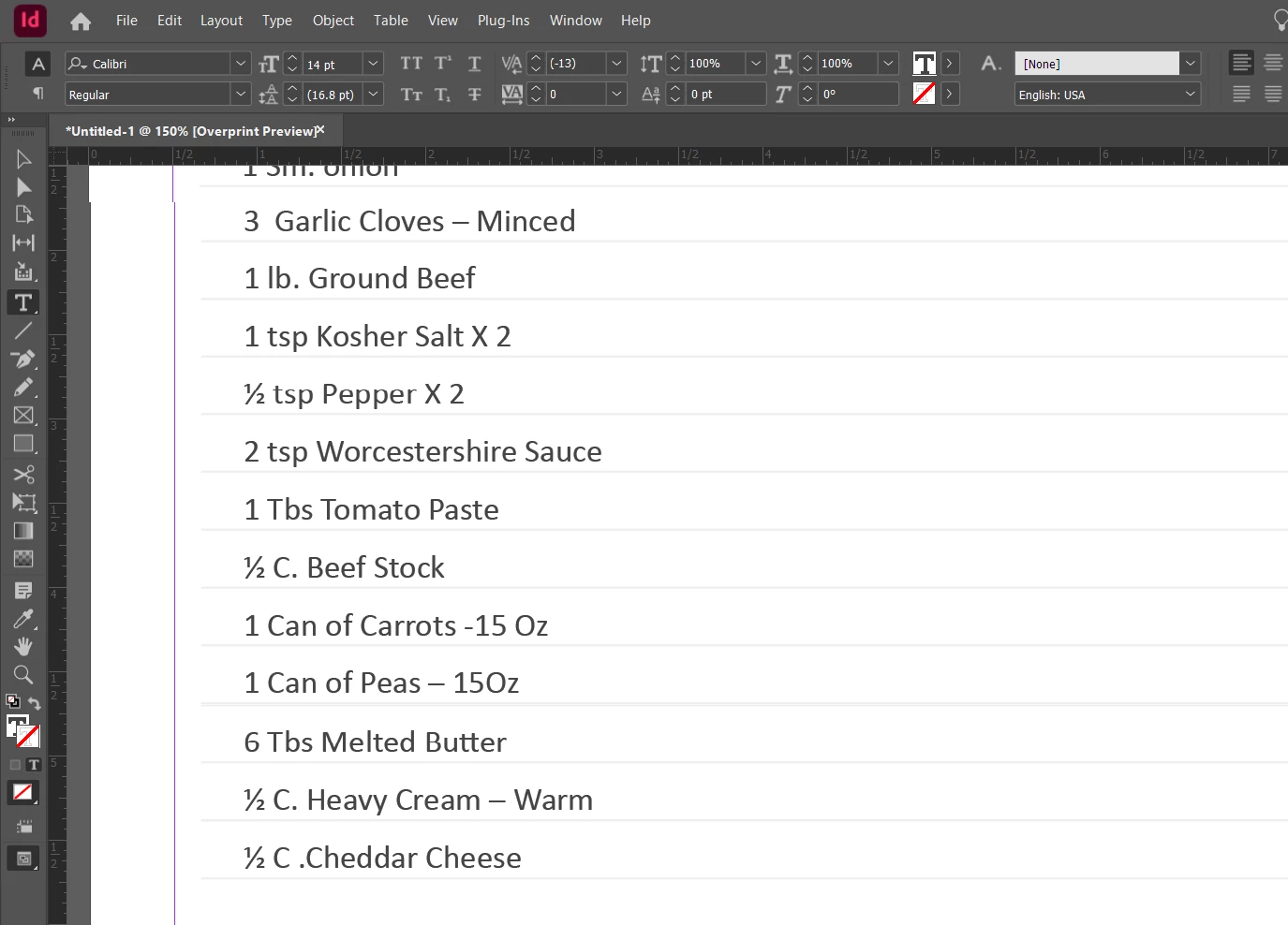
Hoping someone here can help me figure this out. I am currently working on a cookbook for a client. They made the receipes in Microsoft Word- but I'm working on it in InDesign to prepare for printing. I've figured out how to get the copy from Word into InDesign without changing the fonts and setup, however these very light gray lines keep showing up underneath the ingredients. I cannot figure out what they are, where they came from, and of course how to get rid of them. These lines were not in the Word file.
The Word Document this came from was setup as an 11" x 8.5", with 2 columns of copy. The first column contains the receipe name (which does not have these lines around it in InDesign), and the ingredients themselves. The 2nd column contained the instructions, which showed up underneath this list here, but these lines did not show up for that part. It's literally only this ingredient section where these lines came up. I don't know if there's something in the Word doc I need to look for or if it's a setting issue in InDesign.
The fonts and look is perfect except for these gray lines. Hope someone can point me in the right direction on fixing this. I have more pages to add, and I suspect this same problem will occur with each one until I get it figured out. Appreciate the input and assistance!
 AdChoices