Participating Frequently
June 21, 2021
Answered

Need help creating an Indesign Javascript to find and replace colors

  • June 21, 2021
  • 5 replies
  • 7051 views

Hello!


After scouring the internet for a few hours, I have come to the conclusion I need help. 


I am attempting to find a script that will find an unnamed color in Indesign (C:82, M:100, Y:11, K:0) and replace it with an existing swatch named "GGS purple"


I then need the same script to find GGS purple and replace it with the existing Pantone 186 C.


I also am looking for a find and replace script for text and the findchangebylist is baffling me as well.


This isn't something we do every day, but we have hundreds of documents to process and the find/change function in Indesign is great, but scripts will cut down on time, which matters with this many documents. 


Thank you so much in advance!

This topic has been closed for replies.
Correct answer Mike Bro

Hello Amanda!


Below are two different scripts,  the first one is for changing the swatches per your requirements and the second one is for "looking for text and changing to" you'll just to modify the "What you want to find" and the "Change to" for your needs. You could combine the two scripts together if you wanted.


re: This isn't something we do every day, but we have hundreds of documents to process and the find/change function in Indesign is great, but scripts will cut down on time, which matters with this many documents. 

You could use Peter Kahrel's batch_convert.jsx to run either of the scripts I posted to run on all the Indesign documents that need to be proessed in one shot.


https://creativepro.com/files/kahrel/indesign/batch_convert.html
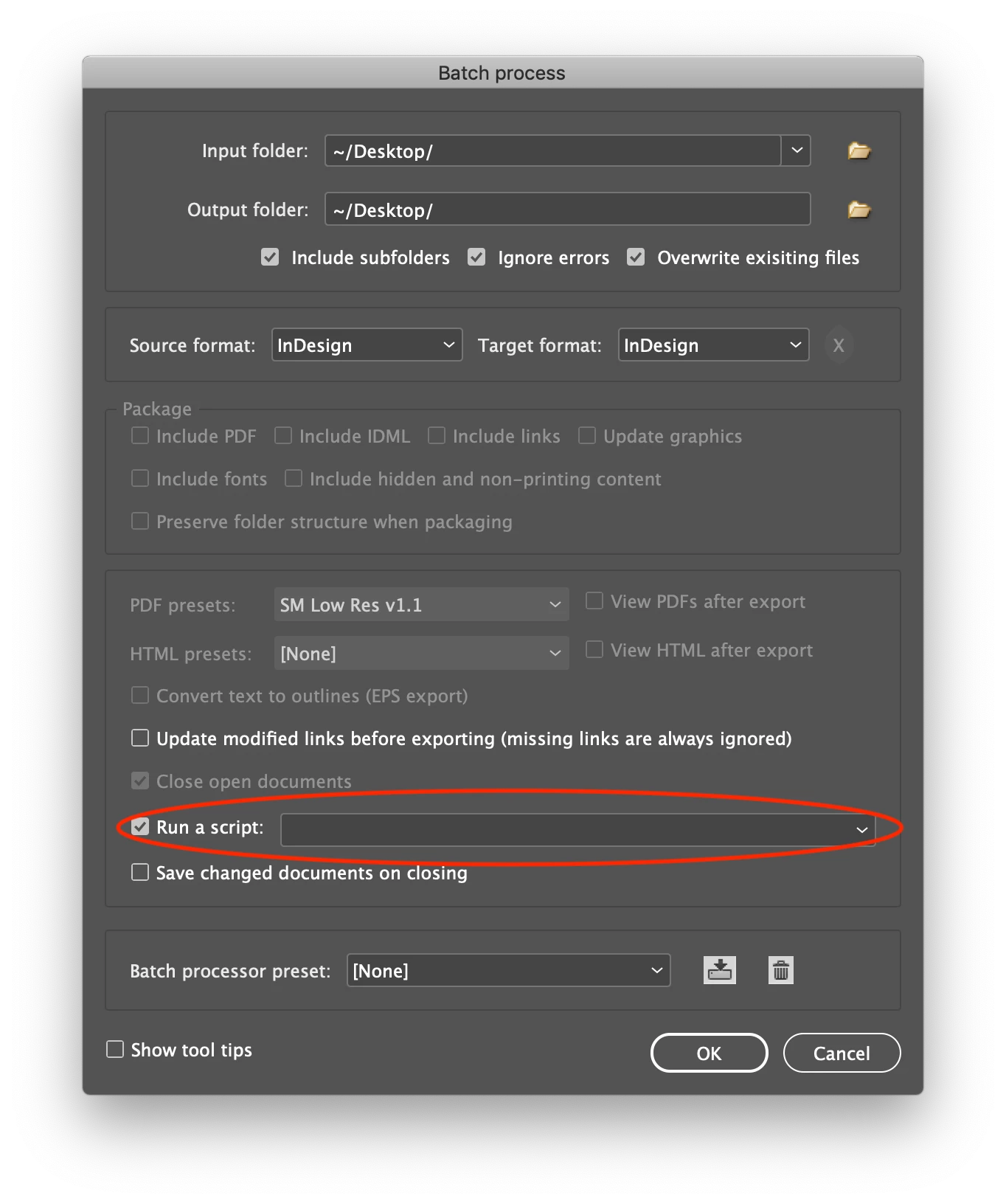
Note: all three swatches must exist in the document(s) for this script to work.


var doc = app.activeDocument;

doc.colors.item("C=82 M=100 Y=11 K=0").remove("GGS purple");

doc.colors.item("GGS purple").remove("PANTONE 186 C");


var doc = app.activeDocument;

//Clear the find/change text preferences.
app.findGrepPreferences = NothingEnum.nothing;
app.changeGrepPreferences = NothingEnum.nothing;

//Set the GREP find options (adjust to as needed)
app.findChangeGrepOptions.includeFootnotes = false;
app.findChangeGrepOptions.includeHiddenLayers = true;
app.findChangeGrepOptions.includeLockedLayersForFind = true;
app.findChangeGrepOptions.includeLockedStoriesForFind = false;
app.findChangeGrepOptions.includeMasterPages = true;

//Look for the text and change to
app.findGrepPreferences.findWhat = "What you want to find";
app.changeGrepPreferences.changeTo = "Change to";
doc.changeGrep();

//Clear the find/change text preferences.
app.findGrepPreferences = NothingEnum.nothing;
app.changeGrepPreferences = NothingEnum.nothing;


Regards,

Mike

5 replies

Community Expert
June 22, 2021

Amanda said: "… What would the script be if I needed it specifically only for page 1"


Well, scripting method changeColors() is only known to the document.


A possible algorithm could be to set the findChangeColorOptions.includeLockedLayersForFind to false and lock all objects on all document spreads that should not be found and changed. After changeColor() is done to the document unlock all the objects that were locked before.


Regards,
Uwe Laubender

( ACP )

Community Expert
June 22, 2021

Amanda said:

"Is there a way to have the color change only run on that page?"


Hi Amanda,

on what page exactly?


Brian's script still has the document as scope:

doc.changeColor();

Masters are not included, but still all document pages and all document pasteboards are accessed.


Regards,
Uwe Laubender

( ACP )

armorup33Author
Participating Frequently
June 22, 2021

Hey @Laubender


Each of these documents has only one page, but if there were more, we would want it to apply to all pages except the masters. So it works for our needs. What would the script be if I needed it specifically only for page 1?


Thanks,

Amanda

Community Expert
June 22, 2021

Amanda,

is there an appropriate item on a page where that unnamed color is applied to?

An object that could be selected where a script could start to read out the fill color?


Mike,

to find an unnamed color one could loop the colors of the document and look for an empty string for the name.

If an item is found check the colorValue array. If the values are close* to the values Amanda indicates, store the color to a variable and use that variable with remove().


* I said: "close" to the values, because InDesign's UI will never reveal the super-eaxct values with 13 digits after the dot if necessary. So at best a script could start with a selected object like a rectangle or some text where this color was applied to as fill color. Then it's easy to determine the unnamed color.


Below two screenshots with a sample CMYK color with quite some different values revealed by name in the UI, by color value in the UI and by the "true" color value revealed by a script alert:


Name: C=3 M=0 Y=90 K=0

Values revealed: 3.12, 0, 89.86, 0


You see, InDesign is able do do some rounding when it comes to naming a color after the color values that are revealed in the UI:


Even more, the exact values of the color's colorValue array can only be shown with a script:


Cyan

3.1199999153614
Magenta

0
Yellow

89.8599982261658
Black

0


Regards,
Uwe Laubender

( ACP )

armorup33Author
Participating Frequently
June 22, 2021

Thanks for that thorough response, @Laubender. We don't need to find colors that exactly. The previous answers worked great for our needs!

Mike BroCorrect answer
Legend
June 22, 2021

Hello Amanda!


Below are two different scripts,  the first one is for changing the swatches per your requirements and the second one is for "looking for text and changing to" you'll just to modify the "What you want to find" and the "Change to" for your needs. You could combine the two scripts together if you wanted.


re: This isn't something we do every day, but we have hundreds of documents to process and the find/change function in Indesign is great, but scripts will cut down on time, which matters with this many documents. 

You could use Peter Kahrel's batch_convert.jsx to run either of the scripts I posted to run on all the Indesign documents that need to be proessed in one shot.


https://creativepro.com/files/kahrel/indesign/batch_convert.html

Note: all three swatches must exist in the document(s) for this script to work.


var doc = app.activeDocument;

doc.colors.item("C=82 M=100 Y=11 K=0").remove("GGS purple");

doc.colors.item("GGS purple").remove("PANTONE 186 C");


var doc = app.activeDocument;

//Clear the find/change text preferences.
app.findGrepPreferences = NothingEnum.nothing;
app.changeGrepPreferences = NothingEnum.nothing;

//Set the GREP find options (adjust to as needed)
app.findChangeGrepOptions.includeFootnotes = false;
app.findChangeGrepOptions.includeHiddenLayers = true;
app.findChangeGrepOptions.includeLockedLayersForFind = true;
app.findChangeGrepOptions.includeLockedStoriesForFind = false;
app.findChangeGrepOptions.includeMasterPages = true;

//Look for the text and change to
app.findGrepPreferences.findWhat = "What you want to find";
app.changeGrepPreferences.changeTo = "Change to";
doc.changeGrep();

//Clear the find/change text preferences.
app.findGrepPreferences = NothingEnum.nothing;
app.changeGrepPreferences = NothingEnum.nothing;


Regards,

Mike

brian_p_dts
Community Expert
Community Expert
June 22, 2021

Assuming the initial purple is unnamed as indicated, you'll need to name it to find it by Adding All Unamed Colors from the menu. And if the Pantone is also unnamed, might as well roll your own. Here it is put together with Mike's. Still assumes GGS purple is named, but if it's not, you can do the same I did with the Pantone: 

var doc = app.activeDocument;
app.menuActions.item("$ID/Add All Unnamed Colors").invoke();
doc.colors.item("C=82 M=100 Y=11 K=0").remove("GGS purple");
var c = doc.colors.item("PANTONE 186 C");
if (!c.isValid) {
    c = doc.colors.add({
        name: "PANTONE 186 C",
        colorValue: [0, 100, 80, 5],
        model: ColorModel.PROCESS,
        space: ColorSpace.CMYK,
    });
};
doc.colors.item("GGS purple").remove("PANTONE 186 C");
lfcorullon13651490
Legend
February 25, 2023

Hello, @brian_p_dts.

I'm trying some options and none is working.
I also tryied manually and an object (rectangle) with manual applied color (not by style), doesn't change. Is this feature bugged in 2023?

Both colors are inside groups (find color in group "a", change color in group "b"). The dialog alerts the change (manual operation) but the color is not effectivelly changed. Any idea?


var doc = app.activeDocument;
var a = doc.colorGroup.itemByName("a");
var b = doc.colorGroup.itemByName("b");

changeSw(doc,a,b)

function changeSw(doc,a,b) {
	app.findChangeColorOptions.includeFootnotes = true;
	app.findChangeColorOptions.includeHiddenLayers = true;
	app.findChangeColorOptions.includeLockedLayersForFind = true;
	app.findChangeColorOptions.includeLockedStoriesForFind = true;
	app.findChangeColorOptions.includeMasterPages = true;
	app.findChangeColorOptions.objectType = ObjectTypes.ALL_FRAMES_TYPE;
	
	var match = [];
	for (var i=0; i<a.colorGroupSwatches.length; i++) {
		var swa = a.colorGroupSwatches[i].swatchItemRef;
		var aname = swa.name;
		var anmreg = aname.replace(/^.+?_/,"");
		for (var j=0; j<b.colorGroupSwatches.length; j++) {
			var swb = b.colorGroupSwatches[j].swatchItemRef;
			var bname = swb.name;
			if ( RegExp(anmreg,"i").test(bname) ) match.push([swa,swb]);
			}
		}
	for (var i=0; i<match.length; i++) {
		a = match[i][0];
		b = match[i][1];
		if (a.isValid && b.isValid) {
			app.findColorPreferences = app.changeColorPreferences = NothingEnum.NOTHING;
			app.findColorPreferences.findWhat = a;
			app.findColorPreferences.tintLowerLimit = 0;
			app.findColorPreferences.tintUpperLimit = 100;
			app.changeColorPreferences.changeTo = b;
			doc.changeColor();
			app.findColorPreferences = app.changeColorPreferences = NothingEnum.NOTHING;
			}
		}
	}


JonathanArias
Legend
June 21, 2021
armorup33Author
Participating Frequently
June 21, 2021

Thank you, @JonathanArias! Yes, we are aware of this function, but wanted a way to do this with "one click" instead of using the swatches find/replace option.