Hi @amandaj97527555:
I'm wondering if you are new to GREP styles and/or styles in general? You were asking for a find and change query, but the GREP style suggested by @jmlevy is the better solution.
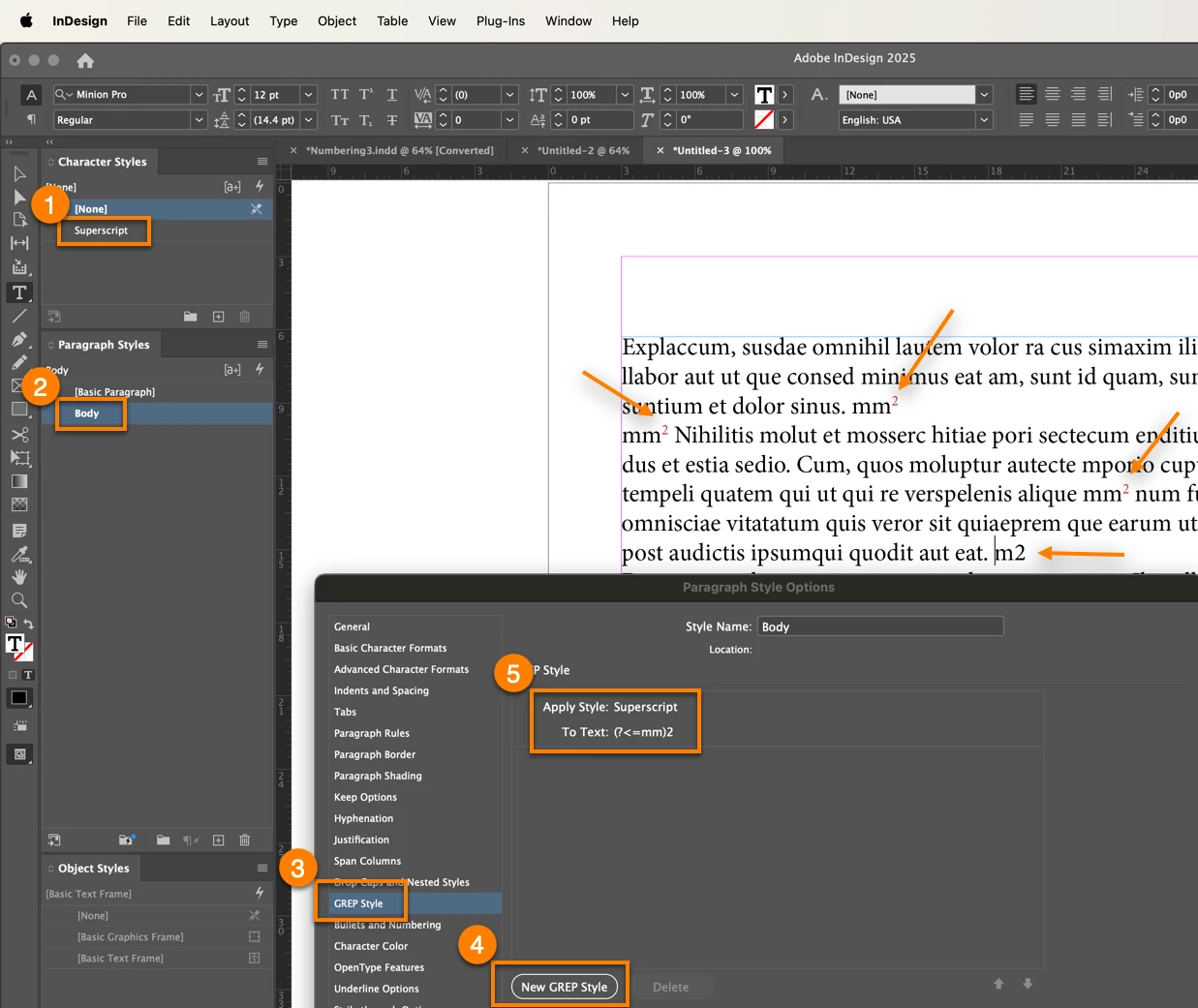
Here are the steps:
- Create a Character style for superscript
- Create a Paragraph style for the paragraphs that will contain the mm2 and format as usual
- Edit the Paragraph style > GREP Styles
- Click Add GREP Style
- Apply the the superscript character style to (?<=mm)2. (See notes below.)
InDesign will then locate each occurrence of mm2 and apply superscript to the 2. An advantage of a GREP style is that if you ever type in mm2 and assign that paragraph style, InDesign will see it and assign the GREP style to the 2 automatically.
Note 1: I added a second m to @jmlevy's expression just in case you have a single m followed by a 2 that should not be superscript. If that's never going to happen, then you can just leave it the way he showed you.
Note 2: @Eugene Tyson's solution will work equally well, and has the bonus of being a few less characters: just substitute mm\K2 for (?<=mm)2.
~Barb

 AdChoices