

shannonwbrown
Inspiring
April 4, 2017
Answered

Negative Space After Style?

  • April 4, 2017
  • 3 replies
  • 3595 views

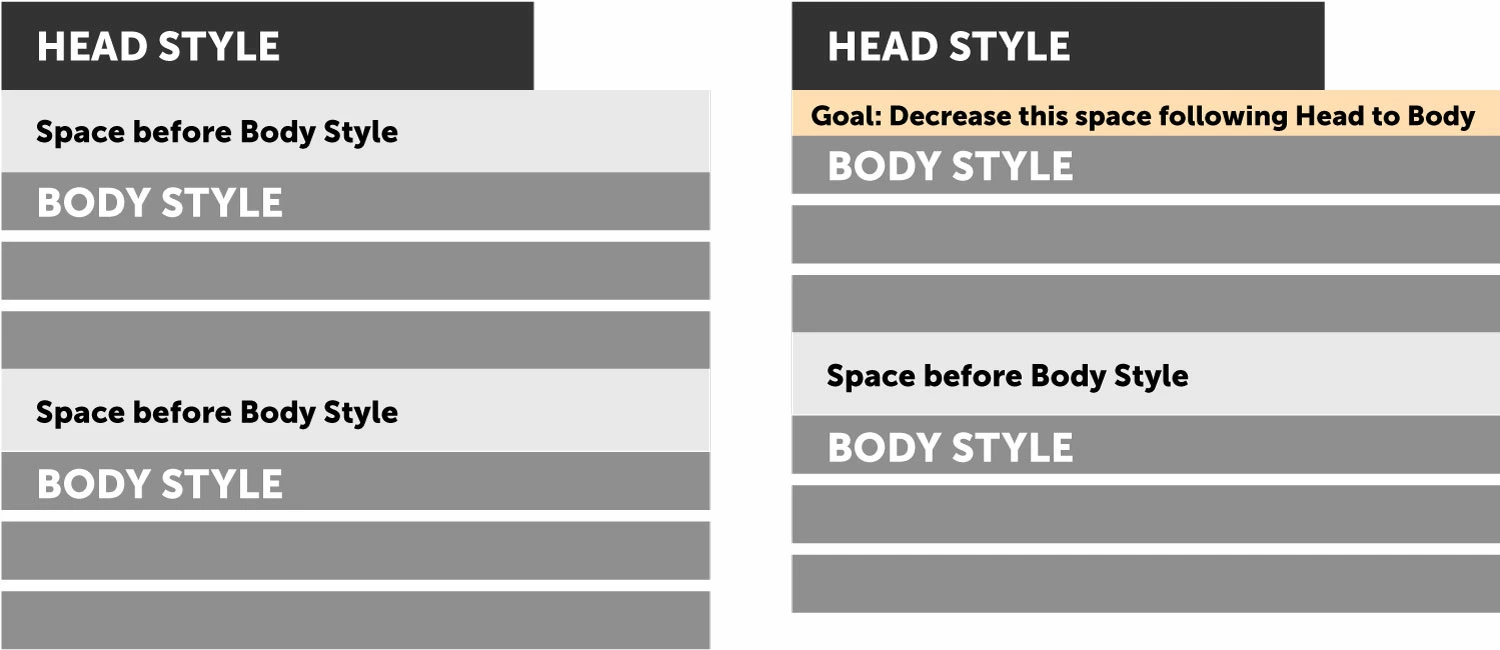
Below is an image of what I'm trying to accomplish. I attempted to make the graphic as simple as possible although I have some more complex instances of this in a fairly complex book layout.

Notes:

  • I know that I can simply create an alternate body style with less space before the paragraph and assign it to the paragraphs that follow the head. But, I'm trying to learn how to do something in a more automatic manner to save lots of time applying styles.
  • I prefer to work with space before rather than space after and would run into the same problem in reverse.

Ideally I could set a "negative" space in the space after panel for the head style, but I don't think this is doable.

Any suggestions?
This topic has been closed for replies.
Correct answer TᴀW

I think you would need to create separate styles (e.g. "BodyText" and "BodyTextFollowingHeading") which is what I do all the time.

Then, to actually apply the styles, it's best with a script. There are both free scripts and paid ones that will do this:

Free:

https://indesignsecrets.com/find-change-the-next-paragraph-style-with-a-script.php

Or my own paid version:

https://www.id-extras.com/products/change-consecutive-paragraphs

(In the comments section I also mention the "Pro" version, which lets you save all these replacements so they can be run automatically the next time you create a similar document).

Ariel

3 replies

knic pfost
Participant
January 30, 2023

There is another option! You only need two styles, Head and Body.


  • For your Body Style, set "Space Before" and "Space After" to 0pt (yes, zero).
  • Then, in the same style window, set "Space Between Paragraphs Using the Same Style" to whatever your current "Space before Body Style" happens to be.
  • Finally, set your Head Style spacing to whatever you want.


Yes, for your Head Style, you will have to use "Space After" as well as "Space Before"—but the benefit is that your Head Style will be the only style defining the space between Head and Body content, and won't be affected by the space between your Body paragraphs.

Peter Spier
Community Expert
Community Expert
January 31, 2023

Just to note, this thread was originally posted over five years ago, and that was not an option at the time.

TᴀW
TᴀWCorrect answer
Legend
April 4, 2017

I think you would need to create separate styles (e.g. "BodyText" and "BodyTextFollowingHeading") which is what I do all the time.

Then, to actually apply the styles, it's best with a script. There are both free scripts and paid ones that will do this:

Free:

https://indesignsecrets.com/find-change-the-next-paragraph-style-with-a-script.php

Or my own paid version:

https://www.id-extras.com/products/change-consecutive-paragraphs

(In the comments section I also mention the "Pro" version, which lets you save all these replacements so they can be run automatically the next time you create a similar document).

Ariel

shannonwbrown
Inspiring
April 4, 2017

Ariel, The way you suggested of creating a separate paragraph style is how I've been doing it. The manual process of assigning those styles is what my post was in response to. I was looking for a better way

The script you have looks perfect! I will run the trial and if it works well I will purchase the paid version. This could be a huge timesaver for me with various projects.

TᴀW
Legend
April 4, 2017

Great. I'm a typesetter myself (well, at least part time) so all these scripts are workhorses -- put to daily, real-world use...

Barb Binder
Community Expert
Community Expert
April 4, 2017

Is this the desired outcome? More space between Body paragraphs but less under the Heads?

~Barb at Rocky Mountain Training
shannonwbrown
Inspiring
April 4, 2017

Yes.

shannonwbrown
Inspiring
April 4, 2017

Ok! I set up two paragraph styles—one for the Heading and one for the Body paragraphs.

In the Body paragraph,  I set the space after to 1p0 in Indents and Spacing.

For the Heading paragraph, I set the space after to 0p2 also in Indents and Spacing.

You can, of course, use any numbers that you like.


Thank you for taking the time to interact with me. If you read my original post I acknowledged that I'm a "space before" person whereas others are "space after" designers. It's really relative as far as I can tell because if you solve my problem using "space after," I will have the same problem in reverse.

On your first screenshot it occurred to me that perhaps I need to assign BOTH a "space before" and "space after" for my various styles.

Of course, I wish my book design consisted of only a couple styles, but because it's a curriculum it has probably 25 styles. I'm thinking it will probably be worth my while to spend the time to fine-tune all of this.

Ideally, I would be able to assign "conditions" to paragraph styles. So, for example, If "body" is preceded by "head" then over-ride the primary spacing and using conditional spacing.