
Inspiring
December 7, 2021
Answered

Newbie understanding Documents & book workflow

  • December 7, 2021
  • 2 replies
  • 1109 views

First I have only used InDesign sporadically over the years and mostly for ads and single page documents.


I have just gotten a contract to update 28 books that havean InDesign  book and chapters, TOC and index as seperate documents. 


I have made the changes to all chapters of the first book and I have opened the book file to update the chapters and I get a dialogue box that says all documents have been modified outside of the book file. 
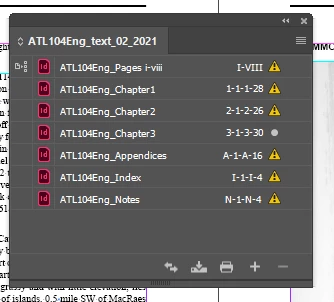


What is the best workflow, open the book file and make new changes there?


ANy workflow or suggetions & tips are greatly accepted.


Thanks, Randy

This topic has been closed for replies.
Correct answer Laubender

Hi Randy,

you modified the documents in a way the book file sees as "outside" of the book file.

This simply means you did not open the documents from the Book panel.

Just do that and save them. Also the book file.


The style source is already there. By default it's the first document in the list of documents of a book file.

Do you see that icon in the first column of that list? That's the indicator for the style source. Drag it to a different document in the list to have a different style source.


Regards,
Uwe Laubender

( ACP )

2 replies

LaubenderCommunity ExpertCorrect answer
Community Expert
December 7, 2021

Hi Randy,

you modified the documents in a way the book file sees as "outside" of the book file.

This simply means you did not open the documents from the Book panel.

Just do that and save them. Also the book file.


The style source is already there. By default it's the first document in the list of documents of a book file.

Do you see that icon in the first column of that list? That's the indicator for the style source. Drag it to a different document in the list to have a different style source.


Regards,
Uwe Laubender

( ACP )

Inspiring
December 7, 2021

Hi Uwe,


thank you, I am just getting my head around the Book idea. I started a new one as the old one was dated April 2021. 


I see the Style Source icon on the first document. I am just working on a workflow, so I will open the Book file first and edit the documents from there. I don't have to do any style changes, yet, I just have to update images and move text blocks to accomodate. 


Best regards,

Randy

Inspiring
December 7, 2021

I am understanding the concept of Bok frrom this page;

https://helpx.adobe.com/indesign/using/creating-book-files.html

Now to figure out how to set up style source or use what is already there?