Participant
July 23, 2019
Answered

No Break names

  • July 23, 2019
  • 2 replies
  • 953 views

Multiple times I have to work with texts that have names and roman numbers after the name like Paul VI or Louis XVI. There is a way to have a list of names and apply the "no break" definition to that list?

    This topic has been closed for replies.
    Correct answer Jongware

    Arrrg, i made an mistake. As you see in "about Ludwig"...there is "no break" and thats wrong. So I have modified the GREP:

    [\l\u]\s[\u]{2,}

    Now it reads like this.

    Try to find a character, low- or upcase, with a blank behind, with 2 or more characters following, which must be upcased.

    But if you have like ChicoPereira12 I (the first), that will break, because im assuming your roman numbers always have minimum 2 charcaters.


    I would restrict the possibilities even more. After all, you know that this should only be applied to "end of proper name + space + roman capital number". This GREP will only match such a final lowercase plus uppercase roman numbers:

    \l\s[IVXLC]+\b

    (lowercase, space, one or more of "IVXLC", end-of-word). It does not validate the notation of the roman number! (Then again, if you're suspicious this may run rampant on your text, set a limit to the length of the roman sequence to something reasonable.)

    As you can see it does not mark the entire name:
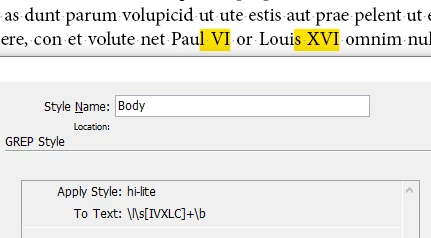
    which may or may be what you want. If you don't want to break any proper name, you could prepend this GREP with "\u\l+", but of course then you are fixing the wrong thing: sure, it won't allow names followed by roman numbers to be broken, but of course names without will still break. So instead, just uncheck "Hyphenate Capitalised Words" in your Hyphenation settings.

    2 replies

    Jeff Witchel, ACI
    Community Expert
    Community Expert
    July 23, 2019

    I would use GREP Styles to apply a No Break Character Style that you set up (as DBLjan recommended) but enter all the exact names in the GREP Styles window as separate GREP Style listings. You don't have to know GREP code to use GREP Styles. When using exact names, you won't have to worry about exceptions that the code may miss.

    By the way, I'm not a big fan of Non-breaking Spaces, because the names could hyphenate someplace other than the spaces between the names.

    Legend
    July 23, 2019

    Jeff Witchel​, if you want to make a quick'n'dirty-approach, you can hard-wire the strings into simple GREPs, yes. But imagine 100+ names. It would be a super-tedious task to type in those many GREPs, click by click. Or is there any way to import GREP from an file-source into a paragraph-style, which I didnt found yet? I doubt it, looking at the example-scripts.

    Jeff Witchel, ACI
    Community Expert
    Community Expert
    July 23, 2019

    Absolutely! If there's a hundred names, 'hard-wiring" could take a ridiculous among of time. But I'm assuming (usually a bad thing to do) there's nowhere near that number of names.

    Willi Adelberger
    Community Expert
    Community Expert
    July 23, 2019

    Write those names with a non-Breaking space (STRG/cmd + shift + alt + X) or with a non-Breaking fixed space from the spaces.

    Legend
    July 23, 2019

    If you want to make you paragraphs-styles smarter, try to make use of GREP where possible.

    Heres an exaple:

    As you see, the character-style just is set to no break, nothing else.

    As you see, and I used an underlineing instead of no break, to visualize.

    Legend
    July 23, 2019

    Arrrg, i made an mistake. As you see in "about Ludwig"...there is "no break" and thats wrong. So I have modified the GREP:

    [\l\u]\s[\u]{2,}

    Now it reads like this.

    Try to find a character, low- or upcase, with a blank behind, with 2 or more characters following, which must be upcased.

    But if you have like ChicoPereira12 I (the first), that will break, because im assuming your roman numbers always have minimum 2 charcaters.