
taylor_n308
Participant
May 3, 2017
Answered

No Composite CMYK color option in InDesign for printing

  • May 3, 2017
  • 6 replies
  • 17834 views

Why can I select composite cmyk color option when printing in indesign CC? There're only options for Composite RGB or Composite Gray and nothing else. I tried to uninstall the old version and updated to CC but the problem is still there. All the Adobe software in my MAC have this problem. I don't think it's printer's problem because I tried to print on both and none has this option. Does anyone know why? Please help!
This topic has been closed for replies.
Correct answer rob day

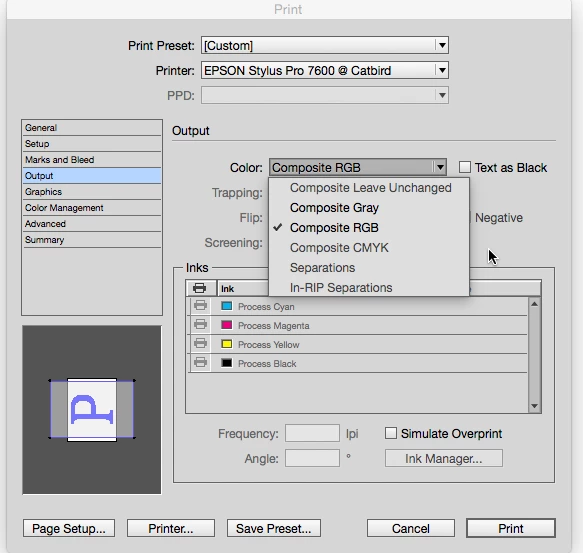
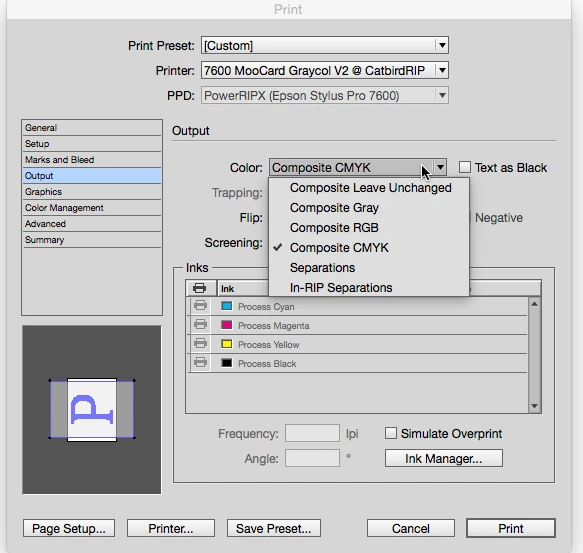
It depends on the print driver. Many non postscript RGB drivers will only take RGB and the conversion to the printer's space happens on output So here's Epsons RGB driver vs. a third party RIP:

6 replies

Participating Frequently
February 23, 2022

It's because stupid Adobe has removed the CMYK palette that used to exist for print and replaced it with a junky RGB palette that is NOT nearly as good...Adobe upgrades are almost always idiotic -what was wrong with the CMYK palette? It was awesome - now we just have a junky RGB palette where we have to CONVERT to CMYK...say what???? Totally stupid and unnecessarily labor intensive. The problem with Adobe is all it does now is just add on more layers of JUNK - adding on additional complications and doodats is not what a good software program does. I can't wait till someone comes along (as Quark did to Pagemaker) and blows crummy InDesign back into the Stoneage where it belongs. And by the way, if anyone hasn't really noticed InDesign IS Pagemaker - buried under all the bells and whistles is the original inferior desktop program. Those of us who've been around awhile know a rat when we smell one...and InDesign is a rat...

KittyQuig
Known Participant
January 3, 2023

This is awful. And frustrating. I suppose what you are saying is true? I'm really struggling to have access to that option. 

Conrad_C
Community Expert
Community Expert
January 3, 2023

Most of the statements in the post you are replying to are not true.


The answer that is marked correct is actually correct. The original post is from a person who was printing to a desktop inkjet printer (not a printing press), which uses software that expects RGB data to come in, not CMYK. Therefore InDesign is setting up the job as the printer driver allows. It would be wrong to send that printer CMYK, because the printer uses more than 4 inks and therefore sending it CMYK would not take full advantage of the printer. Sending it RGB data provides for a larger original color gamut, which is then converted to the larger gamut that the inkjet printer’s 8 or 9 inks can reproduce.


Now, you might actually be working on a job that is only intended to go to a CMYK press in the end, and therefore it is best to specify all the colors in CMYK. Maybe you want to do a “hard proof” on a desktop inkjet printer to check the colors. That is possible to some extent with the printer’s own driver software, but to do things like preview halftoned CMYK separations (which most people shouldn’t actually have to do), you should have the printer emulate the final platemaker as closely as possible. But to do that, you need extra printer emulation software. That is what Rob Day was talking about when he mentioned a “third-party RIP” (raster image processor). If you set up one of those, or if you are actually hooked up to a CMYK output device, then InDesign will present CMYK options in the Print dialog box. InDesign is only doing what is correct for the way the printing pipeline is set up.


They said they didn’t have to convert to CMYK before. That might be because in the old PageMaker days, all jobs were CMYK, because all jobs went to press. But that is no longer true, the world has changed since then. Now jobs need to go to web, to video and TV, to apps, and maybe to press, and old CMYK is not good enough for all that. Around the time high quality desktop color inkjet printers became available about 20 years ago, RGB-based workflows started becoming important, and now RGB is dominant, even in prepress, partly because RGB workflows work much better for multiple media and for reprinting jobs on different presses.


The last statement in the post you replied to is also wrong. I don’t think any PageMaker code exists in InDesign today (and yes, I have used both applications in their prime). In fact, the reason InDesign was created was to start over so that we would no longer have to be held back by the critical technical problems PageMaker had.

Legend
July 1, 2018

I think so - provided HP make them for 10.13. The printer is capable of both PostScript and PCL.

Participating Frequently
July 1, 2018

Awesome thanks for your help One came out in May! Downloading now

Legend
July 1, 2018

What OS is it now? Did you download new drivers for your printer from HP, or just let Apple do its thing?

Participating Frequently
July 1, 2018

OS is 10.13.5 and I have not downloaded new drivers perhaps that would be the next step?

Legend
July 1, 2018

Which part aren't you sure about? What did you change between it working (CMYK allowed) and not?

rob day
Community Expert
rob dayCommunity ExpertCorrect answer
Community Expert
May 3, 2017

It depends on the print driver. Many non postscript RGB drivers will only take RGB and the conversion to the printer's space happens on output So here's Epsons RGB driver vs. a third party RIP:

taylor_n308
Participant
May 12, 2017

Hi Rob. Can you please explain more of what is third party RIP? Are they trust-worthy?

rob day
Community Expert
Community Expert
May 12, 2017

The CcMmYKk inkset your Canon printer uses has a considerably larger color gamut than standard offset press inks, so to take advantage of that larger gamut the driver expects composite RGB and the driver makes the final conversion into the printer's profile. Usually RGB drivers do better if you send RGB images and colors.

The iProof RIP I'm showing in my capture can output actual document CMYK values, but typical offset profiles like the default US SWOP Coated don't work in that case because the profile of the printer doesn't resemble offset at all.

Steve Werner
Community Expert
Community Expert
May 3, 2017

What kind of printer are you printing to? Please give exact make and model.

taylor_n308
Participant
May 12, 2017

I'm using Canon Pixma Pro-100 and HP OfficeJet 4650