
Inspiring
December 11, 2019
Answered

No visualiza las imagenes inDesign

  • December 11, 2019
  • 1 reply
  • 1291 views

Hola,

des de hace días cuando abro inDesign un documento con imágenes a veces no me las visualiza pero las imagenes estan dentro del marco. Entonces las tengo que volver a vincular una detrás de otra. Puedo trabajar con el documento durante días pero más tarde o temprano me vuelve hacer lo mismo. Con el ilustrator no me pasa. Alguien sabe porque ocurre? Tiene algo que ver con la GPU y la targeta gráfica? Me la tengo que canviar?
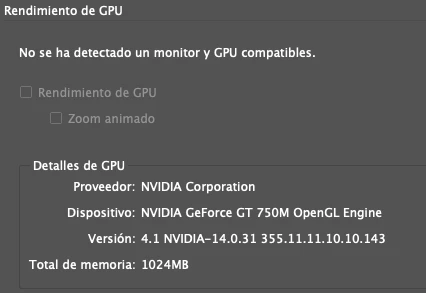

This topic has been closed for replies.
Correct answer xavis53994596

Hi Xavi,


Did you try exporting the file as IDML and then relinking the images? You may also try creating a package for InDesign file and opening the file from packaged folder. 


If that doesn't help either, will it be possible to share the document with us? You can simply zip the package and upload it to creative cloud and share the link with us.


Regards,

Srishti


Hi,

This solved my problem:

Go to your system preferences >  security and privacy > files and folders > click all the boxes under Indesign > Destok Folder


1 reply

Eric Dumas
Community Expert
Community Expert
December 11, 2019

Hi,

Can you share a screenshot of the Links panel that shows the location of the original file?

Are your images stored in the same folder as the InDesign file? 

Are your images stored in an online storage?

Inspiring
December 11, 2019

The screenshot. Las imágenes estan en una carpeta diferente y no estan en línea.

Gracias

Rishabh_Tiwari
Legend
December 11, 2019

Hi there, 


Sorry to hear about the trouble you are facing with InDesign. Will it be possible for you to add the images in the same folder with InDesign file and then re-link? Also, is this happening with this specific file or with other files as well?


Regards

Rishabh