

JonathanArias
Legend
July 31, 2018
Answered

non-proportional scaling

  • July 31, 2018
  • 3 replies
  • 6710 views

Hi,

i am trying to have indesign flag thing for me as i get more jobs done by other designers. i keep gettign this non-proportional scaling (which i though i understood what it meant) error. however, i get it on images i just placed and i know i am scaling proportionally after i place it since i hold shift. what am i missing here? I am not sure i understand the error and what indesign would want me to do here.

Thanks

Jonathan
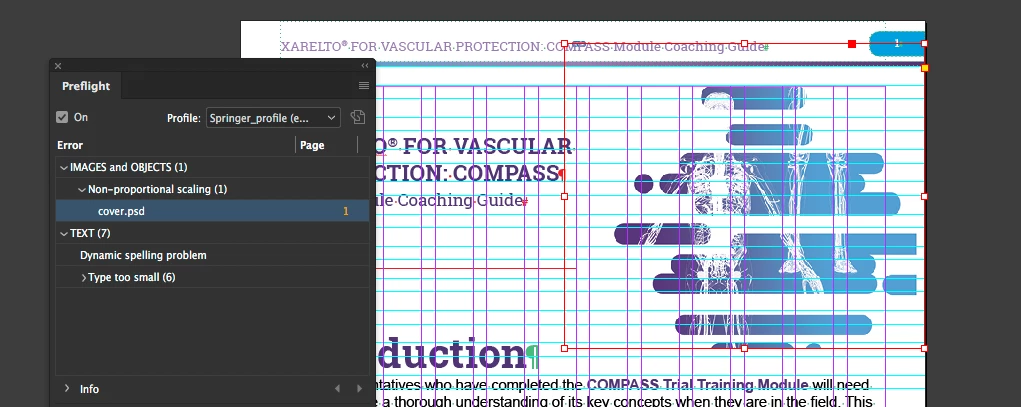
    This topic has been closed for replies.
    Correct answer Jeff Witchel, ACI

    When using File > Place, images will come into a Frame out-of-proportion when you replace an image that is out-of-proportion. The results will also be out-of-priportio if you Relink to a different image using the Links panel.

    3 replies

    Jeff Witchel, ACI
    Community Expert
    Jeff Witchel, ACICommunity ExpertCorrect answer
    Community Expert
    July 31, 2018

    When using File > Place, images will come into a Frame out-of-proportion when you replace an image that is out-of-proportion. The results will also be out-of-priportio if you Relink to a different image using the Links panel.

    JonathanArias
    Legend
    August 1, 2018

    well that explains it.. the error appears from the moment i place the image even if i just click on the layout to place it..

    Jeff Witchel, ACI
    Community Expert
    Community Expert
    July 31, 2018

    Hi Jonathan,

    Here's a video about setting up your own custom Preflight: http://www.jeffwitchel.net/2012/08/finding-potential-printing-problems-automatically/

    When you're setting up your Preflight, "Non-Proportional Scaling of Placed Images" is the second choice under the Images and Objects section.

    See screenshot below.

    The best way to avoid non-proportional scaling entirely is to scale in the Control panel. The X & Y Percentage are Linked by default. If you select either field, you can use your up or down arrow keys on your keyboard to scale very quickly.

    Legend
    July 31, 2018

    Have you checked the scaling on the image? It's possible that you left go of shift a moment too soon, and the proportions are off by a percent or two.

    Steve Werner
    Community Expert
    Community Expert
    July 31, 2018

    @SJSiegel is correct. It's an easy mistake to make whenever you're using a modifier key. As I teach my classes: Always release your mouse before you release the modifier key, or InDesign "forgets" you used it.

    Same things happens with Option/Alt-dragging to copy something, or holding down Cmd/Ctrl when you want to make a spread-wide guide instead of a page-wide guide.