
Inspiring
February 4, 2020
Answered

Not able to open .imdl File from Indesign 2020 in Indesign 2019

  • February 4, 2020
  • 3 replies
  • 10762 views

Hi there,

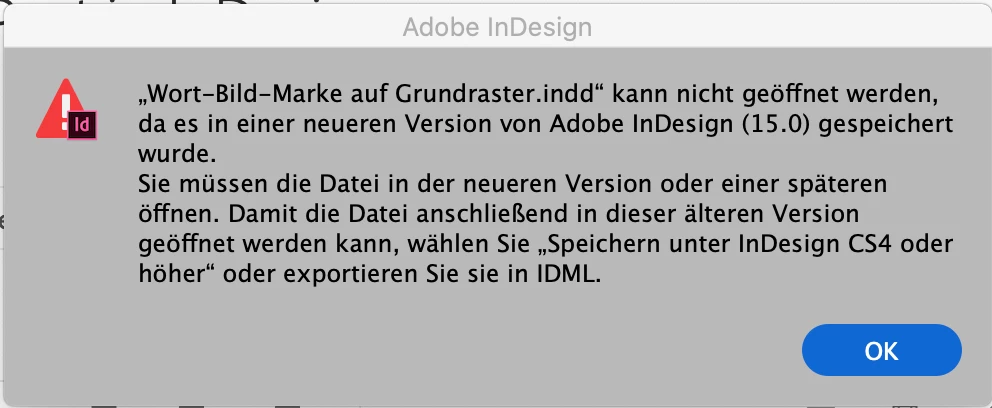
working with Indesign 2020 (V15.01) I’ve exported an .idml file for a client who works with Indesign 2019. Unfortunatly she can’t open it with her application. I’ve tried with my Indesign 2019 installation and got the same result.  Indesign suggests to open the .idml file with a newer or an older version of Indesign. After attempting to open the .idml file, Indesign 2019 crashes.


Does anyone has a fix for that or a work around? Thanks!


This topic has been closed for replies.
Correct answer Sehenistgold

Dear Ashutosh, Frans’ tipp to look at placed Indesign files in the file helped. The problem were these Indesign 2020 Files placed in the idml. file ... it makes sense, that Indesign 2019 cannot open it. Thanks for your help!

3 replies

Community Expert
November 18, 2020

Hi Gold,

what occured to you is a strong argument not to place InDesign pages, but instead use PDF/X-4 pages exported from the source InDesign files. However, InDesign CC 2019 should not crash when trying to open the IDML file and reconstructing an InDesign document in a previous version. This is clearly a bug. You could report it, but I don't think there would be a fix for it with CC 2019. Nevertheless this report should be done. Maybe the developers can fix it with a later version of InDesign.


Bug reports can be done here:

https://indesign.uservoice.com/forums/601180-adobe-indesign-bugs


Regards,
Uwe Laubender

( ACP )

Frans v.d. Geest
Community Expert
Community Expert
November 18, 2020

We have seen a similar thing: we had placed 2020 files in a 2020 document. Then for another user, the document was saved as idml to be opened in her 2019 version. But the placed files were sill 2020. That made 2019 crash. No it is understandable that this goes wrong of course, but a warning instead of a crash would been better...

In another caseswe got the warning, and that makes all the sense in the world of course.

Steve Werner
Community Expert
Community Expert
February 4, 2020

I can't reproduce that problem with my version of InDesign 2020 and InDesign CC 2019.


Could you try restoring your InDesign 2020 preferences and recreate the IDML file, and try again. It's possible that a preference issue in 2020 on your computer is producing an incorrect IDML file.


www.rockymountaintraining.com › Adobe InDesignAdobe InDesign: Rebuilding Preferences and Cache Files ...


Inspiring
February 4, 2020

Hi Steve,

thanks a lot for your reply. I’ve deleted the preferences, unfortunatly this didn’t solve the problem. But by doing that I also realised that even if I open an .idml file, Indesign replies that it cannot open the .indd file. I find that very strange and only noticed it after reading Ashutosh’ comment above.


I’ve also tried to convert the CC 2020-indd.-File via the cloud into a indd.-2019-File, this didn’t work either.


Any more ideas?


Thanks for the help.

Ashutosh_Mishra
Inspiring
February 4, 2020

Would you be able to share this file (if not sensitive)?
If yes, you can upload it to the cloud and share the link on DM with me.

Ashutosh_Mishra
Inspiring
February 4, 2020

Hi there,


Thanks for reaching out. If I see your error message, file name ends in .INDD extension.
You are trying to open .INDD file not .IDML

Please open IDML file, i am sure it will open just fine.


Regards,

Ashutosh

Frans v.d. Geest
Community Expert
Community Expert
February 4, 2020

"I also realised that even if I open an .idml file, Indesign replies that it cannot open the .indd file."


One last thing to test: maybe there is an InDesign document placed as an image in the file that is saved as idml? You can place native InDesign files like images, so the InDesign document is linked like an image. Maybe when opening the idml file it is 'opening' the placed indd file and that is also a newer version?

A far fetch, I know, just thinking out loud here...

Inspiring
February 4, 2020

Dear Frans, that might be it. You are right – I placed other Indesign-Files in my Indesign-File. It sounds plausible that this might cause the problem. I am going to check it – thanks a lot!!