
Participating Frequently
March 20, 2021
Answered

Num Lock for Mac

  • March 20, 2021
  • 3 replies
  • 617 views

I'm using Indesign for Mac and I want to find an alternative button for "number lock" button in order to transfer left page to right page without missing format. Normally, they're using "ctrl+numlock+enter" to transfer it. Is there an alternative way to transfer pages without missing the format for Mac?
This topic has been closed for replies.
Correct answer Geоrge

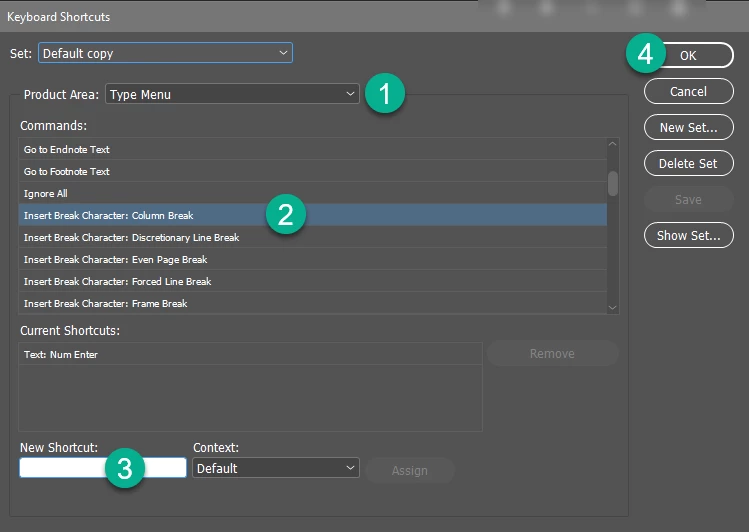
As far as I understand you, you are talk about column break shortcut. 


You can set your own shortcut (Menu —> Edit —> Keyboard shortcuts):

3 replies

Barb Binder
Community Expert
Community Expert
March 20, 2021

Ah, the column break command on a Mac laptop is fn + return


~Barb 

~Barb at Rocky Mountain Training
Barb Binder
Community Expert
Community Expert
March 20, 2021
quote

Is there an alternative way to transfer pages without missing the format for Mac?


I'm unclear what you are asking, so taking a guess. By "transfer pages", do you mean you want to go to the next page or spread (or previous page or spread)?

Next page: fn+down arrow

Previous page: fn+ up arrow


Next Spread, centered: fn+opt+down arrow

Previous Spread, centered: fn+opt+up arrow


~Barb 

~Barb at Rocky Mountain Training
Geоrge
Legend
March 20, 2021

>> order to transfer left page to right page without missing format

Can you specify the command/feature that you mean here? 

Remember, never say you can't do something in InDesign, it's always just a question of finding the right workaround to get the job done. © David Blatner
Dlr34Author
Participating Frequently
March 20, 2021

I don't want to change the page layout when I pass the paragraph one page to another. I mean I want to preserve the layout. I'm looking for a shortcut instead of using "enter".

Geоrge
GeоrgeCorrect answer
Legend
March 20, 2021

As far as I understand you, you are talk about column break shortcut. 


You can set your own shortcut (Menu —> Edit —> Keyboard shortcuts):

Remember, never say you can't do something in InDesign, it's always just a question of finding the right workaround to get the job done. © David Blatner