
Participant
February 2, 2023
Answered

Number Populate in text boxes

  • February 2, 2023
  • 5 replies
  • 4689 views

I am trying to duplicate a singular text box and have a more straightforward way to have each text box's text be a number that is sequential. 


I just want about 96 text boxes to go from 1-96.  I obviously can do this manually, but I have to think there might be a secret trick to this.


Thanks,

Matt
This topic has been closed for replies.
Correct answer FRIdNGE

It's just an InDesign feature that exists since 20 years!


(^/)  The Jedi

5 replies

FRIdNGE
FRIdNGECorrect answer
February 3, 2023

It's just an InDesign feature that exists since 20 years!


(^/)  The Jedi

m1b
Community Expert
Community Expert
February 3, 2023

Nice! I learned something! 🙂

m1b
Community Expert
Community Expert
February 3, 2023

Hi @mattg2, since you tagged scripting, here is a general-purpose script that simply adds sequential numbers to selected text frames (it will ignore other types of items). Note that the layer order of the text frames will dictate the order of the serial numbers. To use it, just select some text frames and run script. It will ask which number to start with.

- Mark


/**
 * Will replace selected text frames' contents
 * with a serial number, entered by user.
 * @discussion https://community.adobe.com/t5/indesign-discussions/number-populate-in-text-boxes/m-p/13549934
 * @author m1b
 */
function main() {

    var startNumber = prompt('Number selected items:\nEnter starting serial number', '1');

    if (
        startNumber == null
        || isNaN(startNumber)
    )
        return;

    replaceItemContentsWithSerialNumber(app.activeDocument.selection, startNumber);


    /**
     * Replace contents of items with a
     * serial number starting at `startNumber`.
     * @param {*} items - array or collection of Page Items
     * @param {*} startNumber 
     */
    function replaceItemContentsWithSerialNumber(items, startNumber) {

        startNumber = Number(startNumber);

        if (isNaN(startNumber))
            startNumber = 1;

        for (var i = 0; i < items.length; i++)
            if (items[i].hasOwnProperty('contents'))
                items[i].contents = String(startNumber++);

    };

}

app.doScript(main, ScriptLanguage.JAVASCRIPT, undefined, UndoModes.ENTIRE_SCRIPT, 'Add serial numbers');
Susan Culligan
Inspiring
February 3, 2023

Are you placing the text frames one or more than one per page? What do the numbers mean (that is, are they page numbers, section numbers, item numbers, or something else)?

mattg2Author
Participant
February 3, 2023

Yes all on one page. Goofy to explain. Let's for simplicity say they are dimensions. Want 1', 2', 3', 4' etc each in their own respective text box.


I'm away from my desk now but will play with it more tomorrow.

Robert at ID-Tasker
Legend
February 2, 2023

Same page or separate pages - one box per page ?? 😉


If multiple TextFrames on the same page - @Dave Creamer of IDEAS already gave you the correct answer.


mattg2Author
Participant
February 2, 2023

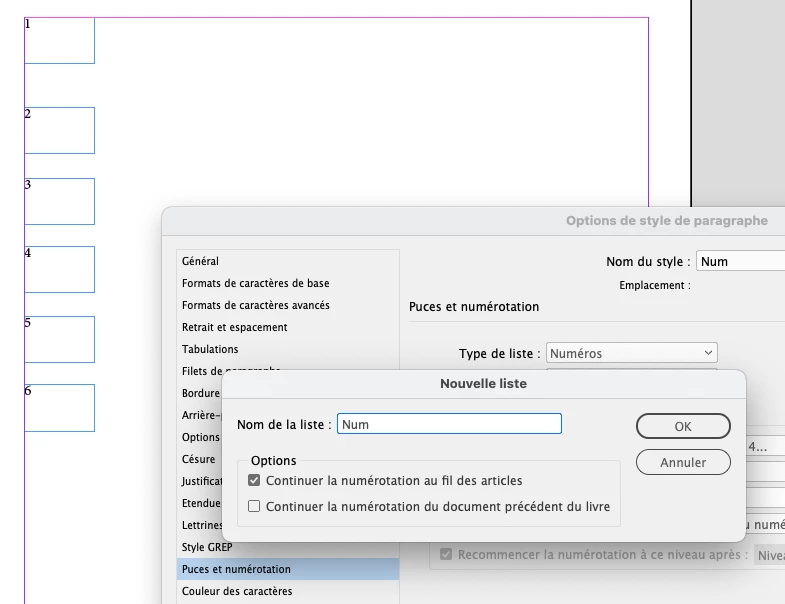
Currrently to test, one page/spread.  Just did a quick array with about 12 frames.  All are starting with the numbering, all say "1." in the frame.


Tried what he said but that's what I am getting.  Probably an error on my part but not sure what.

Robert at ID-Tasker
Legend
February 2, 2023

My idea was to use Page Numbering 😉


But if you have more than one TF per page - or one per page - you need to make a Story - thread all those TFs together - so the text flows between TFs.


Dave Creamer of IDEAS
Community Expert
Community Expert
February 2, 2023

Use a numbered list paragraph style. I would also set style to start in the next text frame.


David Creamer: Community Expert (ACI and ACE 1995-2023)
mattg2Author
Participant
February 2, 2023

I did that.  It worked in frame one.  But the numbering does not seem to be continuing to the following frames.  Any ideas?


Dave Creamer of IDEAS
Community Expert
Community Expert
February 4, 2023

You need to link them together.


Frames do NOT have to be linked.

David Creamer: Community Expert (ACI and ACE 1995-2023)