
Inspiring
April 28, 2017
Answered

Numbering chapters in a book

  • April 28, 2017
  • 3 replies
  • 7237 views

I'm formatting a book that has approximately 50 chapters. I'm a newbie with InDesign, and I think I've determined that the best way to proceed is to create a separate document for each chapter. I've hit upon a few questions:

  • When added to the book (*.indb), does each document automatically become a chapter?
  • If I insert (in a master page) the "chapter number" text variable and apply that master page to the first page of that document, will the chapter number show in the assembled book? (NOTE: I've done this, and some chapter numbers are correct, but others aren't, though I've "updated" all numbers and "synchronized" all variables.

Many thanks!

Ken
    This topic has been closed for replies.
    Correct answer Jose M. Ramos

    Hi Ken! First thing to note is that while InDesign calls it a "Book" file, it's really a way to group individual documents together. InDesign doesn't care if they're chapters, units or pieces of a stationary kit. So the answer to your first question is maybe. Each document you add to a book becomes whatever you'd like.

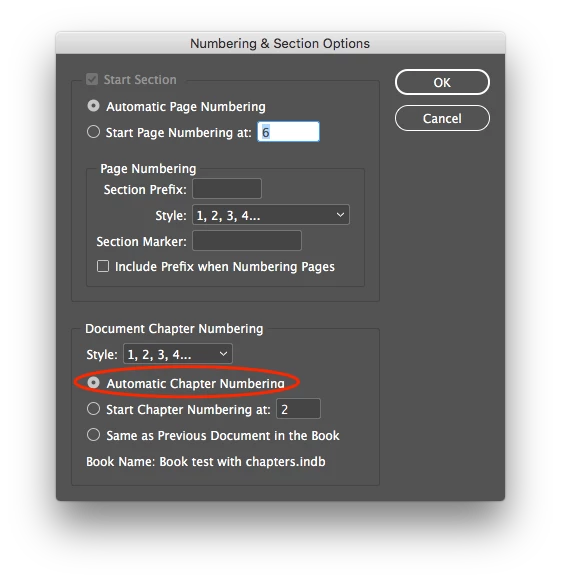
    That said, it seems you're doing all the right things. You're using a chapter number variable on a master page, which in turn applying to the first page of each document. You're also using the Update numbering / Update all numbers command in the Book's flyout panel. My guess is that "Auto chapter numbering" has not been set for some of the documents. The good news is that this is easily fixed by opening each of the "rebellious" documents and:

    * Choose <Numbering and Sections Options> from the Page's flyout menu.

    * Under <Document Chapter Numbering> set it to "Auto..." (Screenshot attached).

    * Click OK and Save your document

    * Finally, update the numbering across ALL documents on the Book panel.

    Hope this helps!

    Jose

    3 replies

    Inspiring
    April 28, 2017

    Jose and Randy,

    I think I got if figured out. Using Jose's post as a guide, I went back over the process I'd followed. In the meantime, I found that each document had two different master pages that could serve as the first page of a chapter--depending on whether it's a left-page or a right-page. And I saw that it appeared that only one of those master pages had the right text variable. I corrected that in each of the three offending chapters, and all came out well.

    Now, I have to see what happens when I create and add the next chapter doc.

    Thanks again for your help.

    Ken

    Jose M. Ramos
    Inspiring
    April 28, 2017

    My pleasure Ken. I hope it works out!

    J

    Inspiring
    May 2, 2017

    Subsidiary question: How do I split an existing, single, document/chapter into 2 chapters? I can't seem to find how to "insert chapter break" (or some such thing.

    Thanks.

    Randy Hagan
    Community Expert
    Community Expert
    April 28, 2017

    Hi Ken.

    Briefly,

    1) No, InDesign's book functions don't automatically turn an InDesign documents into chapters. But it does allow you to easily apply unique attributes to each InDesign document to clearly identify individual chapters, then apply global attributes (page numbering, Table of Contents, Indexing, etc.) to those individual documents.

    2) There are a couple of ways to apply chapter prefix/numbering options. In addition to the example Jose indicated above, you can universally set each InDesign document to start page numbering by activating the Start Section check box by choosing the Start Page Numbering in each InDesign document and entering the page number you want to start each section. Then enter the chapter prefix you want in the Section Prefix: edit box in the Page Numbering section. This works if you want each chapter to start with, say, 1-1, 2-1, etc. It also preludes you from accidentally overriding your page numbering by accidentally invoking book page numbering functions.

    If you'd prefer the page numbering to be sequential throughout your book, I'd suggest a different process. Rather than using the Numbering & Section Options panel to define your chapter prefix (e.g. 1-1 to 52, 2-53 to 78, etc.) create the page numbering with your master pages, using the text variable (1-[page number variable], 2-[page number variable], etc.). Then you can use the book's page numbering functions to maintain/update your running page count without ever affecting the chapter prefix you use from your master pages.

    Hope this helps ...

    Jose M. Ramos
    Jose M. RamosCorrect answer
    Inspiring
    April 28, 2017

    Hi Ken! First thing to note is that while InDesign calls it a "Book" file, it's really a way to group individual documents together. InDesign doesn't care if they're chapters, units or pieces of a stationary kit. So the answer to your first question is maybe. Each document you add to a book becomes whatever you'd like.

    That said, it seems you're doing all the right things. You're using a chapter number variable on a master page, which in turn applying to the first page of each document. You're also using the Update numbering / Update all numbers command in the Book's flyout panel. My guess is that "Auto chapter numbering" has not been set for some of the documents. The good news is that this is easily fixed by opening each of the "rebellious" documents and:

    * Choose <Numbering and Sections Options> from the Page's flyout menu.

    * Under <Document Chapter Numbering> set it to "Auto..." (Screenshot attached).

    * Click OK and Save your document

    * Finally, update the numbering across ALL documents on the Book panel.

    Hope this helps!

    Jose

    Inspiring
    April 28, 2017

    Will try and report back. Thanks much.