

dadagrrr
Known Participant
December 7, 2018
Question

Numbers being added to ToC Chapters... can't turn them off
  • December 7, 2018
  • 6 replies
  • 4698 views

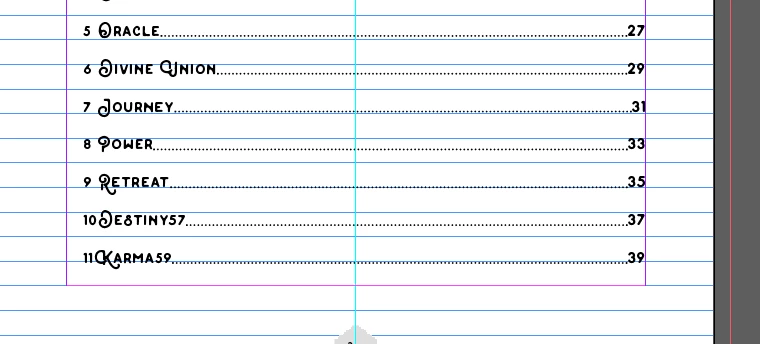
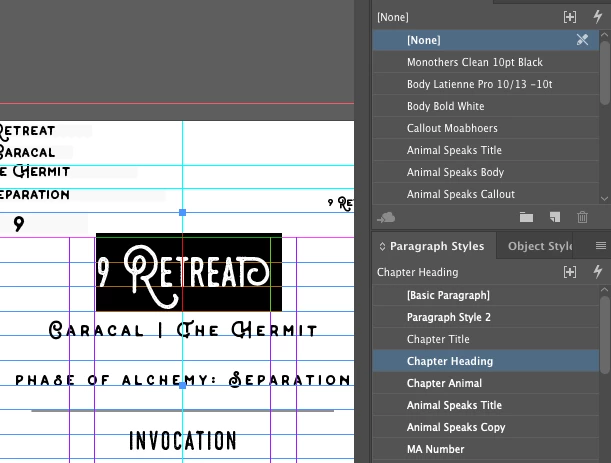
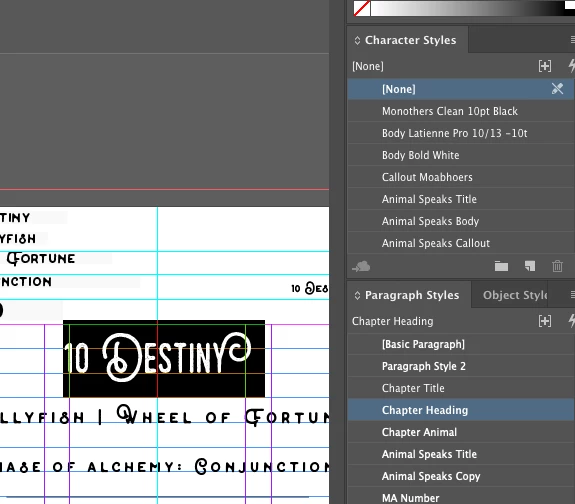
My Table of Contents starts to add these numbers to the end of my Paragraph Style "Chapter Heading". I've looked to see what differences exist for the "9 Retreat" text vs. the "10 Destiny" and so on, but can't find a solution. It continues until the next level ToC entry.

Here is the text in question in the book:
And the rest of the ToC with this issue:

This topic has been closed for replies.

6 replies

Frans v.d. Geest
Community Expert
Community Expert
December 9, 2018

I took a look at your shared document.. it is quite a mess! Why did you use Text variables? I don’t get it. And all those estranged Text frames... This is so bad set up that I advice you to start over from scratch to be honest or hire someone to this for you.

Barb Binder
Community Expert
Community Expert
December 8, 2018

Did you define a text variable for each of the chapter names?

What happens if you just use regular text?

~Barb

~Barb at Rocky Mountain Training
dadagrrr
dadagrrrAuthor
Known Participant
December 8, 2018

Yes, I've got a text variable for each Chapter Heading (10 Destiny, etc.).

When I just place plain text, it works. Issue is, all the other Headings before the issue also use text variables, so then why an issue now.

Frans v.d. Geest
Community Expert
Community Expert
December 8, 2018

Text variables? That you have to explain because numbered items do not use Text variables. Can you elaborate? Maybe that is where the problems come from...

dadagrrr
dadagrrrAuthor
Known Participant
December 8, 2018

I'm using them throughout the book and they shouldn't be breaking anything. Plus, the 9 other pages aren't showing it before this page either.

Frans v.d. Geest
Community Expert
Community Expert
December 9, 2018

Thanks, Eugene and Frans.

Yes, I know that plain text works. I was using the text variables because it was easier for me to populate the hidden frames when creating the document and I was experimenting with them.

And, thanks, but no thanks, Frans. This is just a reduced version of my document and it's working fine all other things considered in the master document. I've laid out four books so far using InDesign and don't need to "start from scratch" or "hire someone" for this.


Right, sorry, no offence ;-) But I can not get my head around the way that you set this up...

Barb Binder
Community Expert
Community Expert
December 8, 2018

Hi dadagrrr:

There are two ways to add numbers to the TOC (and the same two ways disable them):

  1. Pull in the numbers from the source documents when you generate the TOC—use Exclude Numbers on the bottom row to stop this behavior.
  2. Add the numbers to the TOC using Bullets and Numbering—disable numbering for your style to turn this off.

~Barb

~Barb at Rocky Mountain Training
Community Expert
December 8, 2018

Looks like you have paragraph numbering turned - check your bullets and numbering.

dadagrrr
dadagrrrAuthor
Known Participant
December 8, 2018

Tried that, see my response to Barb.

Community Expert
December 8, 2018

Hi dadagrrr ,

what's your version of InDesign?

Look under Help > About InDesign when holding the Ctrl key or the Cmd key when on Mac OS X.

If it is InDesign CC 2019 your issue could be perhaps related to a bug with TOC building I can see here:

2 Headings in 1 cell is displayed incorrectly in the TOC – Adobe InDesign Feedback

At least I can see that the TOC feature in CC 2019 has some bugs.

What can you do?

Save your document to IDML, open the IDML file with InDesign CC 2018.1 and try to build the TOC with that version of InDesign.

Regards,
Uwe

dadagrrr
dadagrrrAuthor
Known Participant
December 8, 2018

I've tried the first one, no luck. You'd think that if that were the case, it'd apply to all the Chapter Heading styles, not just arbitrarily starting halfway down.