
Participant
December 9, 2020
Question

Opacity lost in epub preview

  • December 9, 2020
  • 2 replies
  • 674 views

I'm making this e-book on InDesign 2020.
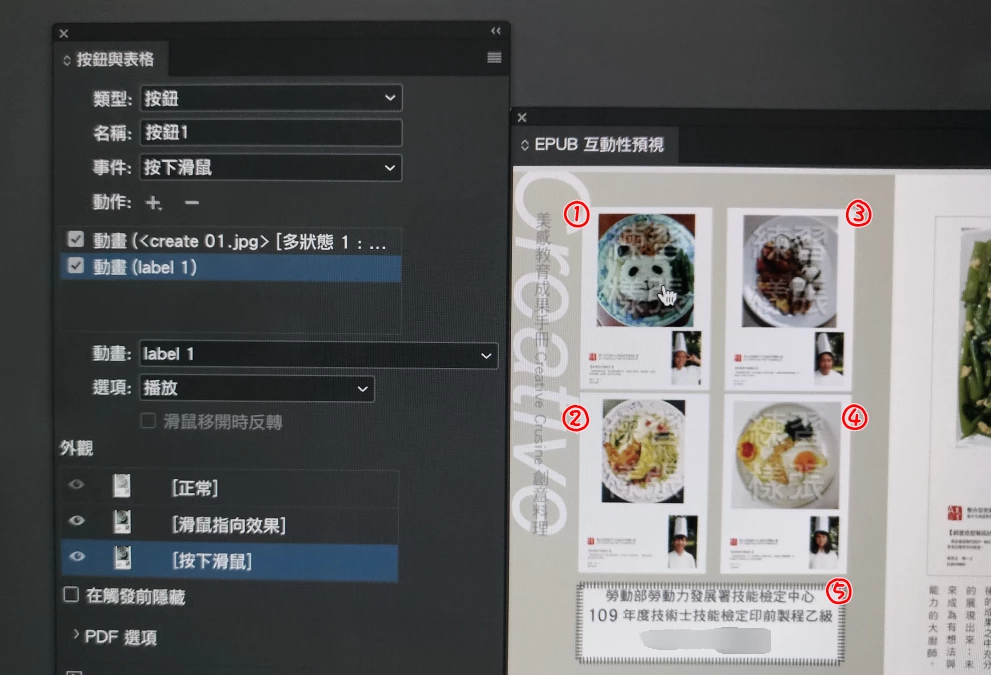
The image is in Chinese but the items numbered ①~⑤ are set as buttons and are suppose to be 50% opacity until the mouse cursor hovers above it, so ②~⑤ were suppose to be 50% opacity while ① is 100%. But in preview, all of them show as 100%, same when exported.
Have tried changing the object style export options to rasterize container/ format png, but has no effect. Can someone help me with this, please?
This topic has been closed for replies.

2 replies

rayek.elfin
Legend
December 10, 2020

I see your are using the epub preview, so you are creating an epub file.

Did you group the circle and number, and then changed the object export option to this?

 
Simple opacity will work, but remember that blend effects are only rasterized correctly when all affected objects are grouped and rasterized.
rayek.elfin
Legend
December 10, 2020

Btw, it works for me if I create this group before turning it into a button.

Derek Cross
Community Expert
Community Expert
December 9, 2020

eBook is a generic term for digital books; which format are you wanting to use?

Participant
December 10, 2020

Epub