
Inspiring
July 17, 2021
Answered

Opening a file in InDesign makes it crash.

  • July 17, 2021
  • 7 replies
  • 1986 views

Last night I was working on a basic A4 menu and saved it with no issues

Today I went to open it and got the following:
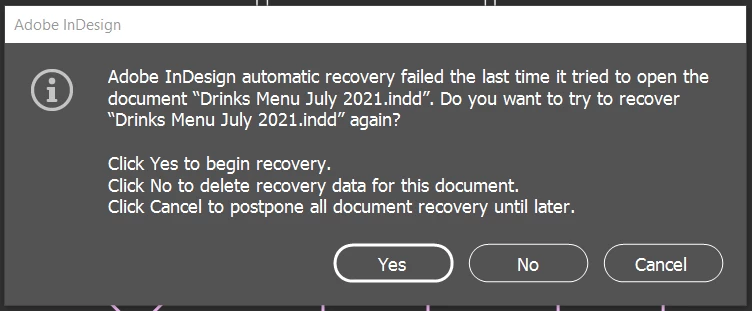
If I click "Yes" or "No" then I get the below error
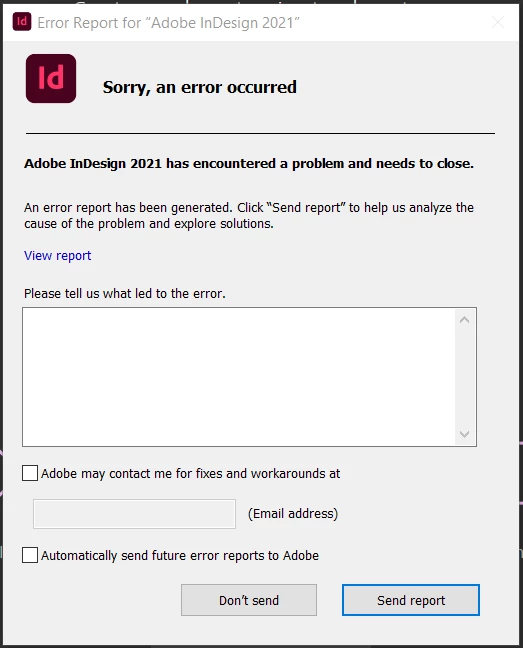
and then InDesign closes, if I try to open the program again then I get the first error until I restart my computer.

If I click "Cancel" then InDesign opens and I can use it as usual - so long as I don't open the file that caused the initial crash. (otherwise its back to InDesign crashing every time it's opened until I restart my computer)
Does anyone have any insight? I have tried uninstalling the app, restarted my computer multiple times, ect. Has my file been corrupted somehow? Is there any way to save it or do I need to start it all over?

Thanks!


{Renamed by MOD}

This topic has been closed for replies.
Correct answer Allira5FFC

Thanks Anshul, in the end I deleted and recreated the file. I think it was due to some illustrations that the previous designer didn't insert correctly. I had already tried resetting my InDesign preferences, this was the first time I had encountered an issue like this, and so faar it hasn't happened again 🙂

7 replies

Participant
January 13, 2024

Well I even restarted my computer but still the error is not stopping 

Derek Cross
Community Expert
Community Expert
January 13, 2024

It might be worth starting a new thread and including system details such as OS, amount of RAM how much spare hard disk capacity and what lead to the issue.

Anshul_Saini
Community Manager
Community Manager
July 20, 2021

Hello there,


Sorry about the crashing. I understand your frustration! In addition to the question asked above by Derek, could you please share a few more details like:

  • Is the issue related to this document only? If yes, could you please share this document with us? You can upload it to the Creative Cloud (https://helpx.adobe.com/in/creative-cloud/help/share.html) and share the download link.
  • Where are you saving the files (Network Drive/ System HDD/ Shared Folder/External HDD)?
  • When did this start happening? Are there any recent changes made to your system? For example, any antivirus, system updates, or web extensions installed recently.
  • Did resetting InDesign Preferences (https://helpx.adobe.com/in/indesign/user-guide.html/in/indesign/using/setting-preferences.ug.html) help to resolve the issue?
    Disclaimer: Please note that resetting preferences will remove all the custom settings, and InDesign will launch with default settings. You can also take a backup of the folders in case you want to. Location is mentioned in the article.


Looking forward to your response.


Thanks & Regards,

Anshul Saini

Allira5FFCAuthorCorrect answer
Inspiring
July 27, 2021

Thanks Anshul, in the end I deleted and recreated the file. I think it was due to some illustrations that the previous designer didn't insert correctly. I had already tried resetting my InDesign preferences, this was the first time I had encountered an issue like this, and so faar it hasn't happened again 🙂

Anshul_Saini
Community Manager
Community Manager
August 4, 2021

Sorry to hear that you had to delete and recreate the file again. But glad to know that you resolve the issue. Please feel free to reach out if you run into any other questions or issues in the future. We'd be happy to help.


Regards,

Anshul Saini 

Participating Frequently
July 20, 2021

I stopped using 2021 a long time ago because of this issue. I was hoping in time it would be resolved. Apparently not. I work with the same files and fonts in 2020 with absolutely no issues. I was able to recover most of my files by opening (converting) in 2020. 2020 has an issue with permissions on Windows 10. If the folder is open and sometimes if another program is accessing the folder you will get a corrupt file message. Perhaps there is a similar issue with 2021 that is causing true corruption, but I haven't been aboe to verify that or find another cause yet. You don't mention the operating system. That would be helpful to know if this is a Windows based issue.

Lukas Engqvist
Community Expert
Community Expert
July 18, 2021

When I was working in prepress this kind of problem would come when preparing recieved files usually due to a font conflict or a bad font. From your dialogs I can see you are using windows. I'm unsure of the best font managemet on Windows. Is there a way to purge your fonts? Since it is in the recovery phase you get a crash, could it be that you are using a free font (with some defects)in your document? If you have auto activate fonts, try to dissable this, you can use the find replace fonts to find out what fonts are missing and activate them via Adobe Fonts manually if need be. 

Inspiring
July 27, 2021

I think it was due to illustrations that the designer who created the original file hadn't embedded correctly, luckily it was a fairly simple one to redo!

Derek Cross
Community Expert
Community Expert
July 18, 2021

Which version of InDesign and OS?

How much RAM and spare hard disk capacity do you have?

Your issue might have been caused by a corrupt font.

It might be worth resetting the InDesign preferences.

Inspiring
July 27, 2021

Thanks Derek, in the end I deleted and recreated the file. I think it was due to some illustrations that the previous designer didn't insert correctly

Community Expert
July 17, 2021

I'd suggest that the problem is with your file, and either it is corrupted itself or something that may have been placed in the file is.


It stinks, but I'd rebuild the file as the quickest course of action — first without any placed graphics, naming it Drinks Menu July 2021 Without Graphics.indd; then close it and re-open it to see if everything works fine. I'm hopeful that it will work fine for you. Then I would take the opened file and place my graphics, and save the file as Drinks Menu July 2021 With Graphics.indd. Then I'd close and open it to see if the new version of the file works better than your original.


This should get you past your issue, or identify what may be causing it.


Hope this helps,


Randy

Inspiring
July 18, 2021

Thanks!  I will give that a try

Community Expert
July 18, 2021

Cool. If the fates are kind, this'll get you past your issues.


If not, come back here and sound the alarm. There are lots of smart folks around here who are willing to lend a hand.


Randy

Inspiring
July 17, 2021

Oh, I should also add that I also get the first error every. single. time. that I open InDesign