Exit
  • Global community
    • Language:
      • Deutsch
      • English
      • Español
      • Français
      • Português
  • 日本語コミュニティ
  • 한국 커뮤니티
1

Optical margin alignment does not work

New Here ,
Mar 23, 2017 Mar 23, 2017

I'm having a problem with OMA in InDesign CC 2017.0. It does not work. Can anyone suggest why and what i can do to make it work?

3.3K
Translate
Report
Community guidelines
Be kind and respectful, give credit to the original source of content, and search for duplicates before posting. Learn more
community guidelines

correct answers 1 Correct answer

Community Beginner , Feb 16, 2018 Feb 16, 2018

We had the same issue, today, and found a check box in the Paragraph menu had been set to "Ignore Optical Margin" (it's also in Paragraph styles). Clearing that solved our problem.

Translate
Community Expert ,
Mar 23, 2017 Mar 23, 2017

Unless the feature is simply 100% inert in your installation, I'm afraid you'll have to be considerably more specific and detailed about what you see on your screen, what you expect from the feature, and exactly how its effects differ from your expectations.

If it is indeed 100% inert, try: Troubleshooting 101: Replace, or "trash" your InDesign preferences

Translate
Report
Community guidelines
Be kind and respectful, give credit to the original source of content, and search for duplicates before posting. Learn more
community guidelines
Community Expert ,
Mar 23, 2017 Mar 23, 2017

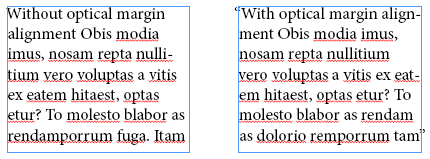
It may be that your particular text doesn't need OMA. In the example below, OMA has been applied to both paragraphs. However, OMA does very little to the left paragraph. It is more obvious in the right paragraph that starts with a quote mark.

Translate
Report
Community guidelines
Be kind and respectful, give credit to the original source of content, and search for duplicates before posting. Learn more
community guidelines
New Here ,
May 03, 2017 May 03, 2017

Same problem here - I use it to hang punctuation in body copy and no matter how I adjust the settings it has no effect on the type.

Translate
Report
Community guidelines
Be kind and respectful, give credit to the original source of content, and search for duplicates before posting. Learn more
community guidelines
Community Expert ,
May 03, 2017 May 03, 2017

Try restoring your InDesign preferences:

Trash, Replace, Reset, or Restore the application Preferences

Translate
Report
Community guidelines
Be kind and respectful, give credit to the original source of content, and search for duplicates before posting. Learn more
community guidelines
Community Beginner ,
Feb 16, 2018 Feb 16, 2018
LATEST

We had the same issue, today, and found a check box in the Paragraph menu had been set to "Ignore Optical Margin" (it's also in Paragraph styles). Clearing that solved our problem.

Translate
Report
Community guidelines
Be kind and respectful, give credit to the original source of content, and search for duplicates before posting. Learn more
community guidelines