
Participating Frequently
May 13, 2022
Answered

Output preview showing 1 color black as 4 color

  • May 13, 2022
  • 5 replies
  • 4254 views

I have a file using 1 color black text, but Acrobat output preview is displaying as 4 color.  Wasn't doing this yesterday.  Same files appear correct on my coworker's computers. Double checked old PDFs I KNOW are correct, and it still displays as 4 color.  I've uninstalled, restarted, reinstalled.  Trashed profiles.  Nothing is fixing it. So what happened? Did I goof up a setting? Is Acrobat DC just trash?  I've wasted far to much time troubleshooting this issue already. I need some help. Thanks.
 

This topic has been closed for replies.
Correct answer Laubender

Hi Luke,

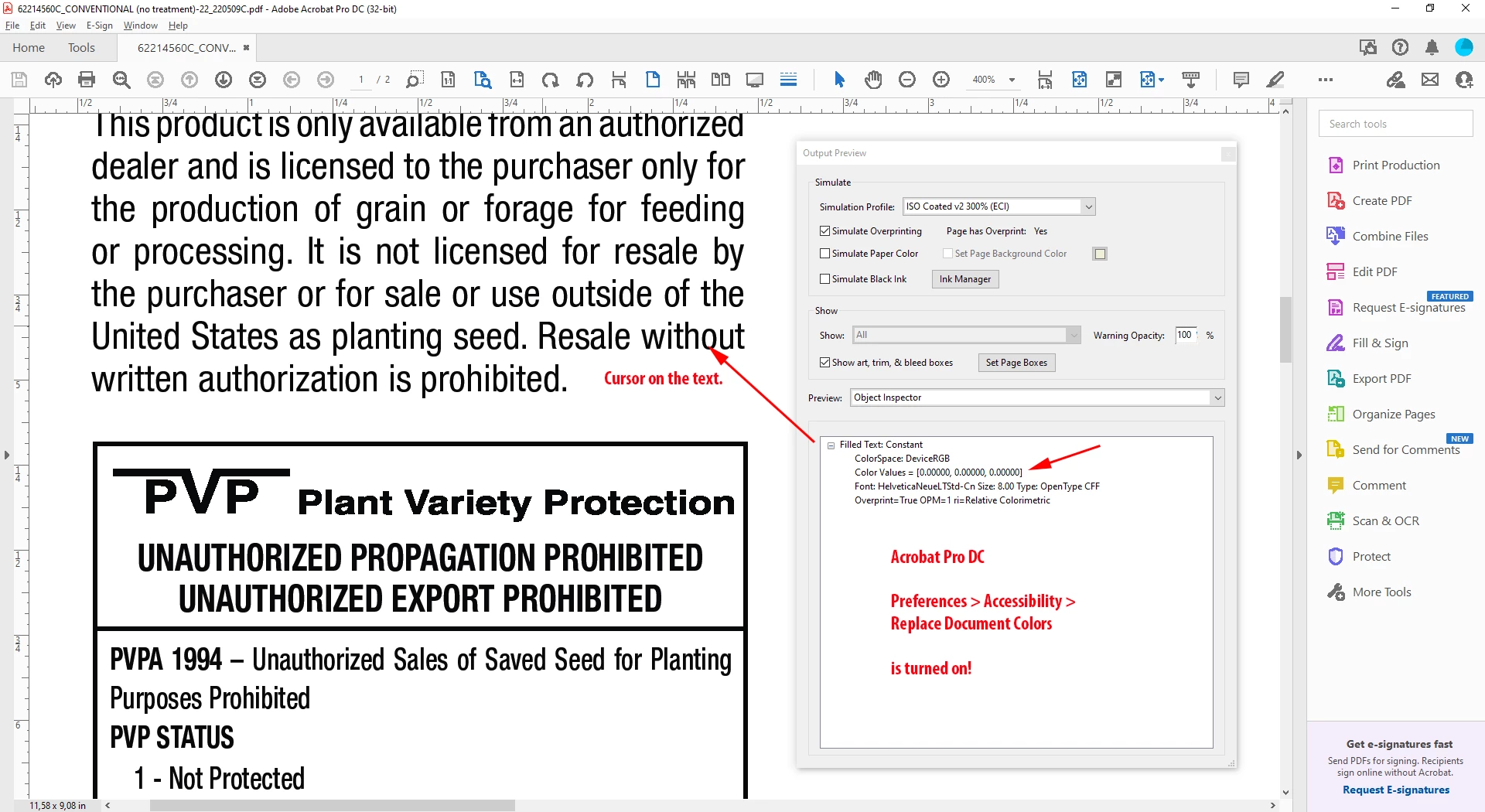
just looked into the Object Inspector when Accessibility > Replace Document Colors is turned on.

Then the Object Inspector will show the color values of all the Black Ink objects of the OPs PDF as DeviceRGB:


Regards,
Uwe Laubender
( Adobe Community Professional )


5 replies

Participant
February 19, 2024

Oh no, it happened with my Acrobat too! This is horrible 😞
AND I dont have Replace Document Colors turned on!

rob day
Community Expert
Community Expert
February 19, 2024

AND I dont have Replace Document Colors turned on!


Hi @AnkePiknerKraft , What preset are using for the Export? Try one of the PDF/X presets and check the values in AcrobatPro‘s Output Preview.

Community Expert
May 24, 2022

Hi Bradley,

just opened your attached PDF from your initial post in Acrobat Pro. I wasn't aware that your "problem" file was attached.


Opened Output Preview and of course Acrobat Pro is showing my default profile as simulation profile which is ISO Coated v2 300% (ECI). No issue with Acrobat Pro on my side; when I turn off "Process Black" nothing is visible inside the trimmed area of both pages.


The exact version of my Acrobat Pro is:

Continuous Release Version 2022.001.20117

Adobe Acrobat Pro DC (32-bit)


Regards,
Uwe Laubender

( ACP )

Luke Jennings3
Community Expert
Community Expert
May 25, 2022

Check your Acrobat Accessibility preference, if Replace Document Colors is on, that might explain your Output preview results.

Community Expert
May 25, 2022

Very good point, Luke!

Turned on Accessibility > Replace Document Colors

and indeed my Output Preview is showing this:


Thanks,
Uwe Laubender
( Adobe Community Professional )

Willi Adelberger
Community Expert
Community Expert
May 24, 2022

The problem is found in your color policy settings.

You should convert RGB into the destination profile and with CMYK keep values. 

If you convert CMYK to destination CMYK profile your colors will convert like CMYK > Lab > CMYK. This causes a shift of CMYK colors and a 4c-K.

Therefore it is good to use RGB images and CMYK vectors and text and convert images not in Photoshop and not convert before PDF export.

Community Expert
May 24, 2022

Willi said: "The problem is found in your color policy settings."


Hi Willi,

I think, you are wrong on that. The screenshot of our OP Bradley is showing:

Color Conversion: Convert to Destination (Preserve Numbers).


Rob has a point. As you can see from Bradley's screenshot, Standard is set to None. Should be one of the PDF/X presets. That's why Acrobat Pro is showing something not fitting as default with Simulation Profile. In effect on the screen you are seeing the wrong numbers. The object inspector of Acrobat's Output Preview gets it right.


Bradley,

to reliably communicate color for prepress purposes you have to use one of the PDF/X standard settings.

That's why PDF/X was invented more than 20 years ago.


Regards,
Uwe Laubender
( Adobe Community Professional )

Willi Adelberger
Community Expert
Community Expert
May 24, 2022

You are right, I was wrong in that point.

Brad @ Roaring Mouse
Community Expert
Community Expert
May 23, 2022

What System? I literally had this very same issue recently with an Acrobat (32-bit) in Windows 10, while every other install worked correctly. Mine was solved with a reinstall, which actually upgraded it to 64-bit version.

Participating Frequently
May 23, 2022

Interesting... I'm on Windows 10 Enterprise 64-bit.  Perhaps the reinstall solved it and was unrelated to version. I've tried uninstalling, restarting and reinstalling, with no luck.  Can't hurt to try again, when I have some time. 

Brad @ Roaring Mouse
Community Expert
Community Expert
May 24, 2022

Is your current install 64-bit? (see the top of your Acrobat window)

Acrobat 64-bit for Windows has only recently been rolling out to certain geographies.

Even here (link below) it doesn't even mention North America yet, but when I reinstalled recently (I'm in Canada), I definitely got the 64-bit edition where I used to have the 32-bit edition.

https://helpx.adobe.com/ca/acrobat/kb/download-64-bit-installer.html

There's a note here also about the Enterprise edition. This might apply to you.

All I know is the issue I was having, which was the same as yours exacly, was resolved. I can't say it was the bit version that did it, though.

rob day
Community Expert
Community Expert
May 13, 2022

Hi @Bradley24443433v7hx Try exporting to a PDF/X preset—the PDF/X standards include an Output Intent Profile, which should be your document’s assigned CMYK profile. AcrobatPro’s Separation numbers are the conversion into the chosen Simulation Profile. PDF/X files automatically set the Simulation Profile to the PDF/X’s Output Intent, so there would be no conversion


Also, if you choose Object Inspector and click on the text, it will show the actual color values with no conversions


Participating Frequently
May 23, 2022

The Object Inspector displays the color correctly.  Using a PDF/X preset did not make a difference.  I have found and am using a work around in which, I turn "simulate overprinting" off and then back on and it displays correctly, or I can change the "Simulation Profile" and then it will display correctly.  I've checked with coworkers, we are on the same version; 22.0

rob day
Community Expert
Community Expert
May 23, 2022

or I can change the "Simulation Profile" and then it will display correctly


What are you changing the Simulation Profile to? With PDF/X Exports the Simulation Profile should default to the Output Intent—the Simulation Profile will begin with the prefix Output Intent: