Participant
August 17, 2019
Answered

Package with fonts in InDesign CC?

  • August 17, 2019
  • 4 replies
  • 11619 views

In previous versions of InDesign, that is until CC, the document package includes the fonts.
To my knowledge the CC-version does not include the fonts in the package if you use fonts from subscription (the cloud).
Surely that is obviously so, because these fonts are protected by the subscription.

But in short: It seems that InDesign CC is not compatible to any versions below, such as CS6, concerning the fonts.
If so - is that not a problem?

    This topic has been closed for replies.
    Correct answer Randy Hagan

    Your inference is correct; InDesign packages only fonts that are actually stored on your system. It will not store cloud-based Adobe Fonts, as you've surmised correctly, because the fonts are protected by the subscription.

    As for the latest versions of InDesign CC not creating .indd files that are backward-compatible with CS6, the issue is more than just font packaging. Adobe Systems made a conscious decision to break with CS6, which was introduced more than 7 years ago.

    All is not lost, however. It's cumbersome, but you can reach back to InDesign CS6, with various degrees of success, by first packaging your InDesign CC 2019 version of the file.
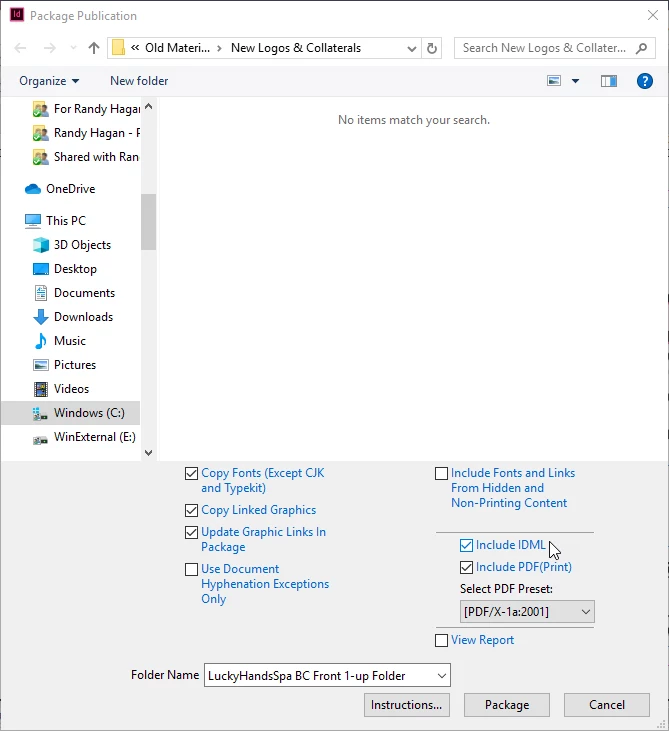
    When you package the file, make sure that the Include IDML check box is selected. This will include a legacy file which can be opened as far back as InDesign CS4. Open the .idml file in CS6 and work from there. Do not save an .indd file from CS6. This will overwrite your current-version InDesign document file and can cause you unnecessary complication.

    Understand that features introduced in later versions of the software won't make the trip, like use of Typekit/Adobe Fonts for example. And of course you will have to manually address version control issues, since you will be working with two separate files. But this will get you a job package folder that's useful in both the current version of InDesign CC and CS6.

    Hope this helps. Good luck.

    Randy

    4 replies

    Community Expert
    March 3, 2021

    Hi Sean,

    also found this from December 2019 at InDesign UserVoice:


    Adobe Fonts automatically substituting versions of fonts that are document-stalled
    n_war_aure, Dec 17, 2019
    https://indesign.uservoice.com/forums/601180-adobe-indesign-bugs/suggestions/39279127-adobe-fonts-automatically-substituting-versions-of


    Regards,
    Uwe Laubender

    ( ACP )

    Community Expert
    March 3, 2021

    Sean5C34 said:

    "…I converted the fonts from truetype to opentype and reinstalled them on all the systems and Windows now prioritizes the installed version before loading the typekit version, whereas it previously prioritized the typekit version beore looking to activate the truetype version."


    Hi Sean,

    thank you for this.

    I have to say I'm very much puzzled.


    So could you perhaps confirm the following:

    [1] You were using a bought font, a TrueType one with suffix *.ttf in your layouts installed with your machine.

    [2] You packaged the document to a folder that contained a Document fonts folder with that TrueType font file.

    [3] That packaged folder was handed over to a colleague on a different machine where the Adobe Font with the same name was installed through the Adobe Fonts Service.

    [4] InDesign on that different machine used the font with the same name loaded from Adobe Fonts Service instead of the TrueType font file in that Document fonts folder.


    I'm not sure at all with items [3] and [4]. Please correct me where I'm wrong.

    And I'm not sure if your colleague perhaps activated the font from Adobe Fonts because it showed up as missing:


    [A] Because a newer version of InDesign was used and InDesign could not detect the missing font in the Document fonts folder until the document was saved from status [Converted].

    [B] Because the document was opened with a lower version of InDesign and Adobe's cloud conversion service converted the document using IDML in the background to the lower version of InDesign. At the moment where the converted document was presented in the lower version of InDesign, the Document fonts folder could not be read (that's a general issue with IDML files).

    [C] Because your colleague moved the InDesign document out of the package folder and opened the document so that InDesign did not look into the Document fonts folder that had the missing font file.


    Regards,
    Uwe Laubender

    ( ACP )

    Participating Frequently
    March 3, 2021
    Good morning. I can confirm the following, and yes it has been a headache
    and i can't pinpoint exactly what the problem was...

    1. Font was originally used from typekit.
    2. Client approved font so font was purchased and installed on original
    machine #1 as well as my machine. #2
    3. Machine #1 packaged an approved file from a server to the server.
    (Document fonts folder did not contain font.)
    4. I deactivated typekit on machine #1 with the creative cloud app as well
    as indesign preferences 'automatically loading font'
    5. Restarted Indd and PC, and font menu continued to show only TK version.
    (Indesign would not release the TK fonts, even after deleting
    preferences.
    6. I opened same project from server on machine #2 and packaged to my
    desktop, and the fonts collected just fine. (both computers had ttf
    formats.)
    7. Uninstalled fonts on Machine #1 and logged in under my user account and
    installed fonts on an admin level. (My permissions)
    8. Restarted and tested packaging again, and still had no luck. Indesign
    was showing the cloud icon in the font menu, even with typekit turned off
    on creative cloud app, as well as preferences menu.
    9. Logged in with Machine #1 user credentials to a Machine #3. Openned indd
    from server. Packaged to desktop, and fonts DID package.
    10. I thought about fonts for a while, and I remembered that other fonts
    we've used have been slightly problematic as ttf formats, Very rarely, but
    there have been times we just couldn't get fonts to package. Therefore I
    tried converting the font to OTF using www.onlinefontconverter.com

    Now it might be the format, or perhaps the conversion stripped the font of
    it's embedded security features? I don't know if that is the case, because
    the ttf font DID package from test machine #3 prior to conversion to otf.

    Finally I uninstalled the fonts again on Machine #1, and installed the
    freshly converted otf set, restarted machine and launched indesign, and
    finally got the dialogue window that fonts were missing and needed to be
    replaced...sure enough the otf fonts were being read and we replaced them
    with the installed copies. Packaged the fole and boom, font files were in
    the final folder.

    I'm curious if this will solve other users packaging problems, or if it is
    just an isolated fluke.
    Participating Frequently
    January 20, 2021

    I purchased fonts that were on typekit and installed them locally and the fonts will package on my machine but not my coworkers. 

    Why wouldn't purchase fonts package to the final folder?

    Randy Hagan
    Community Expert
    Community Expert
    January 20, 2021

    This is a bit complex to answer, so please give me a little leeway as I try.


    If you used cloud fonts with Typekit, you didn't so much purchase them as license them. Typekit was available on a subscription basis, and became what's known today as Adobe Fonts. Which is still available only on a subscription basis as part of Creative Cloud and other Adobe subscriptions. So I'm curious how you came to purchase those fonts.


    But even though you are using "cloud fonts" there are marker files stored on your computer. Those files essentially "phone home" and activate your licensed "cloud fonts" through Typekit/Adobe Fonts. As I understand it, they're not ever supposed to be packaged when you create and wrap up that InDesign package folder. Only resident fonts on your system get packaged in the Fonts sub-folder with your job. Check your Fonts sub-folder with a packaged job using cloud fonts and you should see they won't be in there. Which is why your co-workers aren't able to use them.


    Your co-workers, will only be able to see/use/print those "cloud fonts" if they subscribe to Adobe Fonts and also activate those fonts on their systems. They'll need to get those same marker files on their systems to activate the same font. Or it isn't going to work.


    What font(s) are you using that your co-workers aren't able to use? Knowing that will help us narrow down your issues and let us help you past them.


    Hope this helps,


    Randy

    Participating Frequently
    January 20, 2021
    Hello Randy. Thank for your reply.

    We are using the font Objektiv, which originally was used from typekit.

    As to not always have to rely on the cloud for font activation at work, we
    purchased Objectiv from Daltonmaag.com because it is a brand font for one
    of our clients.

    We create templates for an overseas client and they distribute our
    templates to their printers... so naturally having the font file along with
    the package makes sense to avoid any printing issues.

    The fonts are installed on my machine and a coworkers machine using the
    'install font for all users' and I have verified that the typekit version
    is de-activated so that indesign is loading my local font.

    Strange thing is my computer packages the document fonts without issues,
    but my designer cannot do the same and shows the font as being restricted
    for copying.

    What could be causing this discrepancy? My instincts tell me it may be a
    windows 10 permissions issue, but I believe we both have admin permissions
    to access and install fonts.

    I guess I am wondering if there is anywhere in the indesign software that
    can be tweaked so that this font is not seen as restricted for copying?

    (in the file handling preference we both have checked on the 'Auto Activate
    Adobe Fonts' and being that my computer still packages these files, should
    negate the possibility that indesign is favoring the online variant over
    the installed system one.)

    It's a head scratcher for me and can't find any relative material online
    about this.
    Randy Hagan
    Community Expert
    Randy HaganCommunity ExpertCorrect answer
    Community Expert
    August 17, 2019

    Your inference is correct; InDesign packages only fonts that are actually stored on your system. It will not store cloud-based Adobe Fonts, as you've surmised correctly, because the fonts are protected by the subscription.

    As for the latest versions of InDesign CC not creating .indd files that are backward-compatible with CS6, the issue is more than just font packaging. Adobe Systems made a conscious decision to break with CS6, which was introduced more than 7 years ago.

    All is not lost, however. It's cumbersome, but you can reach back to InDesign CS6, with various degrees of success, by first packaging your InDesign CC 2019 version of the file.

    When you package the file, make sure that the Include IDML check box is selected. This will include a legacy file which can be opened as far back as InDesign CS4. Open the .idml file in CS6 and work from there. Do not save an .indd file from CS6. This will overwrite your current-version InDesign document file and can cause you unnecessary complication.

    Understand that features introduced in later versions of the software won't make the trip, like use of Typekit/Adobe Fonts for example. And of course you will have to manually address version control issues, since you will be working with two separate files. But this will get you a job package folder that's useful in both the current version of InDesign CC and CS6.

    Hope this helps. Good luck.

    Randy

    bammelamAuthor
    Participant
    August 17, 2019

    Thank you, I read your answer - and image - as a confirmation to my question that you can never include the subscripted fonts in a CC-InDesign package. And that is, I'd say, a problem. Of course if everybody is connected to the cloud there is no problem. But not everybody is, on the contrary many designers/users prefer to stay out of the cloud and the dependency and prizing that comes with it.

    I might add that in order to view the document correctly the CS6(and below)-user would have to have the fonts installed already - or go find/buy them.
    It is not new that some fonts may be protected and for that reason cannot be included in the package. But I think that is quite rare whereas using the cloud-fonts may be or may become very common.
    So some may not be aware of the possible complications later.

    Of course transition is transition. It brings some problems.
    And there would be no problem if everyone simply uses the cloud.

    I also understand that with the cloud Adobe enables protection of the fonts as well as their own software from non legal use. The cloud is a way to solve those issues, but at the same time the prizing of the products have gone skyhigh to say the least.
    However that is a different issue.
    :-)

    Randy Hagan
    Community Expert
    Community Expert
    August 17, 2019

    I can't ascribe motives to Adobe's calls regarding cloud fonts. I'm but a simple end user, much like you.

    But if you'll allow me to offer a somewhat artfully-crafted response, I'll say this:

    It's important that you never use fonts in your design jobs that you don't own. When I do jobs for clients who want me to use fonts they own, I'll do so only for their jobs. Not my own, because I don't own them. And when it comes to using Adobe Fonts/Typekit fonts that I don't own, I don't use them. Because I don't own them.

    I strongly believe that's the safest course of action.