
adamk93229702
Known Participant
March 10, 2024
Answered

Page content is different in Preview vs Normal mode

  • March 10, 2024
  • 5 replies
  • 2794 views

I've got a page where if I use the 'W' shortcut to switch to Preview and back, the content changes. Just happens to be on a retail press advertisement with pricing and discounts. SCARY.


It's confidential at the moment, so cannot share, but have a video I can share when the ad hits the newspapers.


I've got a 1 month old Macbook Pro M3 Max with 64gb RAM and an up-to-date version of Sonoma running. It cost me nearly $8,000 and the Indesign experience is hopeless. It's only marginally faster than the 2020 Intel i9 32GB machine that I upgraded and has far more bugs. The upgrade specifically to get better performance in Indesign so far has been a waste of money. Desperately hoping that future releasees of Indesign are compatible with the newest hardware.
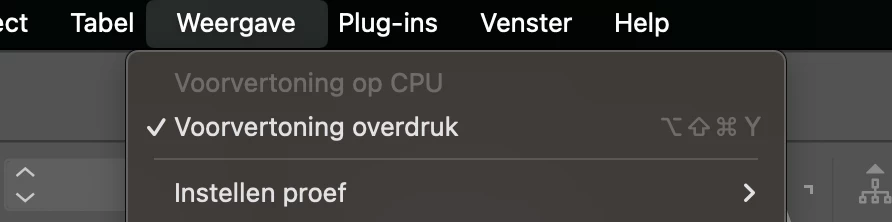
Correct answer mooirood

This helped me: View > check: Overprint preview (in Dutch the picture)


5 replies

mooiroodCorrect answer
Participant
April 1, 2025

This helped me: View > check: Overprint preview (in Dutch the picture)


Participant
March 20, 2024

P.S. I'm running WINDOWS X on a PC, so this issue is not just on Macs. 

Participant
March 20, 2024

I have the same thing happening (today and yesterday), and saw a post about this 4 years ago as well.


Switching between the preview and normal screen setting yields text flowing differently. Of course I don't think it really is different, just that the "preview mode" has not caught up with reality. When I close the document a reopen, it resolves (I ididn't have to quit Indesign to get it looking right). I switch between the two views using a custom keyboard shortcut, but next time will try the menu dropdown. I can't reproduce it now since I resolved it. BUT I would almost put money on it happening again! I'm using an older CC version (2019) but have noticed that some bugs have ridden right along with all of the updates right back CS 4.0!

leo.r
Community Expert
Community Expert
March 13, 2024

> an up-to-date version of Sonoma running


I just have to ask: what's the exact version of your macOS? Sometimes "up-to-date version" turns out to not to be such. macOS 14.3 solved the display issues you describe for most users (although some users do report that it didn't make any difference).

adamk93229702
Known Participant
March 13, 2024

I have 14.3.1, which at the time of the OP, was the latest (in Australia, we don't get software releases at the same time as US). I can now see that 14.4 is available but I will wait until the weekend to upgrade in case it causes new issues. An update to 19.3 was released here and I updated it yesterday. The laggy responses to switching documents, panning around the screen, zoom in/out still remain, but I've been able to duplicate pages in the Pages palette without crashing Indesign, so that must have been a known bug fixed in the 19.3. Baby steps.


adamk93229702
Known Participant
March 21, 2024

Sadly not, Indesign crashing again on Duplicate Spread via any method. This time, (3rd time it's happened) crashes the whole system. I've deleted preferences, caches, updated Sonoma to 14.4, Indesign to 19.3. No joy.


James Gifford—NitroPress
Legend
March 11, 2024

What content changes, and how, when you switch from Preview to Normal?


What performance limitations are you seeing with InDesign — specifically?


You should be aware — and as an existing user, should have been aware — that ID is not fully compatible with Sonoma. The recommendation is not to upgrade to Sonoma yet if ID is part of your critical workflow.


As for the rest — money spent has never been a guarantee of "performance" or capability. Based on everything you state, you could have saved either the expenditure on a new system, or such a lavish one. There are a number of performance and reliability issues with InDesign that can be solved by relatively simple reconfiguration, or removing system bottlenecks, that will not necessarily be fixed by moving to an uber platform. (And if you switched platforms with the idea that "Mac is better" for Adobe apps, well, there hasn't been a significant difference in platforms with more or less comparable specs for at least a decade, maybe longer.)


But let's start with those first two questions. While ID can have some performance issues with some complex elements, mostly long documents with complex dynamic formatting and/or cross references and/or many images with applied effects, a single page ad of almost any complexity is — in my experience — well within acceptable performance returns. So let's figure out what's wrong that doesn't have anything to do with the silicon.

adamk93229702
Known Participant
March 11, 2024

James,


1) Text boxes that contain a price, e.g. $7,099 when viewed in Normal view, change to $0,000 (as per the template I started creating the document) when viewed in Preview, triggered using the W shortcut. See before and after from movie I took of it.  I'm sure you can undestand how this could be a frightening bug when sending out press ads that are seen by millions of readers. The issue did not occur in the same file once I'd quit Indesign and restarted.


2) There are a number of performance issues. Zooming in/out using various methods is not responosive, screen redraw when using the hand to pan around the layout is laggy or glitchy, switching between open documents is slower than my old Mac, duplicating pages in the Pages palette crashes Indesign every time. I could go on.


3) The machine came with Sonoma installed. I got it in February. Sonoma was released in September 2023 – I think it's unreasonable to expect users to backdate their OS on new hardware after 5 months. I'd suggest that developer effort could be focused entirely on stable Sonoma release and the list of long-unresolved bugs, rather than niche enhancements and extenstions.


4) I'm based in Australia. We pay far more for Apple gear here, regardless of USD exchange rate. My 2020 MBP would max out of the 32GB RAM; I can't see why opting for a high spec CPU/GPU configuration to maximise the machine's lifespan would be viewed as a poor decision.  I haven't used Windows for 20 years – not sure whey you'd introduce that to this discussion.


5) I'm interested to hear what bottlenecks users need to address to get the software to run nicely on premium hardware. My documents are not complex, generally no more than 4 pages and based on templates I've been using for 10 years.

James Gifford—NitroPress
Legend
March 11, 2024

The templates I'm referring to are ones I've built and refined myself, .indt files that I use as clean starting points to layout 40+ retail press advertisements per week, not purchased templates. I've been using since 2015 without issue, until changing over to new machine.

To your point about machine specs, check this link for how you can configure the 16" model https://www.apple.com/au/shop/buy-mac/macbook-pro/16-inch

There are a limited number of combinations of RAM/CPU/GPU specifications – you can't get a powerful GPU without a powerful CPU. For starters, choosing 16" over 14" screen size automatically bumps you up to the M3Pro chip. Certain RAM sizes are only available with certain CPU/GPU pairings, etc. 


My team all work off our built-in HDs, which are then synced to Dropbox for remote sharing – no NAS servers or networking weakpoints to my knowledge.


They are on either M1 or M2 chip machines with similar core specifications to mine, but all on Ventura and while not perfect by any stretch, don't have anywhere near the number of issues I'm having.


I appreciate your perspective that I've overspecfified my machine, though I do some video work too. However, regardless of the cost, I have some of the best hardware available and this software runs poorly on it. I can only presume that Adobe had partner/beta releases of Sonoma for some time prior to general release in Sept 2023 – it was showcased in June 2023. How long do they need to build a compatible release, while I keep paying thousands per year for my team's licences?

Personally hoping that a new contender comes on the market – Figma for print maybe – that knocks ID off its perch, like it did to Quark Xpress when it became outdated.


Okay. "I'm having weird issues with a template" almost always means "....that I downloaded from Adobe or somewhere." Apply above comments to those.


There's nothing wrong with buying/building a future-powered system, if your budget and expected life-of-use permit. And other apps do make use of that added muscle.


I'll just sum up that most of us — experienced to 'expert' — seem to use fairly modest builds with InDesign, often do very complex work and rarely see the performance issues reported by other users. And repeat that there's next to no difference between macOS and Windows platforms any more — for pretty much any apps, and certainly not Adobe. (A few UI issues seems to be about it.) And if, as an experienced user, you'd checked in beforehand, you'd have learned that you had no compelling reason to switch to a Mac, and that all the 2024+ power in the world won't change ID's fundamental one-core limitation.


If you think Figma or Canva will ever reach ID's level of publication power, you're welcome to wait for those miracles. At some point, these largely amateur-focused, template-based, online-doc (and quick print) tools may become the basic workbench for that subset of work, but I have a ca. 1965 story about box Brownies being just as good as Leicas, too.


And other than your specific glitches with this legacy document — and you should be well aware that frequently edited and reused docs can get corrupted, in many apps — you haven't said what the performance problems were that led you to switching to a different and beefed-up platform. As I've noted, most such perceptions can be fixed with minor changes to the setup, and there is certainly no broad or wholesale case of ID being slow, glitchy and underperforming for some very large part of the professional user base.