Participant
December 13, 2018
Question

Page number won't show up in cross reference

  • December 13, 2018
  • 5 replies
  • 1770 views

Hi,

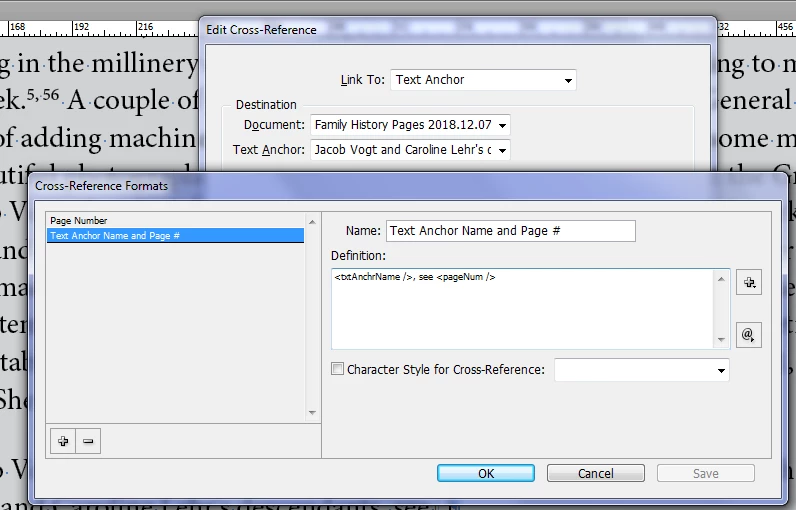
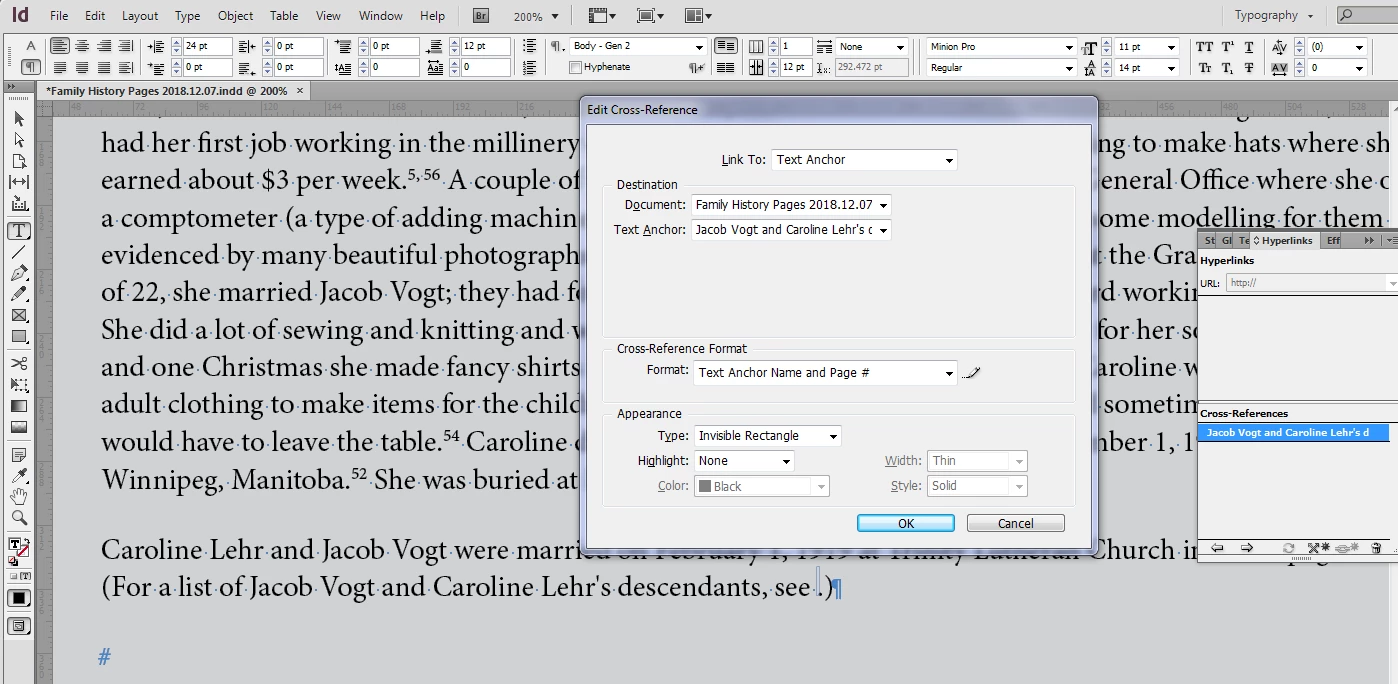
I'm setting up cross references in my InDesign document. Everything I try to do using either paragraph styles or text anchors works, except the page number won't display. Even though I have the cross reference format set to display the text anchor name and page number, what shows is the text anchor and see . (No page number appears. Help please!

Vanessa
    This topic has been closed for replies.

    5 replies

    Participant
    February 3, 2019

    Hello Vanessa,

    I had the exact same problem. I read the answers given to you and one worked for me. It is the one that says you have to import your text into a new (or existing document) by copying and pasting. It worked pretty well for me. I tried the INDD to IDML to INDD again, and it didn't work. I also tried to select the page and move them to another document, but this didn't work as well. So the copying-pasting seems to be the solution to solve this bug (document has been corrupted, whoever knows why…). I hope most of your text is threaded and the process will be quick (this was my case, 54 pages in a single thread… it made my life easier for once!)

    Wish you success in this process.

    Participant
    December 1, 2020

    Hi Everyone,


    I am running into the same problem, with the little pound symbol appearing. Unfortunately none of the above solutions has worked for me. Does anyone have any other suggestions?


    Thanks!

    Community Expert
    December 18, 2018

    I cannot replicate the issue either.

    If what Vinny says isn't working - try moving your pages to a new document.

    Start a new file with the same page margins as you have - then in your current document - select all the pages in the page panel - then go to Layout>Pages>Move Pages

    You can then select to move your pages to the new document.

    See if this frees up the Cross Reference text.

    vinny38
    Legend
    December 18, 2018

    Hmmmmm this little £ is very unusual.

    Never seen it before.

    I found this old thread that relates the exact same bug:

    Problem with pagenumbers in cross references

    Apparently moving all pages into a brand new document seemed to have fixed the issue, just like Eugene suggested.

    You might want to give Eugene's suggestion a try.

    Tell us if it worked for you.

    Participant
    December 19, 2018

    Thank you all for your input. I have set up a new document with the same margins and number of pages and copied the pages from the old document to the new one. I saved the new document and restarted my computer. I set up the text anchor and saved the document. Then when I added the cross reference and tried to save, InDesign crashed. I repeated these steps several times and InDesign stopped working each time.

    Barb Binder
    Community Expert
    Community Expert
    December 18, 2018

    Hi Vanessa and Vinny:

    I have looked over the file and remain perplexed. I think the file is corrupt. Here's a link on how to deal with corrupt files:

    Troubleshoot damaged InDesign documents

    ~Barb

    Notes:

    1. The x-ref format is defined correctly. Replacing all the x-ref formats with those from a working file didn't help.
    2. Saving as .idml, closing, reopening and saving as .indd didn't help.
    3. The # is missing from the x-ref list in the X-ref panel and the page number is missing from the page. A mysterious pound sterling character is appearing after the empty page number box.
    ~Barb at Rocky Mountain Training
    vinny38
    Legend
    December 14, 2018

    Hi Vanessa.

    Have you tried saving your doc as IDML and reopen it ?

    Your screenshots show that your settings are correct, so it may be some sort of document corruption...

    If the IDML solution is not helpful, I'd be also glad to have a look at the file (idml or cs6).

    Besides, probably not related to your issue, but two things slighly bother me:

    - the use of stops in the file name (and spaces too)

    - the use of a straight quote instead of an apostrophe

    Barb Binder
    Community Expert
    Community Expert
    December 14, 2018

    Hi Vinny:

    I still had the file open so tested out those two characters: no problem.

    ~Barb

    ~Barb at Rocky Mountain Training
    Barb Binder
    Community Expert
    Community Expert
    December 14, 2018

    Hi Vanessa:

    I just tested it (v 14.0.1) and it is working fine for me, and I don't see any issues with what you have done so far.

    When InDesign begins to behave erratically, that usually means it is time to delete your preference and/or your cache folder.

    ~Barb

    ~Barb at Rocky Mountain Training
    Participant
    December 14, 2018

    Thank you for trying out the same steps. I cleared the cache and preferences and I'm having the same issue. The blue (transparent) rectangular box shows up, but the page number does not appear. I tried doing cross references using paragraph styles and not anchor text, and the same problem occurred. Perhaps there is some issue with the way page numbers are set up in the document?

    - Vanessa

    Barb Binder
    Community Expert
    Community Expert
    December 14, 2018

    Is the page number the same color as the paper? If not, I’m happy to look at the file if you can put a page or two on Dropbox. Post the link here (public) or hover over my name and message me (private).

    ~Barb

    ~Barb at Rocky Mountain Training