
Participating Frequently
May 28, 2023
Répondu

Page numbering in Individual PDF export

Hello! This is probably an easy fix but I cannot figure it out...


I have a document I need to export as individual pdf pages that starts at p.106


I need the pdf name to reflect p.106 and so-on at the end of the name but I can only get it to start numbering at p.1, p.01 or p.101


How can I get it to automatically number the name of each file from p.106 onwards?


Thank you!
Ce sujet a été fermé aux réponses.
Meilleure réponse par Thunder-Lightning

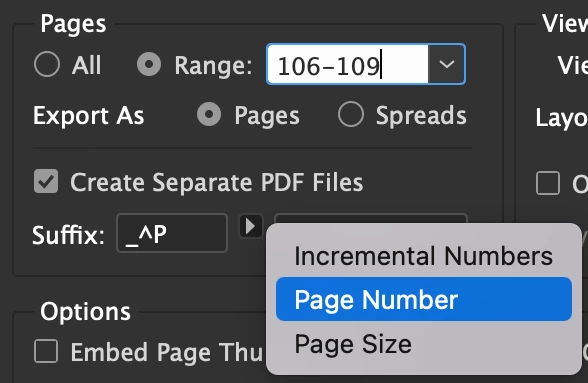
Or when you export the file as Separate PDF Files, you specify the Suffix and choose Page Number.

3 commentaires

Inspiring
May 29, 2023

Or when you export the file as Separate PDF Files, you specify the Suffix and choose Page Number.

Inspiring
May 29, 2023

Try this. Update startPage to change the start page.


var myDoc = app.activeDocument;
var pagesLength = myDoc.pages.length;
var filename = myDoc.name.split(".")[0]; // Update this to a new filename in string format  if required
var path = myDoc.fullName.path;
var destinationFolder = Folder(path + "/output");
if (!destinationFolder.exists) {
 destinationFolder.create();
}

// Update to any start page
var startPage = 106;
if (startPage > pagesLength) {
 alert("Star page does not exist.");
} else {
 for (var i = startPage - 1; i < pagesLength; i++) {
  currentPage = myDoc.pages[i];
  exportPage = currentPage.name;
  pdfName = filename + "_p" + (i + 1); 
  app.pdfExportPreferences.pageRange = "" + exportPage;
  myDoc.exportFile(ExportFormat.PDF_TYPE, File(destinationFolder + '/' + pdfName + '.pdf'), false);
 }
}


 Hope this helps.

Willi Adelberger
Community Expert
Community Expert
May 28, 2023

You will have to do it after export. Use Bridge, Tools > Batch Renaming

Participating Frequently
May 29, 2023

Thank you, that worked well!