
PS Motion
Inspiring
December 8, 2019
Answered

Page sequence in books problem

  • December 8, 2019
  • 3 replies
  • 1201 views
  • Hello,


I'm having trouble setting up a book in InDesign, I need the pages to keep facing each other between documents. I need to make every document starting on the right page? I made separated documents for the covers, so a few of the chapters start on the right and others on the left, then when I export the PDF of the book it prints like the image below. Is there a setting I can change? Thank you!
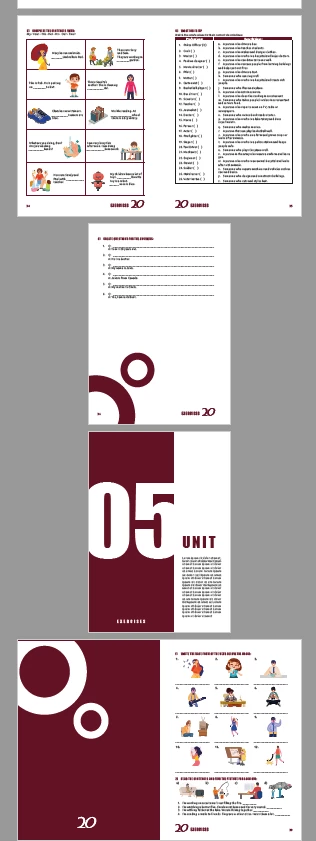


This topic has been closed for replies.
Correct answer Dave Creamer of IDEAS

In your Book file menu, go to Book Page Numbering Options.

Change them to Continue on next even page; check the Insert Blank Page option.

Make sure you documents first page is set to Auto and there are no other page numbering settings in the document.

3 replies

Dave Creamer of IDEAS
Community Expert
Dave Creamer of IDEASCommunity ExpertCorrect answer
Community Expert
December 8, 2019

In your Book file menu, go to Book Page Numbering Options.

Change them to Continue on next even page; check the Insert Blank Page option.

Make sure you documents first page is set to Auto and there are no other page numbering settings in the document.

David Creamer: Community Expert (ACI and ACE 1995-2023)
PS Motion
PS MotionAuthor
Inspiring
December 12, 2019

Thank you so much! That's exactly what I need!

Steve Werner
Community Expert
Community Expert
December 8, 2019

It sounds like you're a good candidate for creating a Book file for your documents. It would allow you to control the numbering, adding extra blank pages to make sure that you start sections/chapters on right-hand pages.


https://helpx.adobe.com/indesign/using/creating-book-files.html


Here's a tutorial to get you started:


https://www.bookdesignmadesimple.com/using-the-book-feature-in-indesign/


PS Motion
PS MotionAuthor
Inspiring
December 12, 2019

I'm sorry, I forgot to mention that I already had created a book, but thanks anyway!

Willi Adelberger
Community Expert
Community Expert
December 8, 2019

Export the book as single-page PDF (the printer would need it so anyway) and choose for the layout facing pages, cover page. It will bring you a PDF in Acrobat with the correct view of the pages.