

Jack Brannen
Known Participant
June 23, 2024
Question

Pages panel doesn't scroll all the way down

  • June 23, 2024
  • 4 replies
  • 3998 views

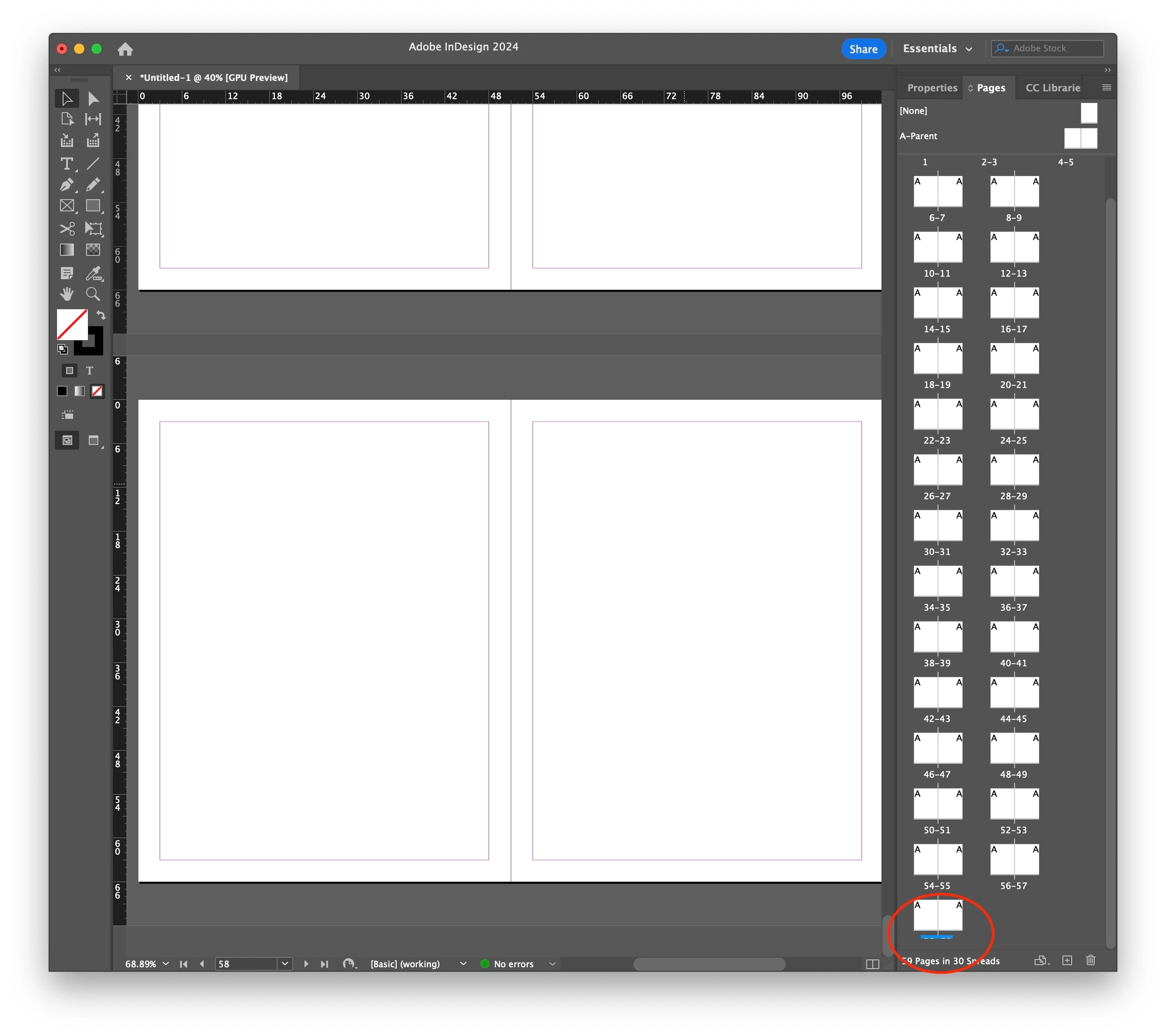
When the Pages panel is set to "View Pages" > "Horizontally," if there are enough pages in the document, the bottom page numbers are cut off when you scoll all the way down. I can reproduce this in InDesign even with preferences reset.


InDesign 19.4

macOS 14.5
 

4 replies

.random..
Inspiring
November 2, 2025

Hi,
I’m experiencing a frustrating issue in InDesign.


In the Pages panel, the page numbers at the bottom of each thumbnail are partially or completely hidden, making it really hard to navigate through the document.


I’ve tried resizing the panel, restarting InDesign, and resetting preferences, but the problem persists.
Could you please help me fix or reset whatever is causing this display bug?


Thanks in advance!

Peter Spier
Community Expert
Community Expert
November 2, 2025

Have you tried dragging the divider between the halves of the panel, or putting the parent pages on top?

.random..
Inspiring
November 2, 2025

 Yes.

Known Participant
September 27, 2024

This bug has been around since at least InDesign 16. It also doesn't matter how you have the panel setup to show pages, or how big the panel window is.  https://indesign.uservoice.com/forums/601180-adobe-indesign-bugs/suggestions/43451784-last-row-of-pages-panel-in-horizontal-view-is-miss

Jack Brannen
Known Participant
September 27, 2024

Thanks, @Larry29731486lwom . It's insane that we pay monthly for these apps and still can't get simple bugs fixed!

Participant
October 14, 2024

I have this issue too – v19.5 – any updates as to a fix?

Harshika Verma
Community Manager
Community Manager
June 24, 2024

Hi @Jack Brannen,

Thank you for reaching out. Would you mind adjusting the pages panel as shown in the video below and let us know if you're able to see the page numbers properly?


I will check with the product team if this is an expected behavior or actually a bug.


Thanks,

Harshika 

Jack Brannen
Known Participant
June 24, 2024

Hi @HARSHIKA_VERMA , thanks for your reply. 

I have tried resizing the pages panel as shown. No change.

If you have more specific instructions for me, or want me to record my screen, I'm happy to do so.

Abhishek Rao
Community Manager
Community Manager
November 17, 2025

@Abhishek Rao Echoing what @.random.. has said here. It's unreasonable that we have documented this clearly as a bug and paid $70/month for our CC subscriptions with no resolution still after 17 months. Please put pressure on your team to escalate fixing known bugs.


Also @.random.. thank you for chiming in as I think the more activity we get on this thread, the more likelihood we will get some response from Adobe.


Hello everyone,


I appreciate all of you for consistently providing updates and for your patience throughout this discussion. I understand that this problem has been disruptive, particularly for those dealing with lengthy documents where the Pages panel must operate reliably.

I want to inform you that this bug has been reported to the product team and is currently being actively reviewed. The team recognizes the effect it has on workflows, and I have ensured that your reports, screen recordings, and follow-ups are visible to them. As soon as we get an update or a fix is available in a future release, I will share it here immediately.

I sincerely thank everyone who has taken the time to document the issue and provide examples. Please feel free to continue sharing any further observations, and thank you once more for your patience while the team addresses this matter.


Best,
Abhishek

Community Expert
June 24, 2024

Yeh I get the same thing


You should post bugs here
https://indesign.uservoice.com/forums/601180-adobe-indesign-bugs


Not much else to do on this one.

leo.r
Community Expert
Community Expert
June 24, 2024

Yes I can confirm this, too. Also in InDesign 2023. Definitely a bug (even if rather minor). I guess that the situation where this bug manifests itself is rather uncommon (plus the last page numbers are known anyway), so it went under the radar until now.

Jack Brannen
Known Participant
June 25, 2024

@leo.r Thanks for confirming. This bug bites me again and again when I'm trying export the last pages in a long document. So, not minor for me! 😣