Participant
April 26, 2020
Answered

PAGES vertical Menu is not aligned

  • April 26, 2020
  • 1 reply
  • 6042 views

Hi!

After having to move some pages of my document around I was not able to have my pages align in the vertical menu as it was before I moved pages (see after pg. 101 on the image attached). It also messed up the page numbers as it now appears in the inside of the page instead of on the outside! Please help! 


Bea
This topic has been closed for replies.
Correct answer Jeff Witchel, ACI

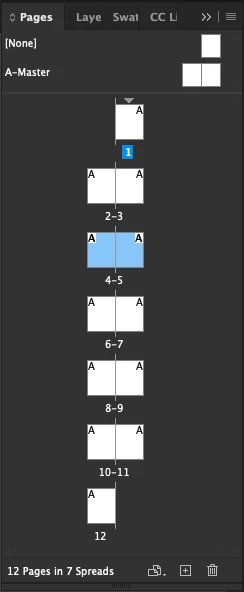
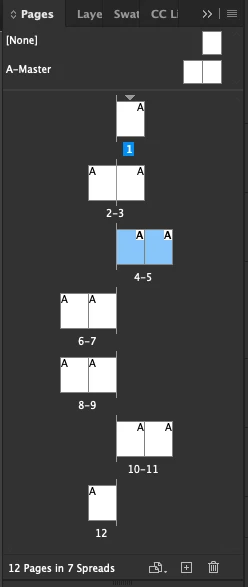
Look under the options menu of the Pages panel and select Allow Documents Pages to Shuffle. This is usually checked by default. 

It will make this...


Look like this

1 reply

Barb Binder
Community Expert
Community Expert
April 26, 2020

Hi genkibea1, Unfortunately, the attachment feature is not working on the forums right now so we can't take a look at your image. Could you just post in a reply so that we can see it? There should be an easy answer.


~Barb

~Barb at Rocky Mountain Training
genkibea1Author
Participant
May 4, 2020

Hello Barb:

Here is the image of my PAGES menu, when I add pages I get this messy alignment of pages with more than 2 pages on the spread (please see pages 112-113)

Thanks!!

Bea

Inspiring
January 5, 2024

Look under the options menu of the Pages panel and select Allow Documents Pages to Shuffle. This is usually checked by default. 

It will make this...


Look like this


My panel options are set to shuffle, but my Pages menu remains misaligned as shown in Barb's menu.  I'm in Indesign 2024.  How do I fix this?