
Exit
  • Global community
    • Language:
      • Deutsch
      • English
      • Español
      • Français
      • Português
  • 日本語コミュニティ
  • 한국 커뮤니티
0

Paragraph Border rounded corner issue

New Here ,
Dec 29, 2022 Dec 29, 2022

Hi All, 


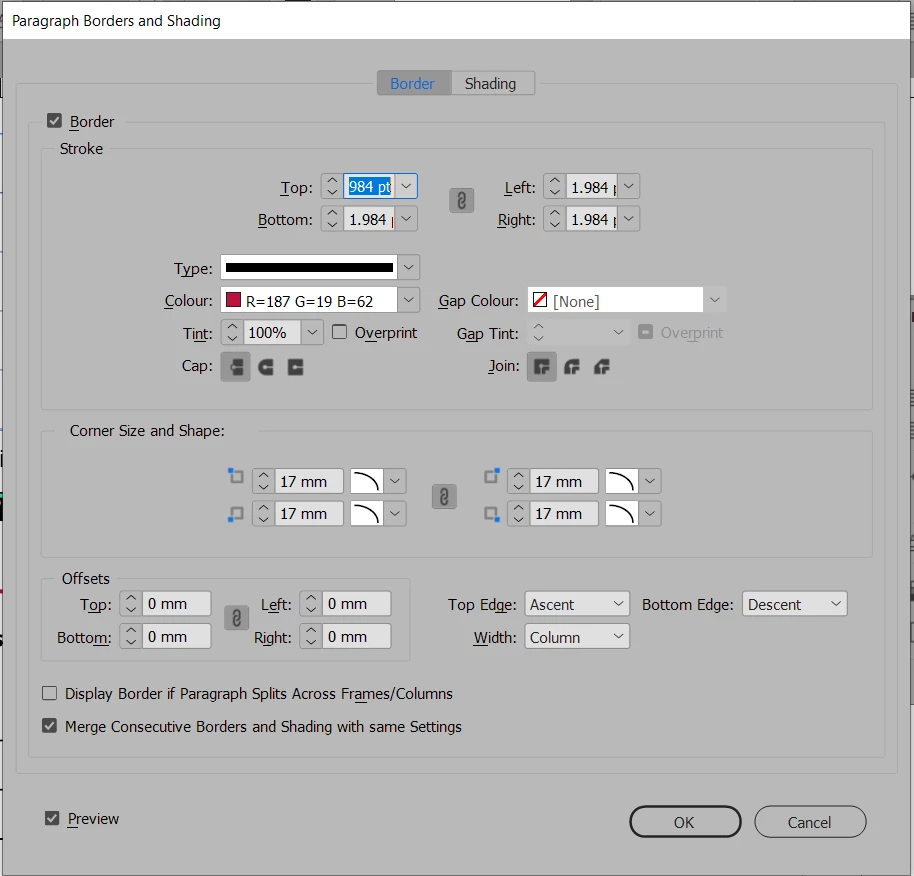
Wonder if someone can help me with this. I'm trying to make a paragraph border with rounded corners but for some reason only the bottom corners will go round and the top ones stay straight. What am I missing? 

Here's the paragraph border with only 2 rounded corners: 

Graphics5F97_0-1672350877983.png


Here's the dialogue box for the paragraph borders. 
Graphics5F97_1-1672350906299.png


I have tried closing and reopening InDesign and I've installed the latest version but to no avail 😞 Also had lots of attempts at trial and fail. Can anyone help me??? (moan, sign, wail!) 
TOPICS
How to , Type
757
Translate
Report
Community guidelines
Be kind and respectful, give credit to the original source of content, and search for duplicates before posting. Learn more
community guidelines

correct answers 1 Correct answer

Community Expert , Jan 01, 2023 Jan 01, 2023

Hi @Graphics5F97:


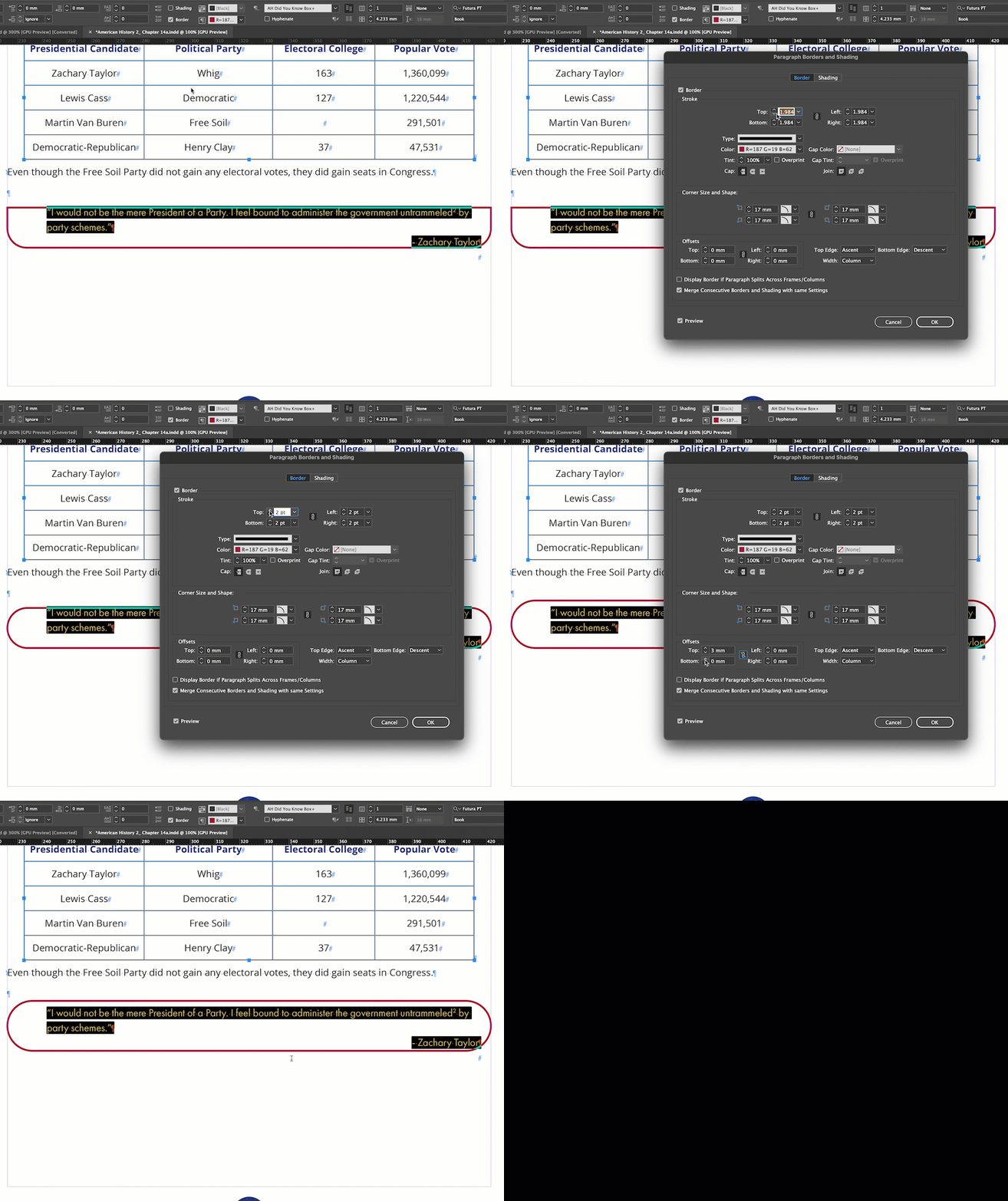
I don't have a clear answer for you—I couldn't find anything wrong with your settings but it fixes itself when I increase or decrease the stroke width. I can even put it back to your original values of 1.984 pt and it's fine. 🤷‍


~Barb


2023-01-01_09-44-19 (1).gif


~Barb

Translate
Community Expert ,
Dec 29, 2022 Dec 29, 2022

Try unchecking "Merge Consecutive Borders..." at the bottom. This feature is nice but can be a bit fussy to get working exactly as desired, and it may be misreading something from the prior paragraph that is blocking the rounding feature.


That may only be a diagnostic move if you have the feature enabled for two paragraphs (the quote and the attribution), but it may point to what's causing the flaw.


ETA: Is that a footnote marker in the quote? That may well also be screwing up the feature's notion of what the adjacent paragraphs are. Try it on text without a footnote.


Translate
Report
Community guidelines
Be kind and respectful, give credit to the original source of content, and search for duplicates before posting. Learn more
community guidelines
Community Expert ,
Dec 29, 2022 Dec 29, 2022

That is very odd. Any chance you can share the page? You can put it on dropbox and add the link here (public), or click my avatar above this message and message me directly (private).


~Barb


Screen Shot 2022-12-29 at 5.34.20 PM.png

Translate
Report
Community guidelines
Be kind and respectful, give credit to the original source of content, and search for duplicates before posting. Learn more
community guidelines
Community Expert ,
Dec 30, 2022 Dec 30, 2022

Hi @Graphics5F97 ,

please share the document or at least that page.


Thanks,
Uwe Laubender
( Adobe Community Expert )

Translate
Report
Community guidelines
Be kind and respectful, give credit to the original source of content, and search for duplicates before posting. Learn more
community guidelines
Community Expert ,
Jan 01, 2023 Jan 01, 2023

Hi @Graphics5F97:


I don't have a clear answer for you—I couldn't find anything wrong with your settings but it fixes itself when I increase or decrease the stroke width. I can even put it back to your original values of 1.984 pt and it's fine. 🤷‍


~Barb


2023-01-01_09-44-19 (1).gif


~Barb

Translate
Report
Community guidelines
Be kind and respectful, give credit to the original source of content, and search for duplicates before posting. Learn more
community guidelines
Community Expert ,
Jan 02, 2023 Jan 02, 2023

Hi Barb,

my assumption is that the radius was too large for both rounded corners; at the top and at the bottom.

A detail that first escaped me. Also InDesign's reaction that the bottom ones are drawn as expected in that case and the top ones are not rendered. A design decision the developers made in such a case, I think.


Regards,
Uwe Laubender
( Adobe Community Expert )

Translate
Report
Community guidelines
Be kind and respectful, give credit to the original source of content, and search for duplicates before posting. Learn more
community guidelines
Community Expert ,
Jan 02, 2023 Jan 02, 2023

I've had paragraph borders, with and without embellishments like rounded corners, simply go wherever they wanted regardless of top and bottom margins, etc. Not sure that's what's at play here.


Translate
Report
Community guidelines
Be kind and respectful, give credit to the original source of content, and search for duplicates before posting. Learn more
community guidelines
Community Expert ,
Jan 02, 2023 Jan 02, 2023

Hi Uwe:


I didn't modify the corner radius, just the stroke width. It started at 1.984pt, and it fixed itself whether I increased it or decreased it. I just went back to play with the corner radius—it doesn't change the top two corners. And what is not evident from my screen shots is that this same style is working correctly on the facing page, with a total of two lines inside. 


~Barb


2023-01-02_09-00-46 (1).gif

Translate
Report
Community guidelines
Be kind and respectful, give credit to the original source of content, and search for duplicates before posting. Learn more
community guidelines
Community Expert ,
Jan 02, 2023 Jan 02, 2023

Well, if you can't make it work, it's probably a Real Bug™.


I do keep looking at that footnote or endnote reference, though. We've seen those cause bizzarre results before.


Translate
Report
Community guidelines
Be kind and respectful, give credit to the original source of content, and search for duplicates before posting. Learn more
community guidelines
Community Expert ,
Jan 02, 2023 Jan 02, 2023

Hi @James Gifford—NitroPress:


There's a footnote reference in my very post and it works as expected.


I'm not disagreeing with either of you, I'm just saying you that I'm not having either experience impact the result. It remains a mystery to me.


~Barb

Translate
Report
Community guidelines
Be kind and respectful, give credit to the original source of content, and search for duplicates before posting. Learn more
community guidelines
Community Expert ,
Jan 02, 2023 Jan 02, 2023
LATEST

Oh, I misinterpreted your video. Takeaway was that it still had the upper corner issue.


Never mind. 🙂


Translate
Report
Community guidelines
Be kind and respectful, give credit to the original source of content, and search for duplicates before posting. Learn more
community guidelines