grif030
Participant
April 6, 2019
Question

Paragraph rules: fixed distance

  • April 6, 2019
  • 2 replies
  • 2999 views

Hi there… i couldn’t find the answer to this question in the forum, so…

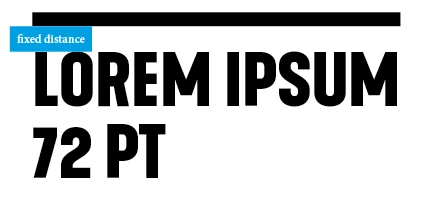
I would like to create a rule above a heading that has always the same distance between the top of my heading and the paragraph rule above it. Independently the heading font size. Let me explain.

Say i have a heading font size of 72 pt and a heading rule above with an offset of 24 mm. When i change the heading font to example 36 pt the distance between the top of the heading and the heading rule increases, because the offset setting is still 24 mm. To keep the distance the same i need to change the heading rule offset. Is there a way or a work around to keep the distance always the same, independently the heading font size and without changing the heading rule offset manually every time?

Hope you understand what try to achieve! Thanks!
This topic has been closed for replies.

2 replies

rob day
Community Expert
Community Expert
April 6, 2019

When i change the heading font to example 36 pt the distance between the top of the heading and the heading rule increases, because the offset setting is still 24 mm.

How many variations of the headline are there? Can’t you make the adjustment in your header style sheets?

grif030
grif030Author
Participant
April 6, 2019

I want to to use this in a magazine design. So the size of the headings are changing constantly, depending on their length and the space there is on the page. So changing them manually is timefull and creating different paragraph styles is pointless.

MW Design
Inspiring
April 8, 2019

Hmm! …

Rob, don't think I could not agree you on this argument but I'm not truly "shocked" by the original question!

Take another look to the third screenshot I gave post 21!

I don't see something visually and desperately awful but just an user graphical choice that I don’t feel well-founded and interested to appreciate.

[personal comment]

Btw: In fact, personally, I won't use your way here, playing with so various sizes of headers in the layout of a magazine! (but I'll keep the code for another use! Thanks for it!  )

Best,

Michel


Personally, if I change the point size of a heading, I want them all to change (so prefer style-based solutions), both in the size of the font and the thickness of a rule—which doesn't seem possible. And if a script is not needed, then all the better.

In the thread, Rob has provided such a capability for the rule weight change—for Mac users. But I use Windows so it needs be a JavaScript. I do greatly appreciate the work Rob put into this thread to provide such a solution for how I would want such headings to act.

However, if someone doesn't want the rule thickness to change, nor the offset, then using only a top border seems to work well and it can be part of a style. So that solution seems best to me under the "don't change the rule thickness" scenario.

Mike

Steve Werner
Community Expert
Community Expert
April 6, 2019

It's not available in the InDesign interface. If you don't get an answer here, you might ask in the InDesign Scripting forum (if it's scriptable).

InDesign Scripting

grif030
grif030Author
Participant
April 6, 2019

Thanks. I will do that.

Community Expert
April 6, 2019

Hi grif030 ,

a wonderful example for a feature request:

Distance from Rule Above or Rule Below should be a percentage of the Point Size or even better, the Cap Height of the font used in a paragraph style.

Go to InDesign Uservoice, do a feature request, come back here to post the link to the request so that we can vote for it:

Adobe InDesign Feedback

Regards,
Uwe