Inspiring
August 4, 2024
Answered

Paragraph style adding a full stop at the end of paragraph (or content)

  • August 4, 2024
  • 2 replies
  • 1766 views

I have picture captions which I want to format with a full stop in a paragraph style (I would prefer it to just be in the style, not actually typing it, as it is not to be used in e.g. the ToC).

Can this be done? In the GREP maybe (in that case how)?

This topic has been closed for replies.
Correct answer Barb Binder

Hi Chris:


As per @James Gifford—NitroPress, we can't add a period/full stop to a paragraph style—just formatting


You could add it with a GREP find/change (not a GREP style) but then you'd have to remove it via second GREP find/change each time you updated the List of Figures, which can only pick up full paragraphs, punctuation included. Or again, as per @James Gifford—NitroPress, you could add a GREP style to the LOF entry to just hide the period. 
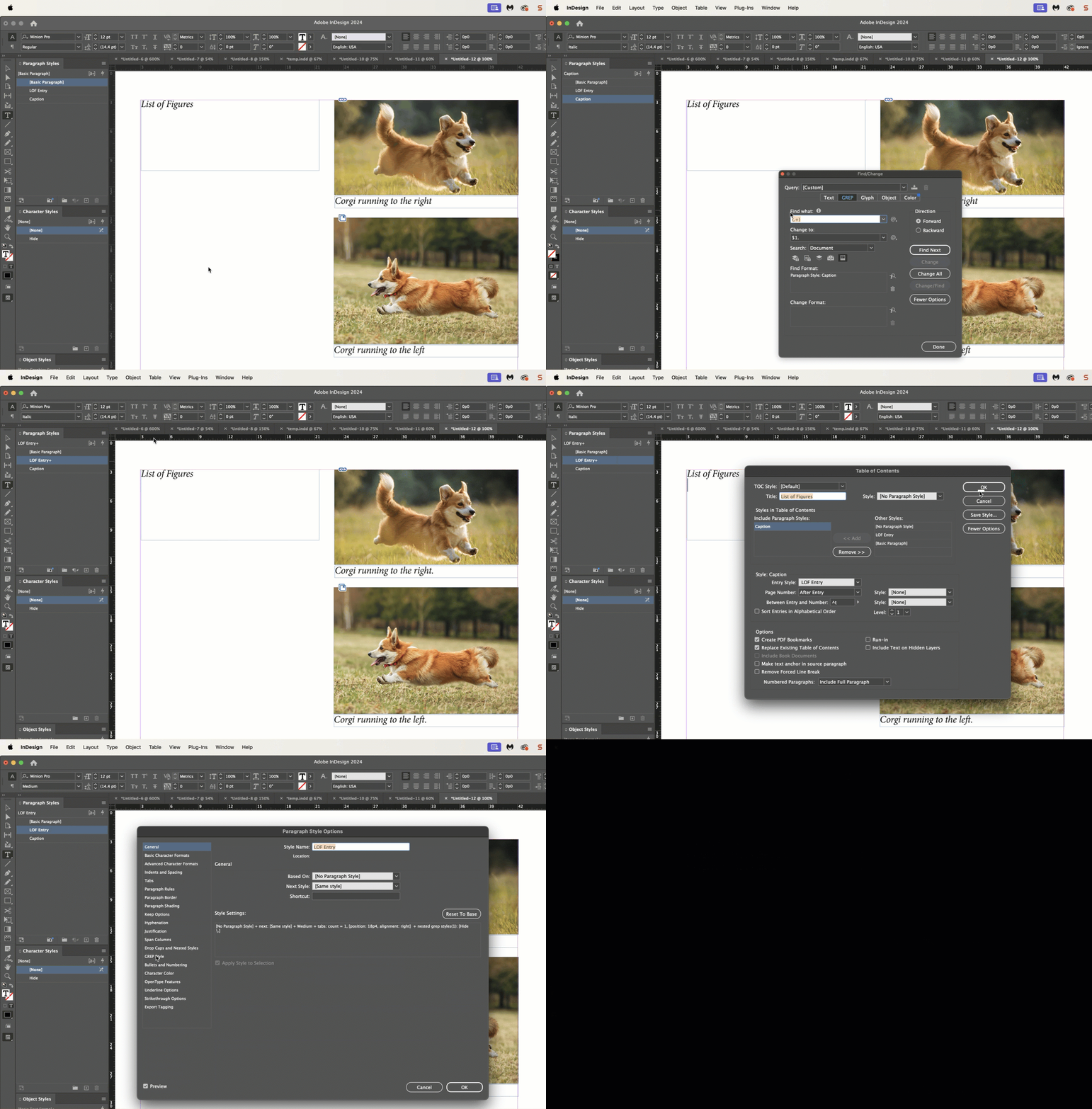


To add the full stop to the captions

Find: (.+)

Change: $1.

Paragraph style: Caption (call it anything)


Assuming all captions are one sentence, to hide it in the LOF:

Create a character style with the color set to none.

Assign the character style as a GREP style to the LOF entry

Apply style: Hide (call it anything)

To text: \.


~Barb

2 replies

Barb Binder
Community Expert
Barb BinderCommunity ExpertCorrect answer
Community Expert
August 5, 2024

Hi Chris:


As per @James Gifford—NitroPress, we can't add a period/full stop to a paragraph style—just formatting


You could add it with a GREP find/change (not a GREP style) but then you'd have to remove it via second GREP find/change each time you updated the List of Figures, which can only pick up full paragraphs, punctuation included. Or again, as per @James Gifford—NitroPress, you could add a GREP style to the LOF entry to just hide the period. 


To add the full stop to the captions

Find: (.+)

Change: $1.

Paragraph style: Caption (call it anything)


Assuming all captions are one sentence, to hide it in the LOF:

Create a character style with the color set to none.

Assign the character style as a GREP style to the LOF entry

Apply style: Hide (call it anything)

To text: \.


~Barb

~Barb at Rocky Mountain Training
Inspiring
August 11, 2024

I now saw that one of the captions include periods I want to keep (e.g. when the caption is "W. Williamson".  Is there a way to only select periods which occur at the end of a paragraph (no caption is longer than a single paragraph)?

James Gifford—NitroPress
Legend
August 11, 2024

This is almost magical 🙂

I now realized that there is sometimes one or two empty spaces after the final period in the caption. I thought that something like this would address this, but doesn't seem to work: (\.$)|(\.\ $)|(\.\ \ $)


GREP is a hell of a lot of fun, and even more useful, once you master the basics. You can do insanely weird things with it.


Note that most general GREP information is a bit cryptic, intended for the code crowd and running from a command line on file sets; ID's implementation is a bit specific and different. You can't do better than Peter Kahrel's GREP for InDesign as a learning resource, but here's a composite cheat sheet I recently updated. (You typically want to use a specific 'space' wildcard in searches, although a space as you've used will often work fine.)

James Gifford—NitroPress
Legend
August 4, 2024

By 'full stop,' I am assuming you mean 'period'? (Just clarifying; the former term isn't common in American English or outside of a typesetting shop. 🙂


But I read your query as that you want a stop/period at the end of every figure caption.... but you don't want that dot to appear in any secondary use like a TOC, list of figures, etc.?


GREP styles can't replace content, only apply format to it. This is sorta-kinda conditional text, but on the fly within the document, which can't really be done in any simple way. The only way I can think of to make this work is apply GREP styles to each secondary use (a TOC line entry style, for example) that applies a color of "None" to the terminal period/stop.

Inspiring
August 10, 2024

Many thanks! I will do what you suggest, add the period (is it the same expression used both in UK and US English?) and then hide it in my TOC.