
MIDI Guru
Inspiring
October 9, 2018
Question

Paragraph Style Weirdness

  • October 9, 2018
  • 3 replies
  • 468 views

I don't know if this is one issue or two or three separate issues. Let's assume they're related. It may be user error on my part -- that's entirely possible. But it isn't how I would expect InDesign to work.

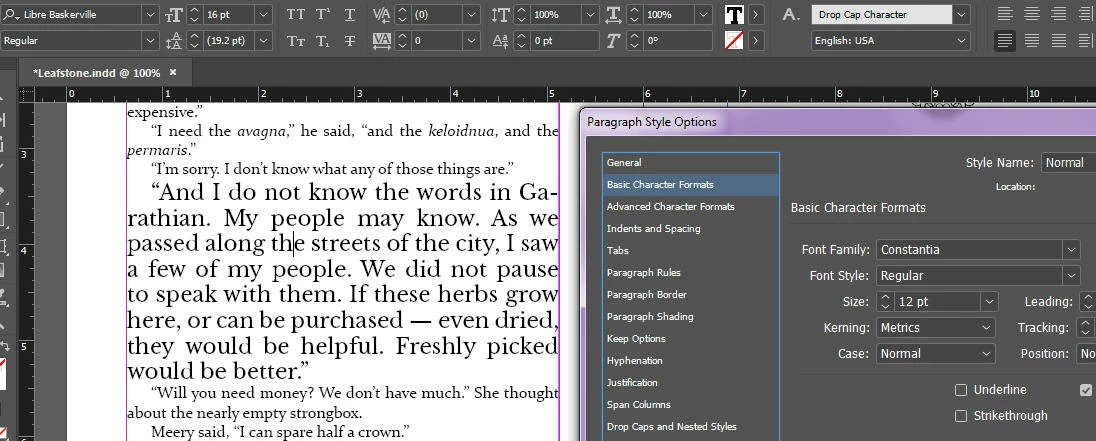
At present, my Normal paragraph style is defined as using 12pt Constantia. That's what the dialog box says it is, and that's how the document appears. But if I click in a paragraph, the Paragraph Styles list shows Normal+. If I then Alt-click to apply the default Normal style, the paragraph turns into 16pt Libre Baskerville!

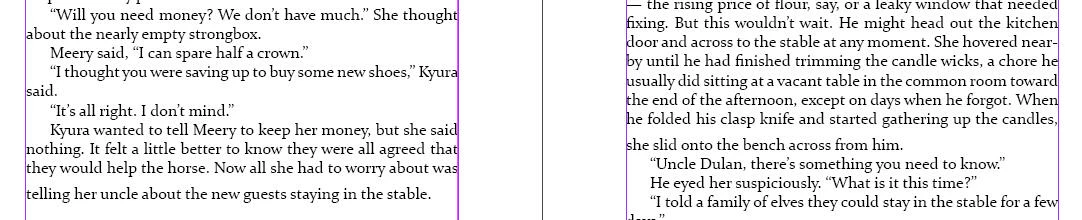
If I then manually switch the paragraph back to 12pt Constantia using the toolbar at the top, the last line of the paragraph has extra leading above it. Not below -- above. That is, there is now extra leading _within_ the paragraph. (See screenshot below -- one paragraph in each column exhibits the problem.)

At present I've defined a Paragraph Style (derived from Normal) called Chapter First Graf. Within that, under Drop Caps & Nested Styles, I have chosen a character style called Drop Cap Character as the style for the drop cap. Or at least I _think_ it's for the drop cap. And of course, the character style Drop Cap Character is 16pt Libre Baskervile.

What appears to be happening is that InDesign is applying the Drop Cap Character style not only to the Chapter First Graf style, but to all of Normal, overriding the settings for Normal. This may be the source of the user error. I was thinking that the setting in the Drop Caps & Nested Styles pane would apply only to the drop cap. Because why would it need to exist if it's going to apply to the whole style? In any event, it's certainly propagating clear back up the object tree to Normal.

Attaching a couple of screen grabs so as to show what I'm talking about. Help would be much appreciated!
    This topic has been closed for replies.

    3 replies

    jane-e
    Community Expert
    Community Expert
    October 9, 2018

    Hi MIDI Guru

    • Normal Paragraph Style
      Click in a paragraph that looks the way you want it to with the plus, then Redefine the style in the Paragraph Styles panel menu to update the style.
      Rename the style called Normal to Body or Body Text or it will look like it came from Word.

    • Last line
      This happens because you didn’t select the paragraph correctly and used local formatting.
      Select the paragraph by clicking four times or by dragging top to bottom to include the non-printing pilcrow at the end. Do not drag bottom to top, as you won’t get the pilcrow. Also, do not use Auto Leading. With 12 pt. type, normal leading is 14 (typesize + 2). What is happening is that the pillow is still 16 pt Baskerville with wrong leading.

    • Drop Cap Character Style
      1. One possibility is that the character style has been applied to the entire paragraph. If so, select the paragraph and apply None in Character styles.
      2. A second is that one style is based on the other. Edit the Paragraph styles and look at the Based On setting. Set it to No Style.

    Does this help? If not, show the General tab of Paragraph styles so we can read the entire definition of each.

    Geоrge
    Legend
    October 9, 2018

    impossible assumption: What if you rename "Normal" to some "MyNormal"? Is this bug still goes through?

    Remember, never say you can't do something in InDesign, it's always just a question of finding the right workaround to get the job done. © David Blatner
    MIDI Guru
    MIDI GuruAuthor
    Inspiring
    October 9, 2018

    Okay, it's now pretty well established that it's an InDesign bug. When I get rid of the character style called Drop Cap Character, the weirdness vanishes.

    Too bad -- I was looking forward to being able to design nice-looking drop-caps in InDesign without having to do it for 57 chapter openers by hand.

    I'm not marking this question as answered, because I might be wrong and would appreciate comment. It's rather discouraging to see this basic a bug in software in 2018 -- so maybe after all it IS user error.

    jane-e
    Community Expert
    Community Expert
    October 9, 2018

    Drop Caps

    Keep the Drop Cap Character style, but don’t apply it manually. Apply the Character style as part of the Paragraph style. In your screen shot you’ll see the tab at the very bottom where it says Drop Caps and Nested Styles.

    Post another screen shot if it doesn’t work. Also turn on Preview so you can play with the settings and see what they do before you commit.