Exit
  • Global community
    • Language:
      • Deutsch
      • English
      • Español
      • Français
      • Português
  • 日本語コミュニティ
  • 한국 커뮤니티
0

Parallel tables cells alignment issue

New Here ,
Mar 11, 2021 Mar 11, 2021

Hi, 
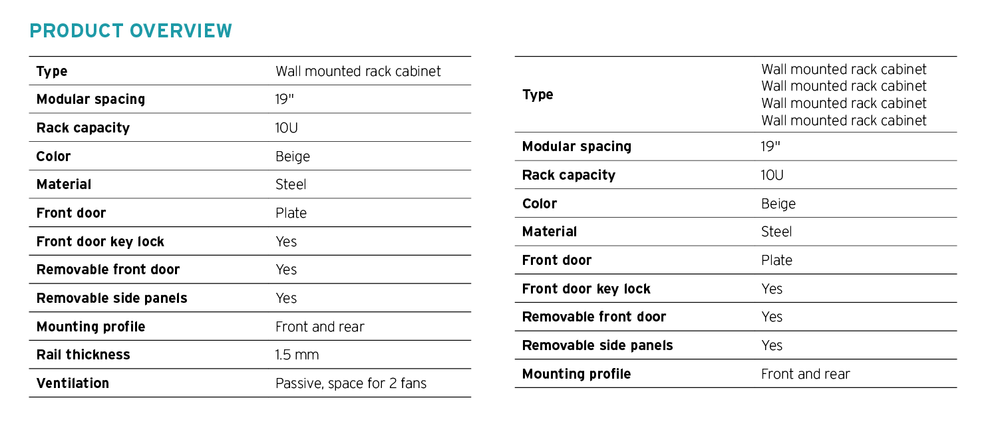
You probably get this a lot, but how can I align the rows for these two parallel tables? Looks ok with one line of text per cell, with 2 or 3 everything gets misaligned. 

Thank you!

table issue.PNG

TOPICS
How to
434
Translate
Report
Community guidelines
Be kind and respectful, give credit to the original source of content, and search for duplicates before posting. Learn more
community guidelines

correct answers 2 Correct answers

Community Expert , Mar 12, 2021 Mar 12, 2021

Hi George,

unfortunatelly there is no magic trick to achieve this.


You could work with fixed height cells.

And for contents that exceeds one line of text apply a factor of 2, 3 and so on.


Regards,
Uwe Laubender

( ACP )

Translate
Community Expert , Mar 12, 2021 Mar 12, 2021

I would consider make this all a single table so the rows align, then format the cells with Cell-Styles to make it look like 2 separate tables.

Translate
Community Expert ,
Mar 12, 2021 Mar 12, 2021

Hi George,

unfortunatelly there is no magic trick to achieve this.


You could work with fixed height cells.

And for contents that exceeds one line of text apply a factor of 2, 3 and so on.


Regards,
Uwe Laubender

( ACP )

Translate
Report
Community guidelines
Be kind and respectful, give credit to the original source of content, and search for duplicates before posting. Learn more
community guidelines
Community Expert ,
Mar 12, 2021 Mar 12, 2021

I would consider make this all a single table so the rows align, then format the cells with Cell-Styles to make it look like 2 separate tables.

Translate
Report
Community guidelines
Be kind and respectful, give credit to the original source of content, and search for duplicates before posting. Learn more
community guidelines
Mentor ,
Mar 12, 2021 Mar 12, 2021
LATEST

>> I would consider make this all a single table

I would do this too. 


@georgeb12475086 If you have many tables in your work then look this plugin  - https://www.woodwing.com/en/smart-styles-adobe-indesign-plugin

It helps to not waste your time on repeated tasks with your tables.

Remember, never say you can't do something in InDesign, it's always just a question of finding the right workaround to get the job done. © David Blatner
Translate
Report
Community guidelines
Be kind and respectful, give credit to the original source of content, and search for duplicates before posting. Learn more
community guidelines