
Exit
  • Global community
    • Language:
      • Deutsch
      • English
      • Español
      • Français
      • Português
  • 日本語コミュニティ
  • 한국 커뮤니티
0

Parent margin changes don't affect document text boxes

Community Beginner ,
May 31, 2022 May 31, 2022

Hi! Sorry if this has been asked before, but I couldn't find it. I'm going pretty crazy and up against a deadline. 


My parent spread margin doesn't affect the text boxes that make up the entire document. It's a full-length paperback book. I've included an image....   Pink line is where the parent spread has asked the bottom margin to stop at, but the blue line is where the document (text box) has decided to stop instead. How do I change it? I've been searching for hours! 
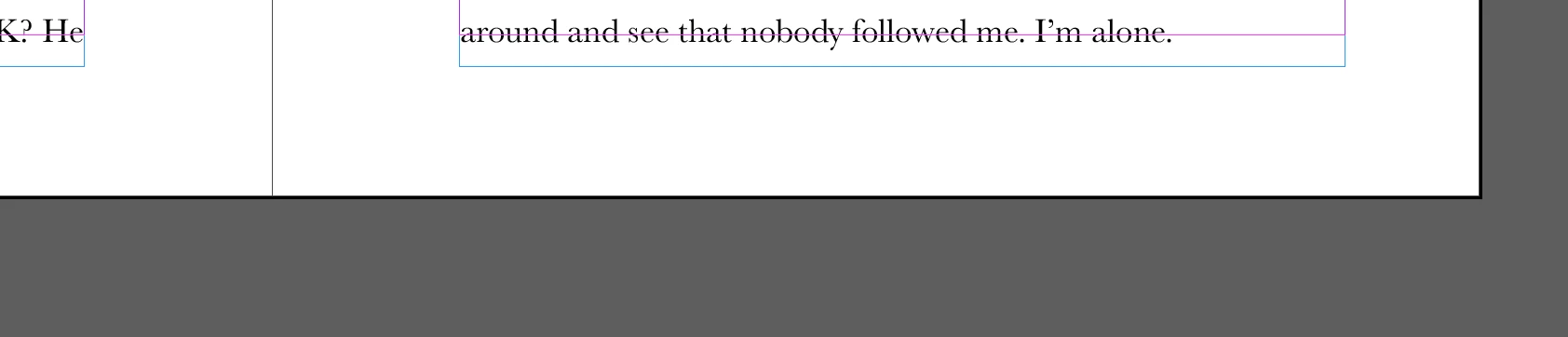
 

Screen Shot 2022-05-31 at 1.33.42 AM.png

TOPICS
How to
221
Translate
Report
Community guidelines
Be kind and respectful, give credit to the original source of content, and search for duplicates before posting. Learn more
community guidelines
Community Expert ,
May 31, 2022 May 31, 2022

When you go in the Layout menu > margins and columns to modify the margins value, do you tick the “adjust layout” checkbox?

Capture d’écran 2022-05-31 à 10.43.43.jpg

Translate
Report
Community guidelines
Be kind and respectful, give credit to the original source of content, and search for duplicates before posting. Learn more
community guidelines
Community Beginner ,
May 31, 2022 May 31, 2022
Yeah, I've tried with and without that checkbox.
Translate
Report
Community guidelines
Be kind and respectful, give credit to the original source of content, and search for duplicates before posting. Learn more
community guidelines
Community Expert ,
May 31, 2022 May 31, 2022
LATEST

Without seeing the actual file, I have no more ideas…

Translate
Report
Community guidelines
Be kind and respectful, give credit to the original source of content, and search for duplicates before posting. Learn more
community guidelines
Community Expert ,
May 31, 2022 May 31, 2022
  1. Layout adjustment must be activated. Do not adjust borders.
  2. Only objects aligned to the guide lines are adjusted.
Translate
Report
Community guidelines
Be kind and respectful, give credit to the original source of content, and search for duplicates before posting. Learn more
community guidelines