

Paste with formatting from word file
Hi,
I doing copy and paste of texts from word file to Indesign. I need to keep all italic, bold etc.
My logic is :
1) Enable the Clipboard Handling as shown below
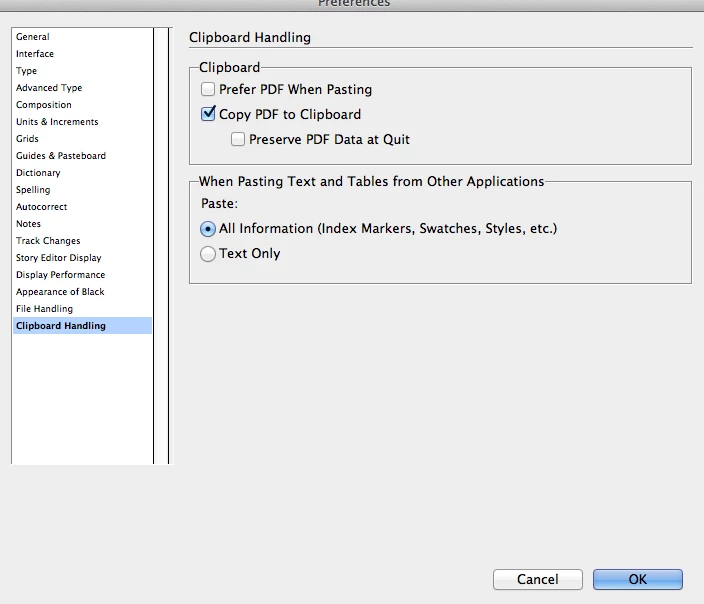
2) Assign cmd+v to execute my script in keyboard shortcuts.
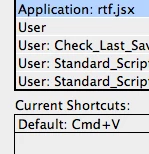
3) So when i press cmd+v it executes the script.
4) Below is the sample code i tried. In my Document i already have 'Bold' character style in style group.
app.menuActions.item("$ID/Paste").invoke(); //assigned cmd+v as shortcut
var myDoc=app.activeDocument;
app.findTextPreferences = null;     app.changeTextPreferences = null;
app.findTextPreferences.fontStyle="Bold";
app.changeTextPreferences.appliedCharacterStyle=myDoc.characterStyleGroups.itemByName("General").characterStyles.item("Bold");
app.changeText();


//app.menuActions.item("$ID/Clear Overrides").invoke();
It doing as expected. My requirement is:
1) I need to override my paragraph style.
2) I used app, so the script running slowly. How i can do it better fastly.
I saw others script to creating paragraph styles but i am trying to create script my own logic.
Thanks,
Karthi


 AdChoices