Participant
March 12, 2025
Question

PDF ÇIKTI ALAMIYORUM
  • March 12, 2025
  • 3 replies
  • 368 views

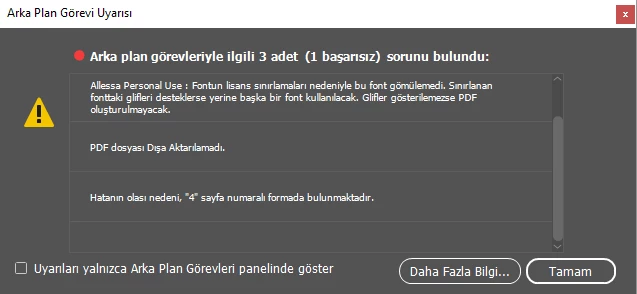
Pdf çıktı almaya çalıştığımda üstteki hatayı alıyorum.

3 replies

Abhishek Rao
Community Manager
Community Manager
March 13, 2025

Hi @A.C.A58,


Thanks for reaching out. As per your screenshot, the error message indicates that the Allessa Personal Use font cannot be embedded in the PDF due to licensing restrictions. InDesign will try to substitute it with another font, but if the missing glyphs are not supported, the PDF may not render correctly.

As suggested by the expert, you can try replacing the font with a licensed or embeddable one. Once the font issue is resolved, try exporting again and let us know if the problem persists.

Looking forward to your update!


^

Abhishek

Willi Adelberger
Community Expert
Community Expert
March 14, 2025

You have to change the font with one which licence permits embeding in the PDF. Many fonts, mostly TTF have an information which hinders embedding in PDF, PostScript and EPUB files. The only legal solution is to get a font with the permission to embed the font as this is needed to create PDFs for print. 

Dave Creamer of IDEAS
Community Expert
Community Expert
March 14, 2025

I already said that. However, some foundries sell an embeddable version for an extra fee, so the OP might be able to use the same font. Otherwise, the OP would have to switch fonts.


David Creamer: Community Expert (ACI and ACE 1995-2023)
Dave Creamer of IDEAS
Community Expert
Community Expert
March 12, 2025

If Google translated the image correctly, you are using a font that cannot be embedded in a PDF, only printed directly.

https://www.1001fonts.com/allessa-personal-use-font.html


I'm not sure if the error on page 4 is due to the font or something else. I would fix the font problem (license it or change to another font), then see if the "page 4" error repeats.


David Creamer: Community Expert (ACI and ACE 1995-2023)
James Gifford—NitroPress
Legend
March 12, 2025

We can translate your post easily, but not text in images. I am not sure what the error is... sorry! Someone else may recognize the error message from context, but to help, you might cut and paste the text into a post for translation.

Dave Creamer of IDEAS
Community Expert
Community Expert
March 12, 2025

@James Gifford—NitroPress Google translate can translate images.


David Creamer: Community Expert (ACI and ACE 1995-2023)
James Gifford—NitroPress
Legend
March 12, 2025

I know. Wasn't sure I had much more of an answer even if I was sure of the error/content. Just making sure the post was acknowledged/bumped.