Participant
March 10, 2017
Resuelto

PDF export from InDesign is tiny

  • March 10, 2017
  • 3 respuestas
  • 5067 visualizaciones

Hey, first forum post! Thank you everyone – reading these Q&As has been super helpful over the years!

I just exported a poster file (24"x36") and it came to 6 mb. It has an image for the background that's 160 mb. I just can't fathom how the whole file shrank to 6 mb when exporting. Any help, much appreciated. Let me know if you have clarifying questions.

I'm defiantly exporting it as a print PDF not an interactive PDF.

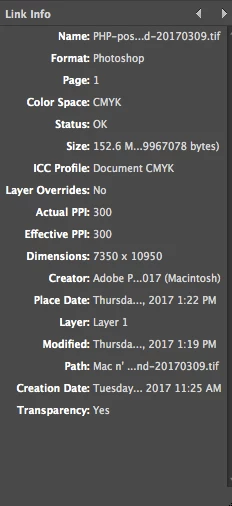
My background image:

Este tema ha sido cerrado para respuestas.
Mejor respuesta de Dov Isaacs

This posting made my day! Virtually all complaints on this forum are about PDF files that are “too big” and this concern is about one that is “too small!” 

Based on the information provided, the image file that was placed into InDesign was a 152.6 megabyte TIFF file. InDesign doesn't indicate what type of compression, if any, that TIFF file had. Typically, TIFF files may compressed with LZW compression, ZIP compression, or no compression. Although image content-dependent, generally the best TIFF file compression is achieved with ZIP compression although that is not the default for Photoshop. But unless one has a raster image TIFF file with contents that are “vector-like” (solid background, some lines, some simple text, etc.), even with ZIP compression, a TIFF file will typically be much larger in size that the comparable file JPEG-compressed, even at the maximum quality JPEG-compression settings.

That brings us to why the PDF file is so small. By default for the typical high quality printing PDF export settings (including High Quality Print, PDF/X-1a, PDF/X-3, and the most highly recommended setting, PDF/X-4), images are compressed on export using Automatic (JPEG), Maximum Quality with downsampling to 300dpi for images at 450dpi or higher effective resolution. The image in question in at effective resolution of 300dpi and as such is not being downsampled, but it is being compressed. The Automatic (JPEG), Maximum Quality attribute means that InDesign examines the image and if vector-like, uses ZIP compression or otherwise if photo-like JPEG compression, maximum quality is used.

I strongly suspect that the image in question is very photo-like and that JPEG compression was used. Assuming that this is indeed the case, extreme compression down to 6 megabytes for the PDF file is not unreasonable. Nor will it yield quality problems.

Bottom line is that if the PDF file displays at high quality in Acrobat and prints without a question, stop worrying and enjoy! This is probably a poster child case of the technology doing what it is supposed to do!

          - Dov

PS:     Our recommendation at Adobe for best print publishing workflow practice is to keep images in their original RGB color space along with the ICC color profile and to export the PDF using the PDF/X-4 settings. This maintains print and display device independence, the highest gamut for print regardless of the actual final print device, and avoid any issues associated with transparency flattening.

3 respuestas

Participant
March 13, 2017

Thank you everyone for chiming in!

Peace of mind + It was great to learn this

Dov Isaacs
Dov IsaacsRespuesta
Legend
March 10, 2017

This posting made my day! Virtually all complaints on this forum are about PDF files that are “too big” and this concern is about one that is “too small!” 

Based on the information provided, the image file that was placed into InDesign was a 152.6 megabyte TIFF file. InDesign doesn't indicate what type of compression, if any, that TIFF file had. Typically, TIFF files may compressed with LZW compression, ZIP compression, or no compression. Although image content-dependent, generally the best TIFF file compression is achieved with ZIP compression although that is not the default for Photoshop. But unless one has a raster image TIFF file with contents that are “vector-like” (solid background, some lines, some simple text, etc.), even with ZIP compression, a TIFF file will typically be much larger in size that the comparable file JPEG-compressed, even at the maximum quality JPEG-compression settings.

That brings us to why the PDF file is so small. By default for the typical high quality printing PDF export settings (including High Quality Print, PDF/X-1a, PDF/X-3, and the most highly recommended setting, PDF/X-4), images are compressed on export using Automatic (JPEG), Maximum Quality with downsampling to 300dpi for images at 450dpi or higher effective resolution. The image in question in at effective resolution of 300dpi and as such is not being downsampled, but it is being compressed. The Automatic (JPEG), Maximum Quality attribute means that InDesign examines the image and if vector-like, uses ZIP compression or otherwise if photo-like JPEG compression, maximum quality is used.

I strongly suspect that the image in question is very photo-like and that JPEG compression was used. Assuming that this is indeed the case, extreme compression down to 6 megabytes for the PDF file is not unreasonable. Nor will it yield quality problems.

Bottom line is that if the PDF file displays at high quality in Acrobat and prints without a question, stop worrying and enjoy! This is probably a poster child case of the technology doing what it is supposed to do!

          - Dov

PS:     Our recommendation at Adobe for best print publishing workflow practice is to keep images in their original RGB color space along with the ICC color profile and to export the PDF using the PDF/X-4 settings. This maintains print and display device independence, the highest gamut for print regardless of the actual final print device, and avoid any issues associated with transparency flattening.

- Dov Isaacs, former Adobe Principal Scientist (April 30, 1990 - May 30, 2021)
Derek Cross
Community Expert
Community Expert
March 10, 2017

Maybe you should have definitely exported it rather than defiantly done so!

Had the image been converted to CMYK and which InDesign Acrobat PDF Preset did you select and what was the intended output?

Participant
March 10, 2017

Hmm, so true.

The image was converted to CMYK and I tried several presets. Mostly High Quality Print but I tried one of the PDF/x version and press quality. I got a range but from 6 mb to - 7.2 mb. Output for print – so normal, 300 ppi.

I don't normally create a backgrounds of this size in photoshop and then import to ID. That's it's the only thing that I can think of that is off. Over half of the background image is a single color (I wanted to avoid any issues with different programs rendering colors different), but again, that image is close to 160 mb.

Derek Cross
Community Expert
Community Expert
March 10, 2017

What is the output eg: desktop inkjet printer, commercial litho, screen?

If you can go back to the original and get the image in RGB it would be better if the PDF preset does the conversion to CMYK.