
Participating Frequently
September 27, 2021
Answered

PDF export from Indesign, objectframe covers background

  • September 27, 2021
  • 3 replies
  • 973 views

Hi everybody,


we are facing an issue with object frames sometimes when we export PDFs from Indesign. So what happens is that we place a pdf to a document in indesign and export it afterwards to a new pdf. During the export some picture frames from the original PDFs appear in white or black and cover/overprint the background.

When we are using another PDF export presetting (for exampe X3 instead of X4) this problem disappears. But we can not locate if the problem comes from one or the other export setting, as it can appear with both or just one of them. Hope my english is not to bad and you can get the point.


Thank in advance

Luke
This topic has been closed for replies.
Correct answer rob day

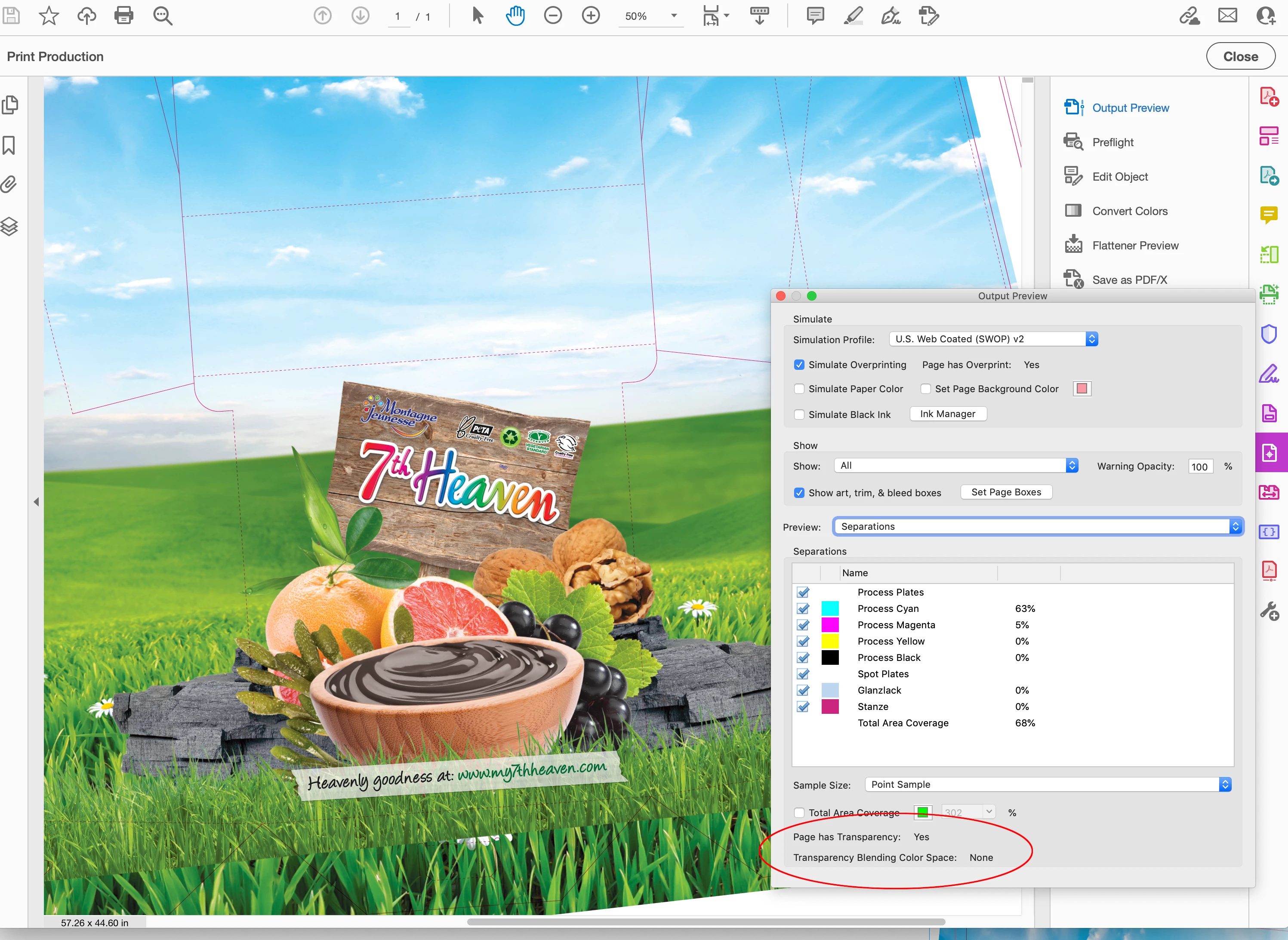
Hi @LukasArmbrust, When I opened your original PDF I noticed that there is transparency in the file, but no Transparency Blend Space:


I ran an AcrobatPro Preflight to convert your original PDF to be PDF/X compliant, which sets a blend space, and that seemed to work. The file is very complex, nearly 3000 objects were listed on the PDF/X conversion, and it crashed Acrobat on the first try.

3 replies

rob day
Community Expert
Community Expert
September 27, 2021

Can you share the placed PDF?

Participating Frequently
September 28, 2021

Hi Rob,


PDF is to big -- 211MB. I'll upload it and share a link here.


rob day
Community Expert
Community Expert
September 27, 2021

Is there a Transparency Effect Blending mode applied to the 7th Heaven text frame? PDF/X-4 can fail with certain blend modes when the document’s Transparency Blend Space is set to RGB

Community Expert
September 27, 2021

Are the images PNG files?  Can you confirm what file format it is? 

If so they need to be saved as PNG 24 - as this causes the issue when they are PNG 8.

If they need to be resaved - then change the format to PSD instead or even TIFF.


Participating Frequently
September 27, 2021

Hi Eugene,


thanks for your request. I`m not quite sure which file format the images are. Tried to find it out by doing a preflight to the original placed PDF files but couldn`t see which file format the embedded pictures are. Just can say they are 8 bit image depth. 

I tried again to use the PDF x4 presetting but changed compatibility to acrobat 4/1.3. This worked out quite well. 

What the difference between these 2 options; compatibility to acrobat 7/1.6 and acrobat 4/1.3?


Community Expert
September 27, 2021

1.6 will keep any transparency live.

1.3 will flatten the transparency.