Participant
November 27, 2024
Answered

Pervious InDesign Files in AppData

  • November 27, 2024
  • 2 replies
  • 528 views

Hello,

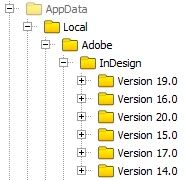
I'm trying to reduce the used space on my drive. Looking on my Windows 10 machine, I see that the I have folders for six versions of InDesign under AppData\Local\Adobe\InDesign. Can I delete the previous version folders without harm?


Thanks!

This topic has been closed for replies.
Correct answer Brad @ Roaring Mouse

If you've already deleted the specific versions of the application, you can probably delete the matching pref folders. That being said, My usual rule for this is, if you have the room don't delete. The particular folders you are looking at aren't very space heavy, but if you HAVE already deleted the corresponding app version, they are superfluous. As far as app versions, I would keep the last one that can handle Type 1 fonts in case you need to deal with some old files that use them (I personally keep CC2021 v16 around for this purpose). And as @Robert at ID-Tasker suggests, always keep the second-latest around in case a newly released version is buggy.

I also keep a running CS6 (v8.0) around for the same PM reasons robert mentions, but you don't seem to have that folder, so you probably don't need to worry about that.

 

2 replies

Brad @ Roaring Mouse
Community Expert
Brad @ Roaring MouseCommunity ExpertCorrect answer
Community Expert
November 29, 2024

If you've already deleted the specific versions of the application, you can probably delete the matching pref folders. That being said, My usual rule for this is, if you have the room don't delete. The particular folders you are looking at aren't very space heavy, but if you HAVE already deleted the corresponding app version, they are superfluous. As far as app versions, I would keep the last one that can handle Type 1 fonts in case you need to deal with some old files that use them (I personally keep CC2021 v16 around for this purpose). And as @Robert at ID-Tasker suggests, always keep the second-latest around in case a newly released version is buggy.

I also keep a running CS6 (v8.0) around for the same PM reasons robert mentions, but you don't seem to have that folder, so you probably don't need to worry about that.


James Gifford—NitroPress
Legend
November 29, 2024

My usual rule for this is, if you have the room don't delete


There's help available for hoarding, Brad. 🙂


I don't disagree in any significant way, especially when it comes to system, app and config files... but even small file sets can pile up over years. Maybe zipping up the folders and restarting, then deleting the archives some number of days later, is a safe halfway practice.

Brad @ Roaring Mouse
Community Expert
Community Expert
November 29, 2024

"There's help available for hoarding, Brad. 🙂"

Mmoooiii???  lol

As someone who worked on the design/prepress side of a printer for many years, we learned to keep EVERYTHING. Clients would come in with pretty much a rat salad of old versioned files.

Robert at ID-Tasker
Legend
November 27, 2024

You shouldn't. 


Unless - you've uninstalled old versions already. 


The latest - 2025 version - would be in "Version 20.0" folder. 


Participant
November 29, 2024

Hi Robert,

Thanks for the reply. Why would one keep the old versions installed?

Robert at ID-Tasker
Legend
November 29, 2024
quote

Hi Robert,

Thanks for the reply. Why would one keep the old versions installed?


By @Addicted2Ammo


Just in case. 


The last version to open PageMaker files is CS6. 


Or in case your client is still using an older version - and you would've to supply him files native to his version. 


Or because 2025 is buggy. 


HDDs/SSDs are cheap.