
Known Participant
June 24, 2025
Question

Photo refuses to anchor

  • June 24, 2025
  • 2 replies
  • 151 views

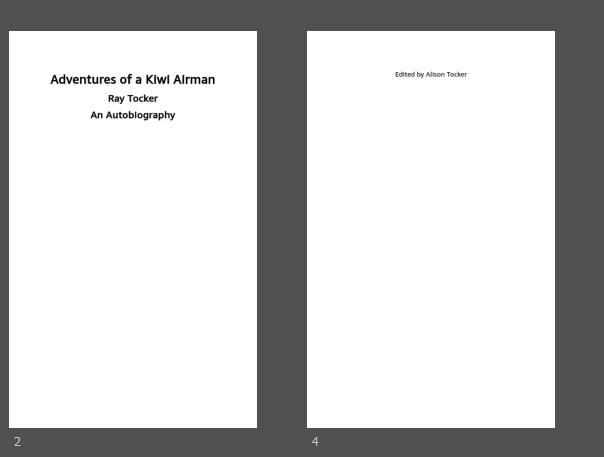
Hi I am creating my first Kindle e-book. I can’t for the life of me get a page break after the editor name on my title page. You'll see it sitting on the second page below instead of at the end of the first page.  I have created styles. For the editor name, I ticked split document. That didn’t work. So I created a style on the line under the editor name and  ticked split document . That didn’t work.  I don’t just want to insert a page break as I believe that’s not good practice for EPUB? Any idea of what's going wrong? Thanks in advance.


2 replies

Participant
June 24, 2025

Hello,


When you tick “Split Document” on a paragraph style, Kindle treats that paragraph as the start of a new HTML file (in EPUB terms). This only works properly if that style is the first visible content on the page. If it’s applied to a style that follows other content on the same page, Kindle will not force a page break before it.

So if your "Editor Name" is just another styled paragraph on the same page as the title and author name, Kindle won’t force it onto a new page—even if “Split Document” is ticked.


Apply “Split Document” to the Title Style (Not Editor Name)
Open your Word document or Kindle Create file.

Ensure your Title has a unique paragraph style (like “Title” or “Heading 1”).

Tick “Split Document” on that Title style.

Leave the Editor Name as a normal paragraph beneath the title.

This ensures the title starts a new page, and the editor name follows on the same one—but if you want the editor name on the next page, move it to its Milestone Mastercard own section.


Create a Dummy Line/Style Between Title and Editor Name
If you absolutely want the editor name to start on its own page, do this:

Create a new style (e.g., called “Page Break Trigger”).

Place a blank paragraph between the title/author and the editor name.

Apply the “Page Break Trigger” style and tick “Split Document” for it.

Now, the editor name will begin on a new “section” or Kindle page.

Kindle will now treat that point as the start of a new section (or "page") when the book is rendered.


Best Regard,


ali_4619Author
Known Participant
June 24, 2025

Sorry - I used wrong heading on this post, as I meant to put photo anchor question first. Will post a separate post with that question.